INSTRUMENT PANEL SAFETY PAD INSTALLATION

Tech Tips
A bolt without a torque specification is shown in the standard bolt chart Click here.
-
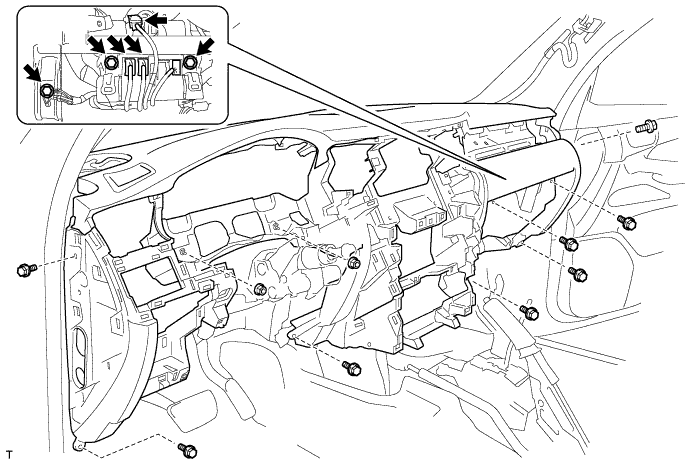
INSTALL INSTRUMENT PANEL SAFETY PAD ASSEMBLY (for LHD)
-
Install the safety pad with the 8 bolts and 2 nuts.
-
Connect the connectors.
-
Install the bolt.
-
Install the 2 passenger airbag bolts.
- Torque:
- 20 N*m { 204 kgf*cm, 15 ft.*lbf }
-
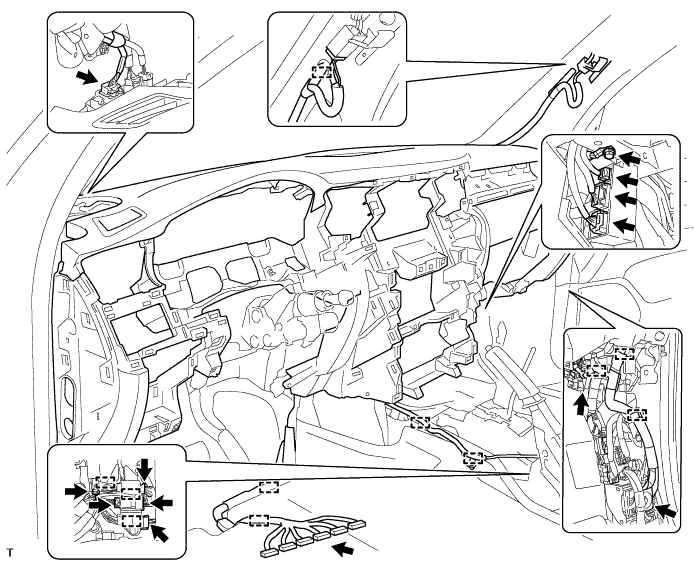
Connect the wire harness with the bolt.
-
Connect the connectors and clamps.
-
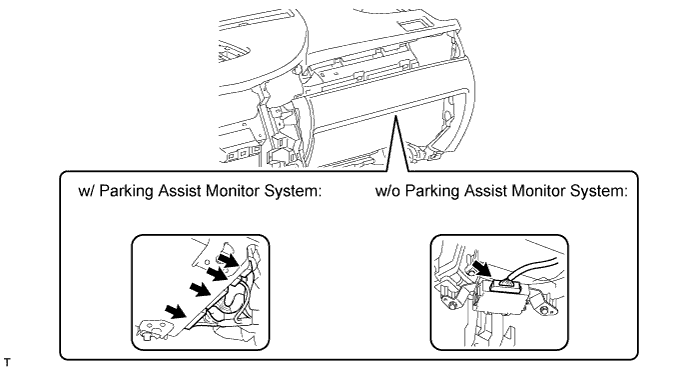
Connect the connectors.
-
-
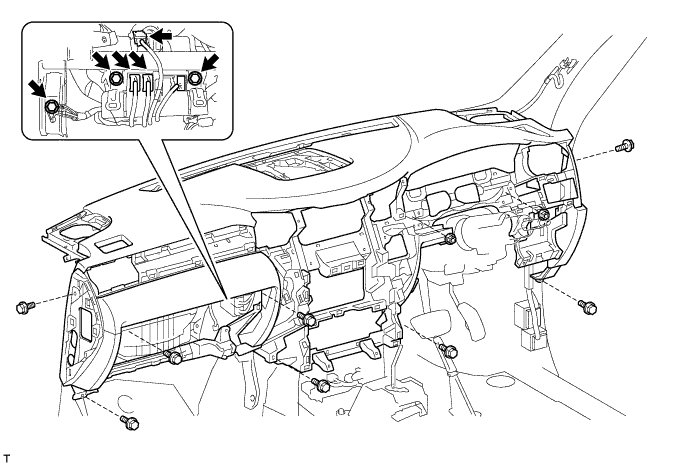
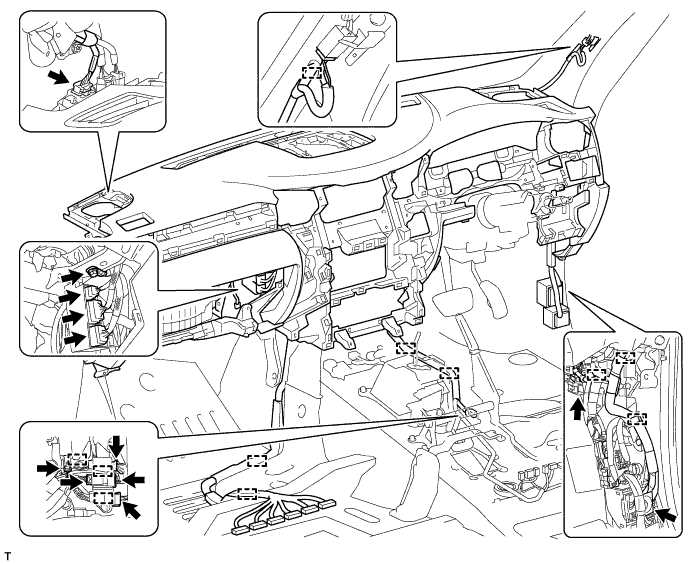
INSTALL INSTRUMENT PANEL SAFETY PAD ASSEMBLY (for RHD)
-
Install the safety pad with the 8 bolts and 2 nuts.
-
Connect the connectors.
-
Install the bolt.
-
Install the 2 passenger airbag bolts.
- Torque:
- 20 N*m { 204 kgf*cm, 15 ft.*lbf }
-
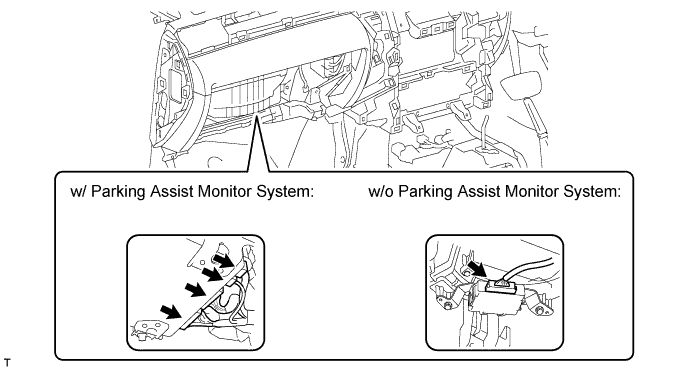
Connect the wire harness with the bolt.
-
Connect the connectors and clamps.
-
Connect the connectors.
-
-
INSTALL REAR NO. 4 AIR DUCT
-
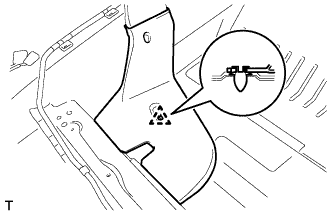
Attach the clip to install the air duct.
-
-
INSTALL REAR NO. 2 AIR DUCT
-
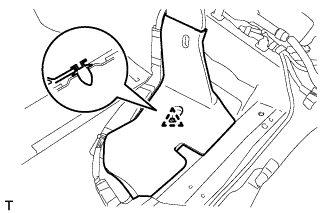
Attach the clip to install the air duct.
-
-
INSTALL NO. 1 INSTRUMENT CLUSTER MOULDING
-
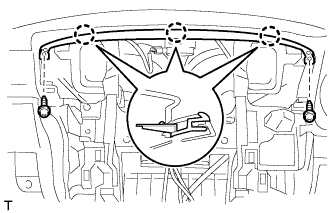
Attach the 3 claws to install the moulding.
-
Install the 2 screws.
-
-
INSTALL MULTI-MEDIA MODULE RECEIVER ASSEMBLY WITH BRACKET
-
Connect the connectors.
-
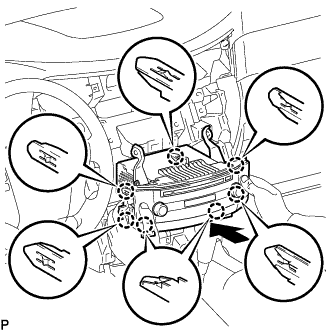
Insert the multi-media module receiver assembly with bracket to attach the 7 claws on its backside.
Note
When inserting the multi-media module receiver assembly, do not press the knobs on it.
-
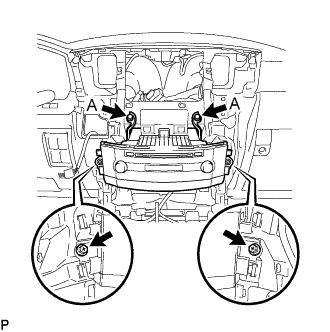
Install the multi-media module receiver assembly with the 2 screws and 2 bolts.
- Torque:
- for bolts labeled A
- 12 N*m { 122 kgf*cm, 8 ft.*lbf }
-
-
INSTALL MULTI-DISPLAY ASSEMBLY WITH BRACKET (w/o Navigation System)
-
Connect the connectors.
-
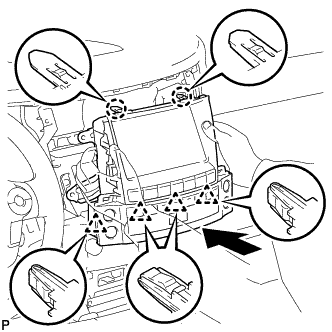
Insert the multi-display assembly with bracket to attach the 2 claws and 4 clips on its backside.
Note
When inserting the multi-display assembly, do not press the knobs on it.
-
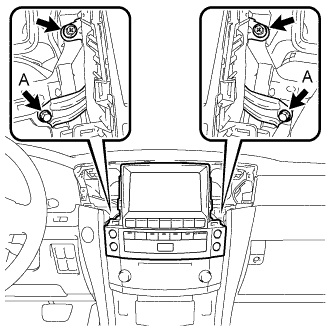
Install the multi-display assembly with the 2 screws and 2 bolts.
- Torque:
- for bolts labeled A
- 12 N*m { 122 kgf*cm, 8 ft.*lbf }
-
-
INSTALL MULTI-DISPLAY ASSEMBLY WITH BRACKET (w/ Navigation System)
-
Connect the connectors.
-
Insert the multi-display assembly with bracket and attach the 2 claws and 4 clips on its backside.
Note
When inserting the multi-display assembly, do not press the knobs on it.
-
Install the multi-display assembly with the 2 screws and 2 bolts.
- Torque:
- for bolts labeled A
- 12 N*m { 122 kgf*cm, 8 ft.*lbf }
-
-
INSTALL FRONT NO. 2 SPEAKER ASSEMBLY (RH Side)
-
Connect the connector.
-
Temporarily install the speaker by aligning speaker with the positioning pins of the instrument panel.
-
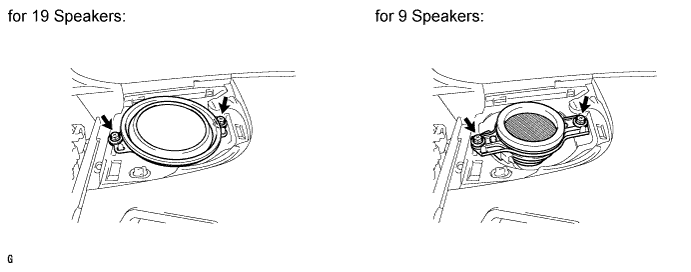
Install the speaker with the 2 bolts.
Note
-
Do not touch the cone part of the speaker.
-
When installing the speaker to the instrument panel, be careful that the wires do not get caught between parts.
-
-
-
INSTALL NO. 2 INSTRUMENT PANEL SPEAKER PANEL SUB-ASSEMBLY
-
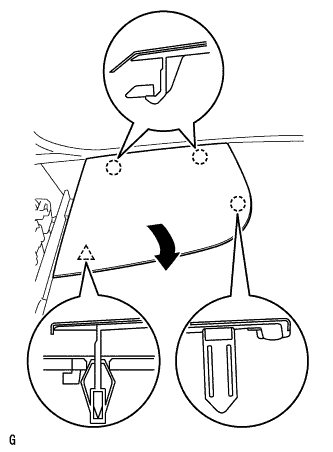
Hook the 2 claws on the far side to the instrument panel to attach them. Then, lower the panel towards the rear of the vehicle in the direction of the arrow, and attach the claw and clip on the front side to install the panel.
-
-
INSTALL FRONT NO. 2 SPEAKER ASSEMBLY (LH Side)
-
Connect the connector.
-
Temporarily install the speaker by aligning speaker with the positioning pins of the instrument panel.
-
Install the speaker with the 2 bolts.
Note
-
Do not touch the cone part of the speaker.
-
When installing the speaker to the instrument panel, be careful that the wires do not get caught between parts.
-
-
-
INSTALL NO. 1 INSTRUMENT PANEL SPEAKER PANEL SUB-ASSEMBLY
-
Hook the 2 claws on the far side to the instrument panel to attach them. Then, lower the panel towards the rear of the vehicle in the direction of the arrow, and attach the claw and clip on the front side to install the panel.
-
-
INSTALL FRONT NO. 4 SPEAKER ASSEMBLY
-
Connect the speaker connector.
-
Temporarily install the speaker by aligning speaker with the positioning pins of the instrument panel.
-
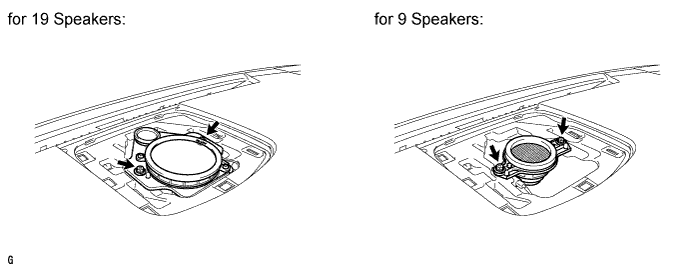
Install the speaker with the 2 bolts.
Note
-
Do not touch the cone part of the speaker.
-
When installing the speaker to the instrument panel, be careful that the wires do not get caught between parts.
-
-
-
INSTALL NO. 1 SPEAKER OPENING COVER ASSEMBLY
-
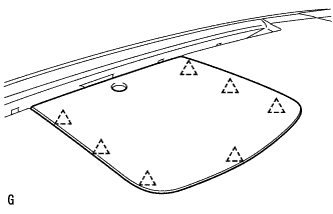
Attach the 7 clips to install the opening cover.
-
-
INSTALL FRONT PILLAR GARNISH LH
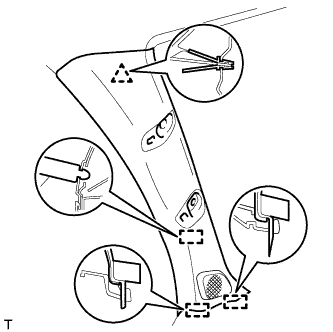
-
Connect the speaker connector.
-
Attach the clip and 3 guides to install the front pillar garnish.
-
-
INSTALL FRONT PILLAR GARNISH RH
Tech Tips
Use the same procedures described for the LH side.
-
INSTALL FRONT ASSIST GRIP SUB-ASSEMBLY
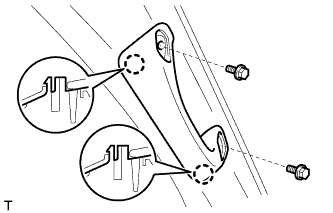
Tech Tips
Use the same procedure to install the front assist grip on the other side.
-
Attach the 2 claws to install the front assist grip.
-
Install the 2 bolts.
-
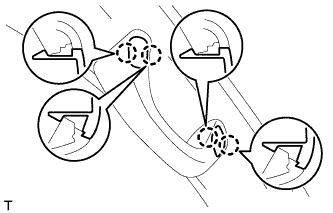
Attach the 4 claws to install the 2 assist grip plugs.
-
-
INSTALL LOWER NO. 2 INSTRUMENT PANEL FINISH PANEL
-
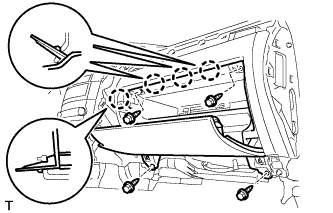
Connect the connector.
-
Attach the 4 claws to install the finish panel.
-
Install the 4 bolts.
-
-
INSTALL INSTRUMENT PANEL BOX DOOR KNOB
-
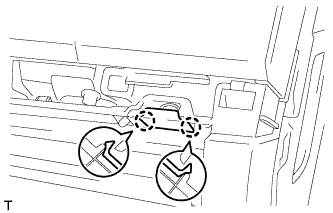
Attach the 2 claws to install the knob.
-
-
INSTALL FRONT PASSENGER SIDE KNEE AIRBAG ASSEMBLY
-
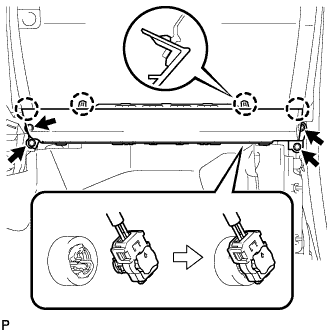
Connect the connector.
Note
When handling the airbag connector, take care not to damage the airbag wire harness.
-
Attach the 4 claws to install the front passenger side knee airbag.
-
Install the 4 bolts.
- Torque:
- 10 N*m { 102 kgf*cm, 7 ft.*lbf }
-
-
INSTALL COWL SIDE TRIM BOARD RH
-
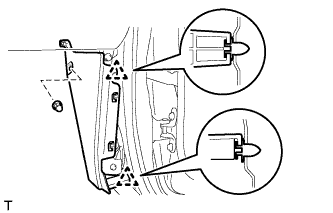
Attach the 2 clips to install the trim board.
-
Install the cap nut.
-
-
INSTALL NO. 2 INSTRUMENT PANEL UNDER COVER SUB-ASSEMBLY
-
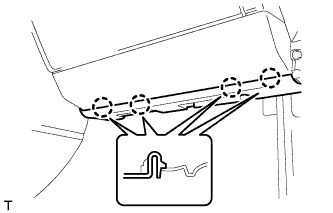
Connect the connector.
-
Attach the 4 claws to install the under cover.
-
-
INSTALL FRONT DOOR SCUFF PLATE RH
Tech Tips
Use the same procedures described for the LH side.
-
INSTALL NO. 3 INSTRUMENT CLUSTER FINISH PANEL GARNISH
-
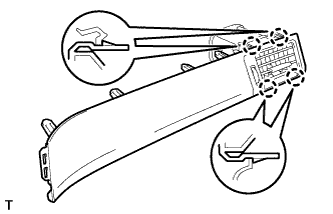
Attach the 4 claws to install the panel garnish.
-
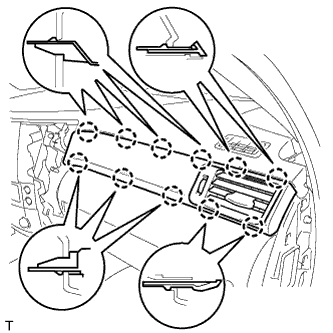
Attach the 11 claws to install the register assembly.
-
-
INSTALL NO. 4 INSTRUMENT PANEL REGISTER ASSEMBLY
-
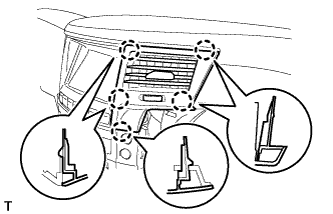
Attach the 5 claws to install the register.
-
-
INSTALL INSTRUMENT SIDE PANEL RH
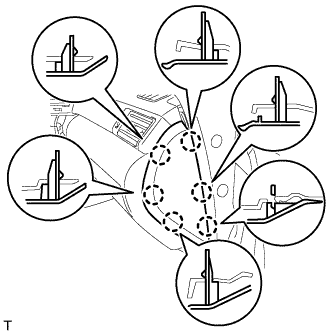
-
w/o Airbag Cut Off Switch:
-
Attach the 6 claws to install the side panel.
-
-
w/ Airbag Cut Off Switch:
-
Connect the connector.
-
Attach the 6 claws to install the side panel.
-
-
-
INSTALL DRIVER SIDE KNEE AIRBAG ASSEMBLY
-
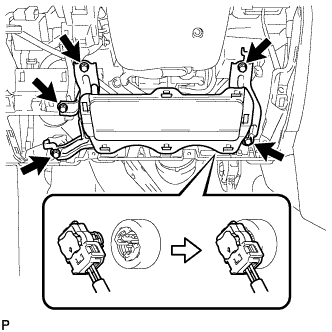
Connect the connector.
Note
When handling the airbag connector, take care not to damage the airbag wire harness.
-
Install the driver side knee airbag with the 5 bolts.
- Torque:
- 10 N*m { 102 kgf*cm, 7 ft.*lbf }
-
-
INSTALL INSTRUMENT PANEL BOX ASSEMBLY
-
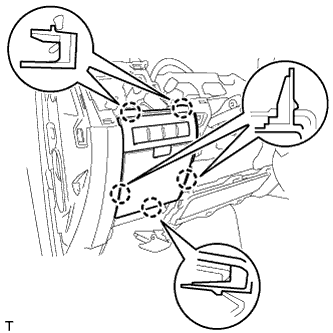
Connect the connectors.
-
Attach the 5 claws to install the box.
-
-
INSTALL LOWER NO. 1 INSTRUMENT PANEL FINISH PANEL
-
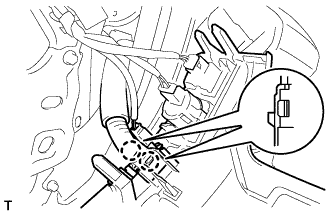
Connect the connectors.
-
Attach the 2 claws to install the sensor.
-
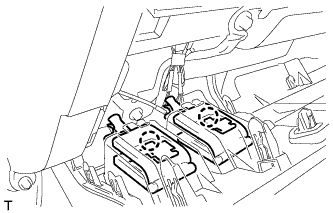
Attach the 2 claws to connect the 2 control cables.
-
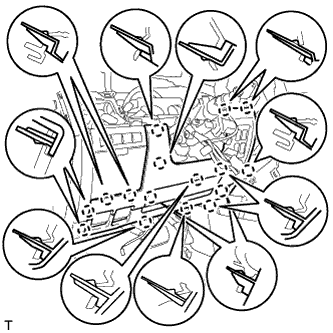
Attach the 16 claws to install the finish panel.
-
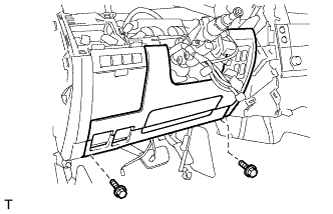
Install the 2 bolts.
-
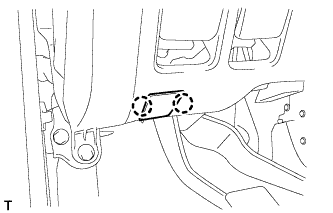
Attach the 2 claws to close the hole cover.
-
-
INSTALL COWL SIDE TRIM BOARD LH
-
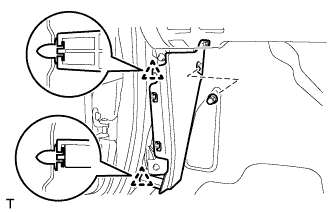
Attach the 2 clips to install the trim board.
-
Install the cap nut.
-
-
INSTALL NO. 1 INSTRUMENT PANEL UNDER COVER SUB-ASSEMBLY
-
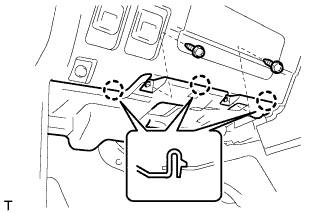
Connect the connectors.
-
Attach the 3 claws to install the under cover.
-
Install the 2 screws.
-
-
INSTALL FRONT DOOR SCUFF PLATE LH
-
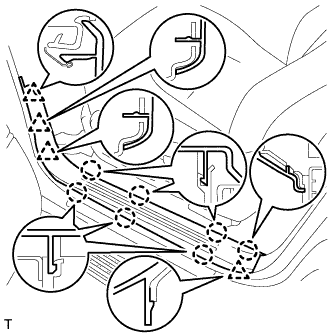
w/o Illumination:
-
Attach the 7 claws and 4 clips to install the scuff plate.
-
-
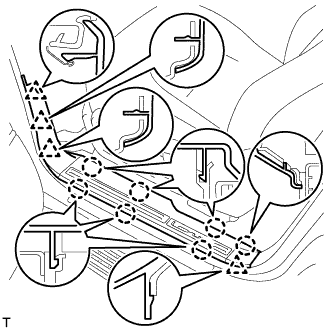
w/ Illumination:
-
Connect the connector.
-
Attach the 7 claws and 4 clips to install the scuff plate.
-
-
-
INSTALL COMBINATION METER ASSEMBLY
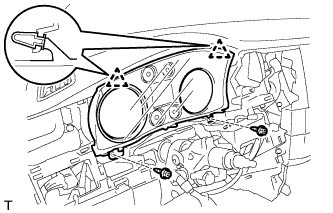
-
Connect the connector.
-
Attach the 2 clips to install the combination meter.
-
Install the 2 screws.
-
-
INSTALL NO. 3 INSTRUMENT PANEL REGISTER ASSEMBLY
-
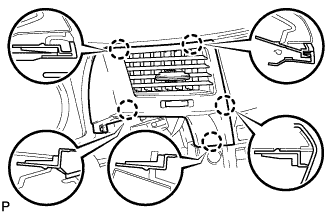
Attach the 5 claws to install the register.
-
-
INSTALL NO. 1 INSTRUMENT PANEL REGISTER ASSEMBLY
-
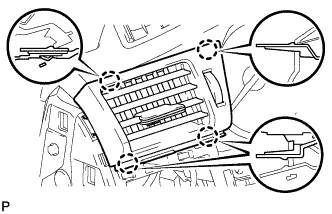
Attach the 4 claws to install the register.
-
-
INSTALL INSTRUMENT CLUSTER FINISH PANEL SUB-ASSEMBLY
-
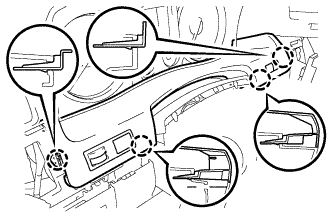
Connect the connectors.
-
Attach the 4 claws to install the finish panel.
-
-
INSTALL NO. 1 SWITCH HOLE BASE
-
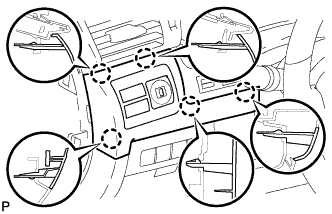
Connect the connectors.
-
Attach the 5 claws to install the switch hole base.
-
-
INSTALL INSTRUMENT SIDE PANEL LH
-
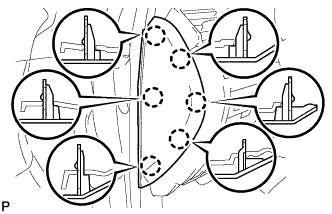
Attach the 6 claws to install the side panel.
-
-
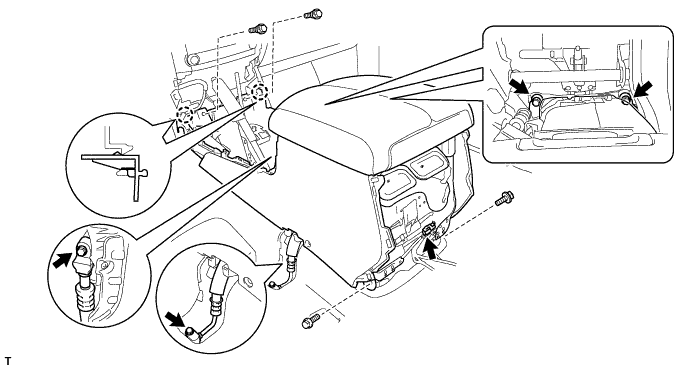
INSTALL COOLING BOX ASSEMBLY (w/ Cool Box)
-
Attach the 2 claws.
-
Connect the connector.
-
Sufficiently apply compressor oil to 2 new O-rings.
Compressor oil ND-OIL 8 or equivalent -
Install the 2 O-rings to the 2 cooler pipes.
-
Connect the 2 cooler pipes with the 2 bolts.
- Torque:
- 9.8 N*m { 100 kgf*cm, 87 in.*lbf }
-
Install the cooling box with the 4 bolts and 2 screws.
-
-
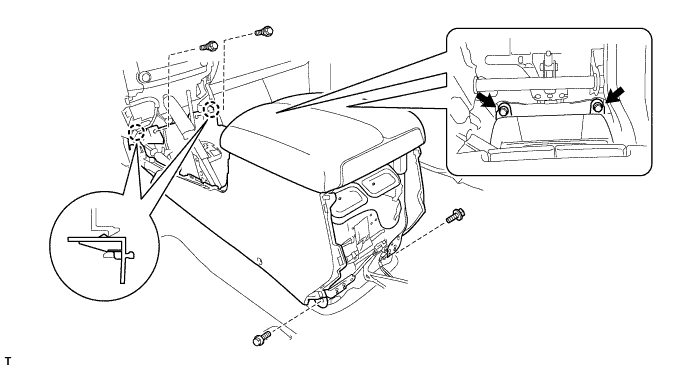
INSTALL REAR CONSOLE BOX SUB-ASSEMBLY (w/o Cool Box)
-
Attach the 2 claws.
-
Install the console box with the 4 bolts and 2 screws.
-
-
INSTALL REAR CONSOLE END PANEL SUB-ASSEMBLY
-
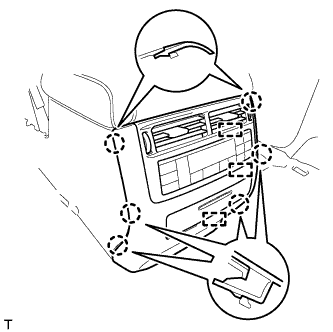
Connect the connectors and 3 clamps.
-
Attach the 6 claws to install the end panel.
-
-
INSTALL NO. 1 COOLER COVER (w/ Cool Box)
-
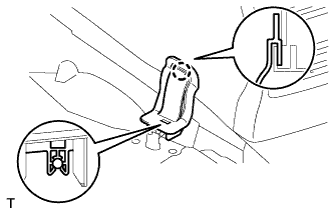
Attach the claw on the upper part of the cooler cover, and then attach the clamp on the lower part of the cooler cover to install it.
-
-
INSTALL UPPER CONSOLE PANEL SUB-ASSEMBLY
-
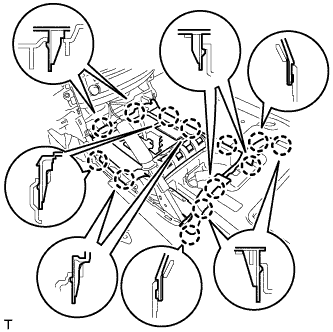
Connect the connectors.
-
Attach the 13 claws to install the console panel.
-
-
INSTALL CONSOLE CUP HOLDER BOX SUB-ASSEMBLY
-
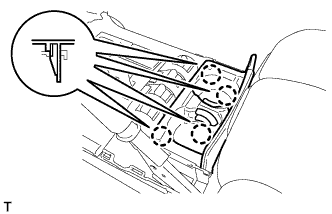
Attach the 4 claws to install the box.
-
-
INSTALL PARKING BRAKE HOLE COVER
-
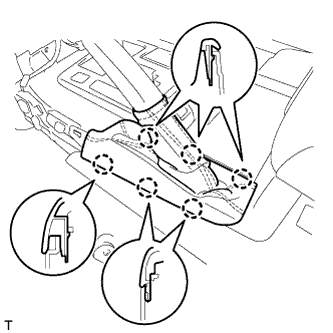
Attach the 6 claws to install the cover.
-
-
INSTALL LOWER CENTER INSTRUMENT CLUSTER FINISH PANEL SUB-ASSEMBLY
-
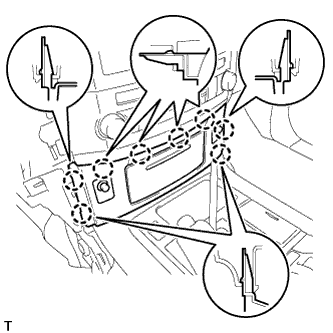
Connect the connectors.
-
Attach the 8 claws to install the panel.
-
-
INSTALL SHIFT LEVER KNOB SUB-ASSEMBLY
-
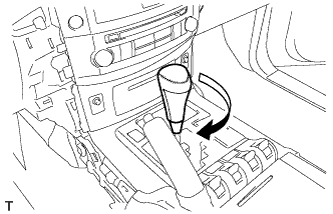
Install the shift lever knob and twist it in the direction indicated by the arrow.
-
-
INSTALL INNER NO. 1 INSTRUMENT PANEL BRACKET COVER RH
-
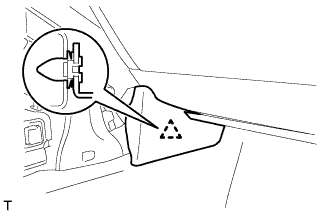
Attach the clip to install the cover.
-
-
INSTALL LOWER INSTRUMENT PANEL PAD SUB-ASSEMBLY RH
-
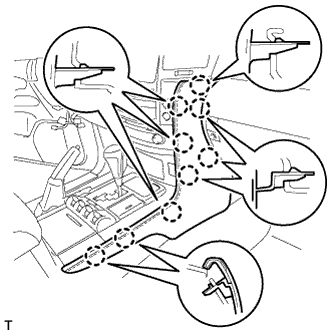
Attach the 9 claws to install the panel pad.
-
-
INSTALL INNER NO. 1 INSTRUMENT PANEL BRACKET COVER LH
-
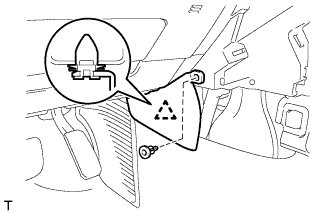
Attach the clip to install the cover.
-
Install the clip.
-
-
INSTALL LOWER INSTRUMENT PANEL PAD SUB-ASSEMBLY LH
-
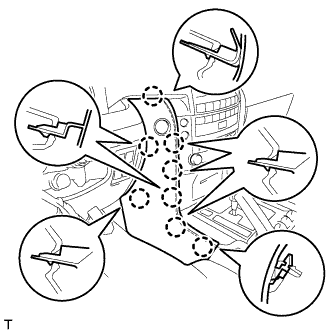
Connect the connector.
-
Attach the 8 claws to install the panel pad.
-
-
INSTALL FRONT SEAT ASSEMBLY RH
-
Install the front seat assembly RH Click here.
-
-
INSTALL FRONT SEAT ASSEMBLY LH
-
Install the front seat assembly LH Click here.
-
-
INSTALL COMBINATION SWITCH ASSEMBLY WITH SPIRAL CABLE SUB-ASSEMBLY
-
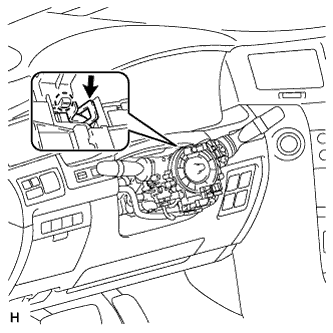
Using pliers, grip the claws of the clamp and install the turn signal switch assembly with spiral cable sub-assembly to the steering column assembly with the clamp.
-
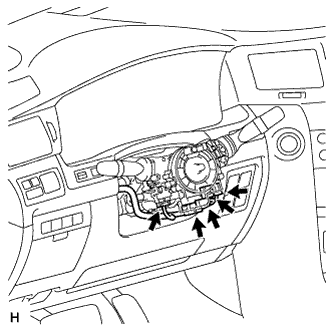
Connect the 5 connectors to the turn signal switch with spiral cable.
-
-
INSTALL TILT AND TELESCOPIC SWITCH
-
Attach the claw to install the switch.
-
Connect the switch connector.
-
-
INSTALL UPPER STEERING COLUMN COVER
-
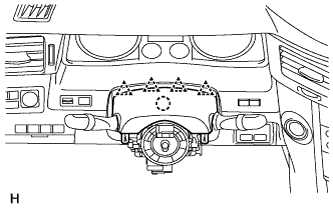
Attach the claw to install the upper steering column cover.
-
Attach the 4 clips to install the upper steering column cover onto the instrument cluster finish panel.
-
-
INSTALL LOWER STEERING COLUMN COVER
-
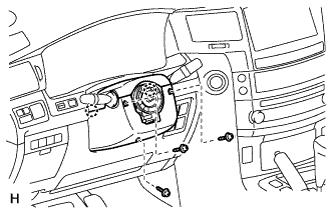
Attach the 2 claws to install the lower steering column cover.
Note
Do not damage the tilt and telescopic switch.
-
Install the 3 screws.
- Torque:
- 1.5 N*m { 15 kgf*cm, 13 in.*lbf }
-
-
INSTALL STEERING WHEEL ASSEMBLY
-
w/ Shift Paddle Switch:
Install the steering wheel assembly Click here.
-
w/o Shift Paddle Switch:
Install the steering wheel assembly Click here.
-
-
INSTALL STEERING PAD
-
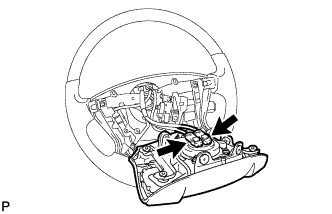
Support the steering pad with one hand.
-
Connect the 2 connectors to the steering pad.
Note
When handling the airbag connector, take care not to damage the airbag wire harness.
-
Connect the horn connector.
-
Confirm that the circumference groove of the "TORX" screw fits in the screw case, and place the steering pad onto the steering wheel.
-
Using a T30 "TORX" socket wrench, tighten the 2 screws.
- Torque:
- 8.8 N*m { 90 kgf*cm, 78 in.*lbf }
-
-
INSTALL LOWER NO. 2 STEERING WHEEL COVER
-
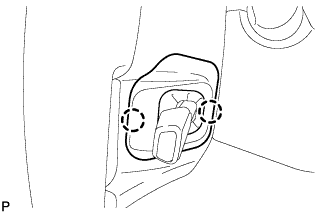
Attach the 2 claws to install the cover.
-
-
INSTALL LOWER NO. 3 STEERING WHEEL COVER
-
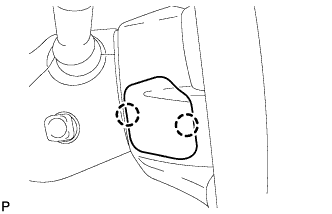
Attach the 2 claws to install the cover.
-
-
CONNECT CABLE TO NEGATIVE BATTERY TERMINAL
Note
-
Reset the Autoaway/Return function setting to the previous condition by changing the customize parameter Click here.
-
When disconnecting the cable, some systems need to be initialized after the cable is reconnected Click here.
-
-
CHARGE REFRIGERANT (w/ Cool Box)
- SST
- 09985-20010 ( 09985-02130, 09985-02150, 09985-02090, 09985-02110, 09985-02010, 09985-02050, 09985-02060, 09985-02070 )
-
Perform vacuum purging using a vacuum pump.
-
Charge refrigerant HFC-134a (R134a).
Standard: Condenser Core Thickness Cool Box Refrigerant Charging Amount 22 mm (0.866 in.) w/ Cool Box 1010 +/-30 g (35.6 +/-1.1 oz.) w/o Cool Box 970 +/-30 g (34.2 +/-1.1 oz.) 16 mm (0.630 in.) w/ Cool Box 970 +/-30 g (34.2 +/-1.1 oz.) w/o Cool Box 920 +/-30 g (32.5 +/-1.1 oz.) 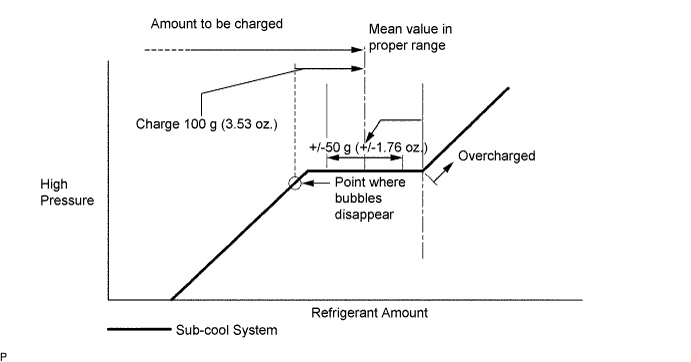
Note
-
Do not operate the cooler compressor before charging refrigerant as the cooler compressor will not work properly without any refrigerant, and will overheat.
-
Approximately 100 g (3.53 oz.) of refrigerant may need to be charged after bubbles disappear. The refrigerant amount should be checked by measuring its quantity, and not with the sight glass.
-
-
WARM UP ENGINE (w/ Cool Box)
-
Warm up the engine at less than 1850 rpm for 2 minutes or more after charging the refrigerant.
Note
Be sure to warm up the compressor when turning the A/C switch on after removing and installing the cooler refrigerant lines (including the compressor), to prevent damage to the compressor.
-
-
CHECK FOR REFRIGERANT GAS LEAK
-
After recharging the refrigerant gas, check for refrigerant gas leakage using a halogen leak detector.
-
Perform the operation under these conditions:
-
Stop the engine.
-
Secure good ventilation (the halogen leak detector may react to volatile gases other than refrigerant, such as evaporated gasoline or exhaust gas).
-
Repeat the test 2 or 3 times.
-
Make sure that some refrigerant remains in the refrigeration system. When compressor is off: approximately 392 to 588 kPa (4.0 to 6.0 kgf/cm2, 57 to 85 psi).
-
-
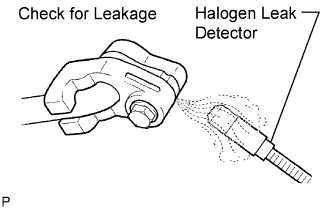
Using a halogen leak detector, check the refrigerant line for leakage.
-
If a gas leak is not detected on the drain hose, remove the blower motor control (blower resistor) from the cooling unit. Insert the halogen leak detector sensor into the unit and perform the test.
-
Disconnect the connector and wait for approximately 20 minutes. Bring the halogen leak detector close to the pressure switch and perform the test.
-
-
INSTALL UPPER RADIATOR SUPPORT SEAL
-
Install the upper radiator support seal with the 3 clips.
-
-
INSTALL ENGINE ROOM SIDE COVER RH
-
Install the engine room side cover RH with the 7 clips.
-
-
INSTALL ENGINE ROOM SIDE COVER LH
-
Install the engine room side cover LH with the 7 clips.
-
-
CHECK SRS WARNING LIGHT
-
Check the SRS warning light Click here.
-