REAR CRANKSHAFT OIL SEAL REMOVAL

-
DISCONNECT CABLE FROM NEGATIVE BATTERY TERMINAL
Note
-
w/ Navigation System:
After the engine switch is turned off, the HDD navigation system requires approximately 6 minutes to record various types of memory and settings. As a result, after turning the engine switch off, wait 6 minutes or more before disconnecting the cable from the negative (-) battery terminal.
-
When disconnecting the cable, some systems need to be initialized after the cable from the cable is reconnected Click here.
-
-
REMOVE AUTOMATIC TRANSMISSION ASSEMBLY
-
Remove the automatic transmission Click here.
-
-
REMOVE DRIVE PLATE AND RING GEAR SUB-ASSEMBLY
-
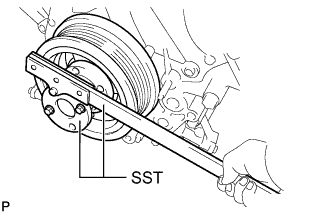
Using SST, hold the crankshaft.
- SST
- 09213-70011 ( 09213-70020 )
- 09330-00021
-
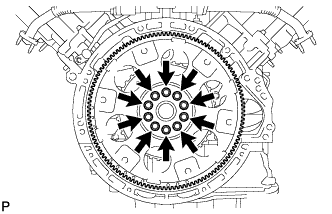
Remove the 10 bolts, rear drive plate spacer, drive plate and crankshaft angle sensor rotor.
-
-
REMOVE REAR CRANKSHAFT OIL SEAL
-
Using a knife, cut off the lip of the oil seal.
-
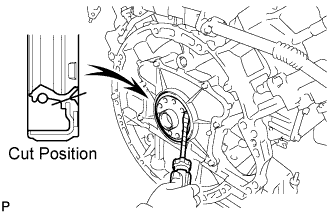
Using a screwdriver, pry out the oil seal.
Tech Tips
Tape the screwdriver tip before use.
Note
Do not damage the surface of the oil seal press fit hole and crankshaft.
-