REAR UPPER ARM REMOVAL

Tech Tips
-
Use the same procedures for the RH side and LH side.
-
The procedures listed below are for the LH side.
-
REMOVE REAR WHEEL
-
DISCONNECT CABLE FROM NEGATIVE BATTERY TERMINAL
Note
When disconnecting the cable, some systems need to be initialized after the cable is reconnected Click here.
Note
w/ Navigation System:After the engine switch is turned off, the HDD navigation system requires approximately 6 minutes to record various types of memory and settings. As a result, after turning the engine switch off, wait 6 minutes or more before disconnecting the cable from the negative (-) battery terminal.
-
REMOVE REAR HEIGHT CONTROL SENSOR SUB-ASSEMBLY LH
-
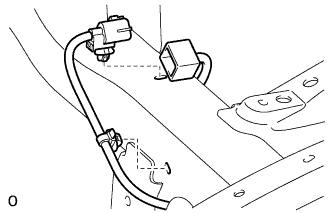
Disconnect the connector and 2 clamps.
-
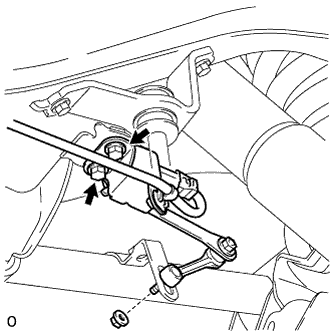
Remove the 2 bolts, nut and sensor.
-
-
DISCONNECT SPEED SENSOR WIRE HARNESS
-
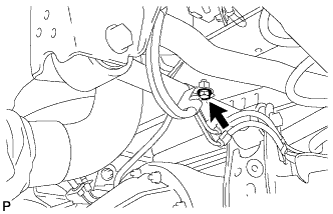
Remove the bolt and disconnect the speed sensor wire harness from the upper control arm.
-
-
REMOVE UPPER ARM BUSH HEAT INSULATOR
-
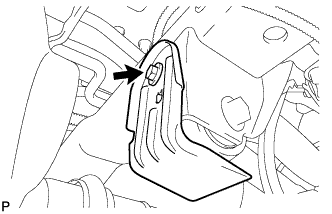
Remove the bolt and upper arm bush heat insulator.
-
-
SUPPORT REAR AXLE HOUSING ASSEMBLY
-
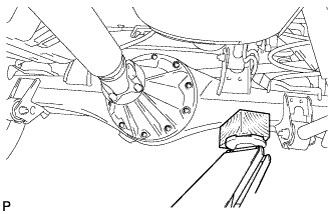
Support the rear axle housing with a jack using a wooden block to avoid damage.
-
-
REMOVE REAR UPPER CONTROL ARM ASSEMBLY LH
-
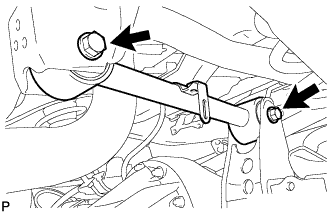
Remove the 2 nuts, 2 washers, 2 bolts and upper control arm.
-