ЗАДНИЙ САЛЬНИК КОЛЕНЧАТОГО ВАЛА СНЯТИЕ

-
REMOVE MANUAL TRANSMISSION ASSEMBLY
-
Remove the manual transmission Click here.
-
-
REMOVE CLUTCH COVER ASSEMBLY
-
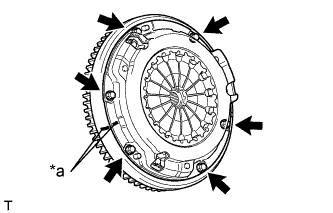
Text in Illustration *a Matchmark Place matchmarks on the clutch cover and flywheel.
-
Loosen each set bolt one turn at a time until spring tension is released.
-
Remove the 6 set bolts and pull off the clutch cover.
Note
Do not drop the clutch disc.
-
-
REMOVE CLUTCH DISC ASSEMBLY
Note
Keep the lining part of the clutch disc, the pressure plate and the surface of the flywheel away from oil and foreign matter.
-
REMOVE FLYWHEEL SUB-ASSEMBLY
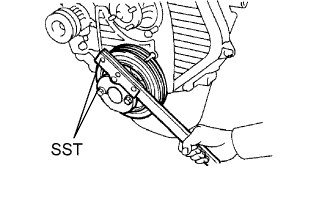
-
Using SST, hold the crankshaft.
- SST
- 09213-54015 ( 91651-60855 )
- 09330-00021
-
Remove the 8 bolts and flywheel.
-
-
REMOVE REAR END PLATE
-
Remove the 2 bolts and rear end plate.
-
-
REMOVE FLYWHEEL HOUSING DUST SEAL
-
REMOVE REAR CRANKSHAFT OIL SEAL
-
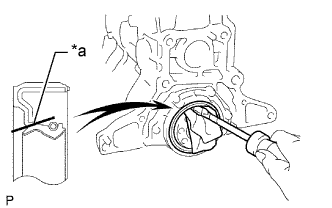
Text in Illustration *a Cut Position Using a knife, cut off the lip of the oil seal.
-
Using a screwdriver, pry out the oil seal.
Note
After the removal, check that the crankshaft is not damaged. If damaged, repair it with a sandpaper (#400).
Tech Tips
Tape the screwdriver before use.
-