REAR BUMPER DISASSEMBLY

-
REMOVE NO. 1 ULTRASONIC SENSOR (for Corner Sensor)
-
for RH side:
-
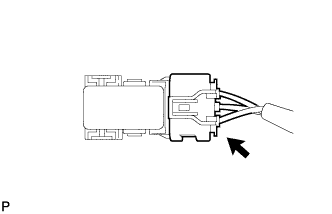
Disconnect the connector.
-
-
for LH side:
-
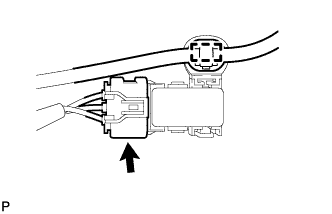
Disengage the clamp.
-
Disconnect the connector.
-
-
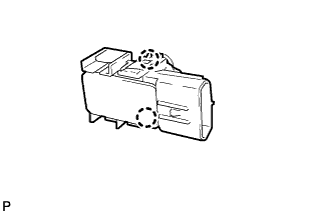
Disengage the 2 claws and remove the No. 1 ultrasonic sensor from the No. 2 ultrasonic sensor bezel.
Tech Tips
The illustration is for the RH side. The orientation for the LH side is the opposite of the RH side.
-
for LH side:
-
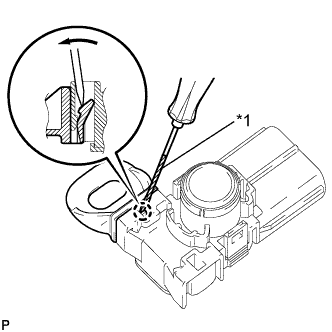
Text in Illustration *1 Protective Tape Using a screwdriver, disengage the claw and remove the ultrasonic sensor clip from the No. 1 ultrasonic sensor.
Tech Tips
Tape the screwdriver tip before use.
-
-
-
REMOVE NO. 2 ULTRASONIC SENSOR BEZEL (for Corner Sensor)
-
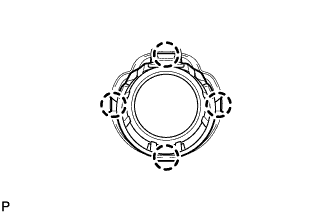
Disengage the 4 claws and remove the No. 2 ultrasonic sensor bezel from the rear bumper assembly.
Tech Tips
The illustration is for the RH side. The orientation for the LH side is the opposite of the RH side.
-
-
REMOVE NO. 1 ULTRASONIC SENSOR (for Back Sensor)
-
for LH Side: Click here
-
for RH Side:
Tech Tips
Use the same procedure as for the LH side.
-
-
REMOVE NO. 3 ULTRASONIC SENSOR BEZEL (for Back Sensor)
-
for LH Side: Click here
-
for RH Side:
Tech Tips
Use the same procedure as for the LH side.
-
-
REMOVE REAR FOG LIGHT ASSEMBLY (w/ Rear Fog Light)
-
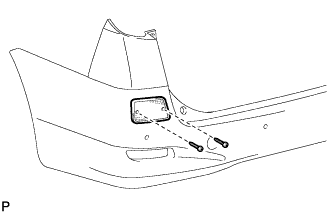
Remove the 2 screws, rear fog light assembly and rear fog light bracket.
-
-
REMOVE NO. 3 REAR BUMPER SIDE RETAINER
-
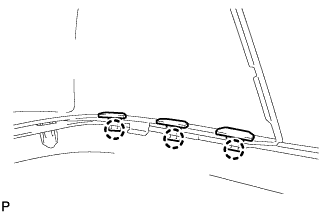
Disengage the 3 claws and remove the 3 No. 3 rear bumper side retainers.
Tech Tips
Use the same procedure for the RH side and LH side.
-
-
REMOVE REAR BUMPER UPPER COVER LH
-
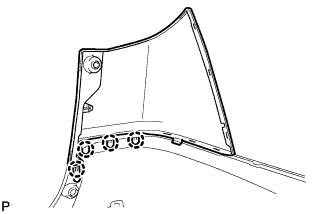
Disengage the 4 claws and remove the rear bumper upper cover LH.
-
-
REMOVE REAR BUMPER UPPER COVER RH
Tech Tips
Use the same procedure as for the LH side.
-
REMOVE NO. 2 LUGGAGE ROOM WIRE
-
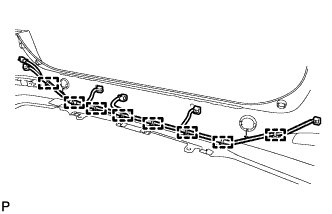
Disengage the 8 clamps and remove the No. 2 luggage room wire.
-
-
REMOVE REFLEX REFLECTOR ASSEMBLY LH
-
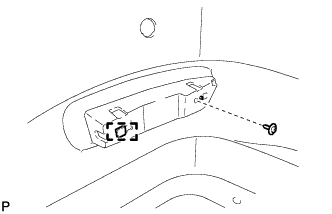
Remove the screw.
-
Disengage the guide and remove the reflex reflector assembly LH.
-
-
REMOVE REFLEX REFLECTOR ASSEMBLY RH
Tech Tips
Use the same procedure as for the LH side.
-
REMOVE REAR BUMPER ENERGY ABSORBER LH (w/ Energy Absorber)
-
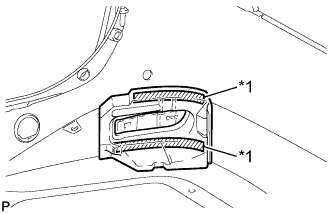
Text in Illustration *1 Double-sided Tape Peel off the double-sided tape to remove the rear bumper energy absorber LH.
-
-
REMOVE REAR BUMPER ENERGY ABSORBER RH (w/ Energy Absorber)
Tech Tips
Use the same procedure as for the LH side.
-
REMOVE NO. 1 REAR BUMPER PLATE
-
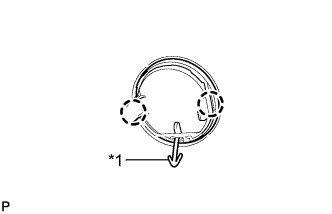
Text in Illustration *1 Hook Disengage the 2 claws.
-
Disengage the hook and remove the No. 1 rear bumper plate from the rear bumper cover.
Tech Tips
Use the same procedure for the RH side and LH side.
-
-
REMOVE NO. 1 REAR BUMPER SIDE SUPPORT LH
-
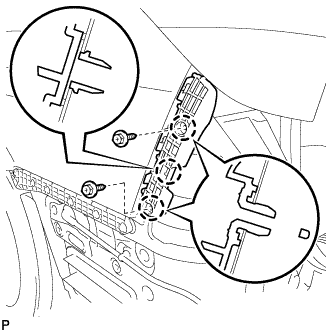
Remove the 2 screws.
-
Disengage the 3 claws and remove the rear bumper side support LH.
-
-
REMOVE NO. 1 REAR BUMPER SIDE SUPPORT RH
Tech Tips
Use the same procedure as for the LH side.
-
REMOVE REAR BUMPER SIDE SUPPORT LH
-
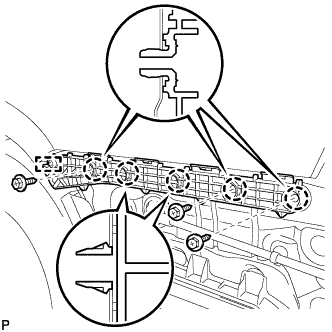
Remove the 3 screws.
-
Disengage the 5 claws and guide, and remove the rear bumper side support LH.
-
-
REMOVE REAR BUMPER SIDE SUPPORT RH
Tech Tips
Use the same procedure as for the LH side.
-
REMOVE REAR BUMPER BAR LH
-
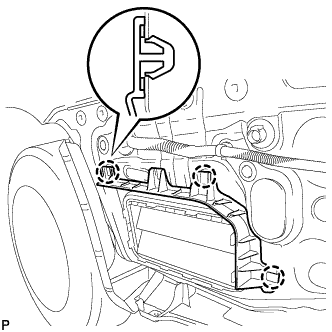
Disengage the 3 claws and remove the rear bumper bar LH.
-
-
REMOVE REAR BUMPER BAR RH
Tech Tips
Use the same procedure as for the LH side.
-
REMOVE REAR BUMPER PROTECTOR LH (for LHD)
-
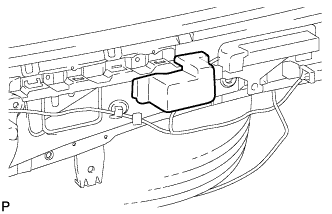
Remove the rear bumper protector LH.
-
-
REMOVE REAR BUMPER PROTECTOR RH (for LHD)
Tech Tips
Use the same procedure as for the LH side.