REAR LIGHT ASSEMBLY (for ALPHARD) INSTALLATION

-
INSTALL REAR LIGHT ASSEMBLY
-
Install the clip to the rear light assembly.
-
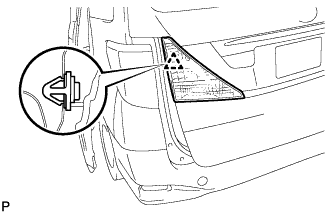
Engage the clip to install the rear light assembly.
-
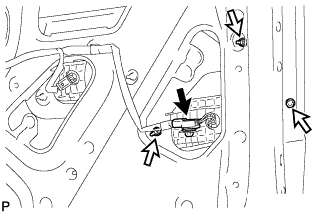
Install the 3 nuts.
- Torque:
- 1.7 N*m { 17 kgf*cm, 15 in.*lbf }
-
Connect the connector.
-
-
INSTALL POWER BACK DOOR TOUCH SENSOR ASSEMBLY LH (w/ Power Back Door)
-
Install the power back door touch sensor assembly with the 2 new power back door sensor clips.
-
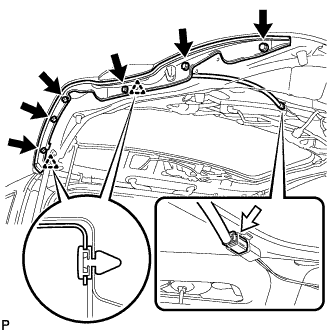
Install the 6 bolts.
-
Connect the connector.
-
-
INSTALL BACK DOOR TRIM BOARD ASSEMBLY
-
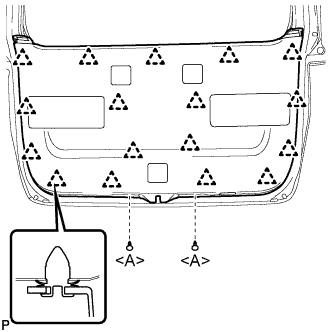
Engage the 17 clips and install the back door trim board assembly.
-
Install the 2 clips <A>.
-
-
INSTALL SWITCH BEZEL (w/ Power Back Door)
-
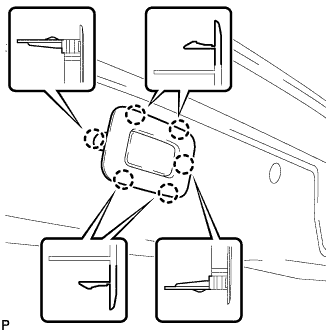
Engage the 6 claws to install the switch bezel.
-
-
INSTALL BACK DOOR INSIDE HANDLE
-
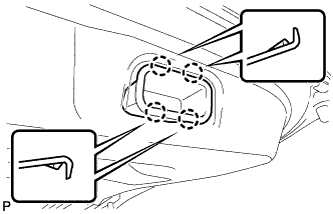
Engage the 4 claws to install the back door inside handle.
-
-
INSTALL REAR WINDOW SIDE GARNISH LH (w/o Power Back Door)
-
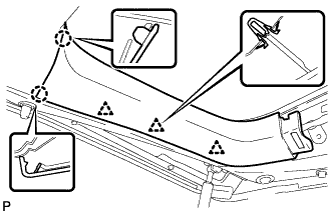
Engage the 3 clips and 2 claws to install the rear window side garnish LH.
-
-
INSTALL REAR WINDOW SIDE GARNISH LH (w/ Power Back Door)
-
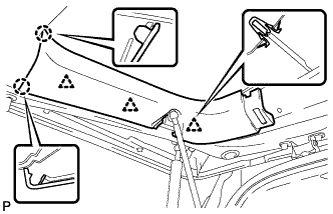
Engage the 3 clips and 2 claws to install the rear window side garnish LH.
-
-
INSTALL BACK DOOR NO. 2 SERVICE HOLE COVER (w/ Power Back Door)
-
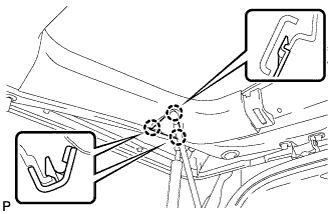
Engage the 3 claws to install the back door No. 2 service hole cover.
-
-
INSTALL REAR WINDOW SIDE GARNISH RH
-
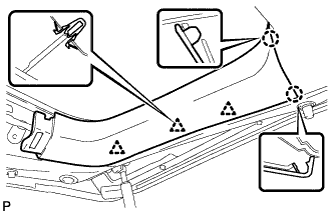
Engage the 3 clips and 2 claws to install the rear window side garnish RH.
-
-
INSTALL BACK DOOR CENTER GARNISH
-
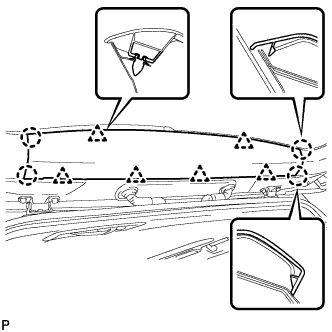
Engage the 6 clips and 4 claws to install the back door center garnish.
-