POWER MIRROR CONTROL SYSTEM (w/ Memory) OPERATION CHECK

-
CHECK POWER MIRROR SWITCH OPERATION
-
Turn the engine switch on (ACC).
-
With the mirror select switch set to L, check that the mirror surface moves up, down, left and right normally.
-
With the mirror select switch set to R, check that the mirror surface moves up, down, left and right normally.
-
-
CHECK MEMORY AND REACTIVATION FUNCTION
Tech Tips
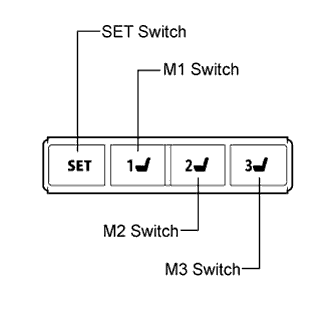
The SET, M1, M2 and M3 seat memory switches are shown in the illustration.
-
Turn the engine switch on (IG) and move the shift lever to P.
-
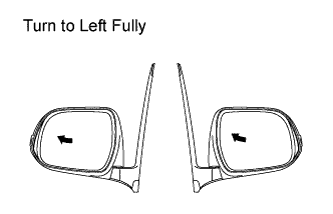
Check the M1 switch.
-
Using the outer mirror switch assembly, turn the mirror surface to the fully left position.
-
Press the M1 switch while the SET switch is being pressed.
Note
-
The mirror surface position will not be memorized if the SET switch and 2 or more of the M1, M2 and M3 switches are pressed at the same time.
-
If the SET switch and 2 or more of the M1, M2 and M3 switches are pressed at the same time, the mirror surface position will not be memorized unless the SET switch is turned off.
-
-
Check that the buzzer sounds for 0.5 seconds and the mirror surface position is memorized.
-
Using the outer mirror switch assembly, turn the mirror surface to the fully right position.
-
Press the M1 switch.
-
Check that the buzzer sounds for 0.1 seconds and the outer mirror automatically moves to the recorded fully left position.
-
-
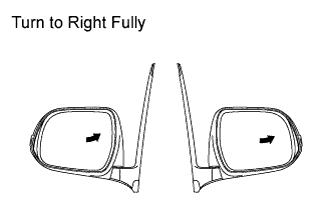
Check the M2 switch.
-
Using the outer mirror switch assembly, turn the mirror surface to the fully right position.
-
Press the M2 switch while the SET switch is being pressed.
Note
-
The mirror surface position will not be memorized if the SET switch and 2 or more of the M1, M2 and M3 switches are pressed at the same time.
-
If the SET switch and 2 or more of the M1, M2 and M3 switches are pressed at the same time, the mirror surface position will not be memorized unless the SET switch is turned off.
-
-
Check that the buzzer sounds for 0.5 seconds and the mirror surface position is memorized.
-
Using the outer mirror switch assembly, turn the mirror surface to the fully left position.
-
Press the M2 switch.
-
Check that the buzzer sounds for 0.1 seconds and the outer mirror automatically moves to the recorded fully right position.
-
-
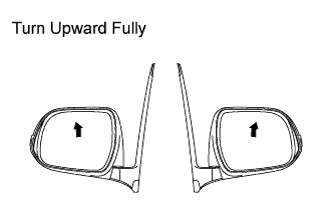
Check the M3 switch.
-
Using the outer mirror switch assembly, turn the mirror surface to the fully upward position.
-
Press the M3 switch while the SET switch is being pressed.
Note
-
The mirror surface position will not be memorized if the SET switch and 2 or more of the M1, M2 and M3 switches are pressed at the same time.
-
If the SET switch and 2 or more of the M1, M2 and M3 switches are pressed at the same time, the mirror surface position will not be memorized unless the SET switch is turned off.
-
-
Check that the buzzer sounds for 0.5 seconds and the mirror surface position is memorized.
-
Using the outer mirror switch assembly, turn the mirror surface to the fully downward position.
-
Press the M3 switch.
-
Check that the buzzer sounds for 0.1 seconds and the outer mirror automatically moves to the recorded fully upward position.
-
-
-
CHECK POWER RETRACTABLE MIRROR
-
Turn the engine switch on (ACC).
-
At each outer rear view mirror position, check the retractable mirror operation when operating the outer mirror retractable switch of the outer mirror.
-
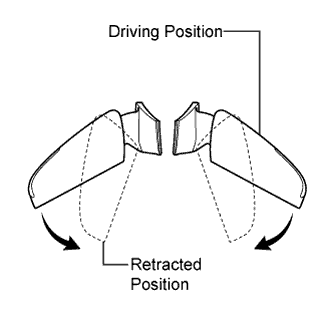
Move the mirrors to the driving position.
-
Turn the outer mirror retractable switch to the retract position.
-
Check that the right and left outer rear view mirrors move from the driving position to the retracted position.
-
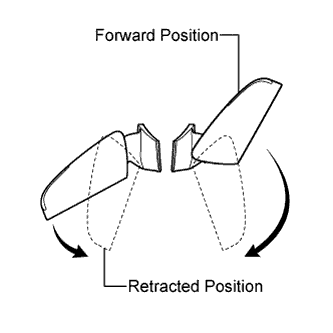
Move the mirrors to the driving position.
-
Move one of the outer rear view mirrors to the forward position by hand.
-
Turn the outer mirror retractable switch to the retract position.
-
Check that the outer rear view mirror in the forward position moves to the retracted position, and check that the other mirror moves to the retracted position.
-
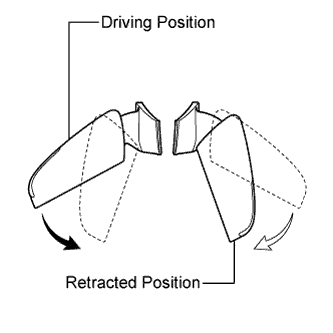
Move the outer rear view mirrors to driving position.
-
Move one of the outer rear view mirrors to the retracted position by hand.
-
Turn the outer mirror retractable switch to the retract position.
-
Check that the outer rear view mirror in the driving position moves to the retracted position.
-
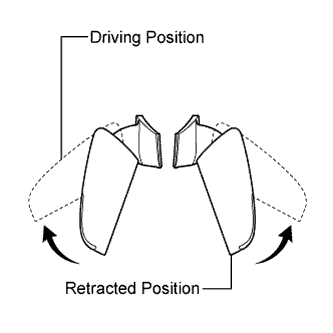
Move the mirrors to the retracted position.
-
Turn the outer mirror retractable switch to the driving position.
-
Check that the right and left mirrors move from the retracted position to the driving position.
-
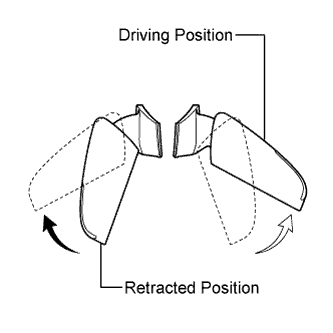
Move the mirrors to the retracted position.
-
Move one of the outer rear view mirrors to the driving position by hand.
-
Turn the outer mirror retractable switch to the driving position.
-
Check that the retracted outer rear view mirror moves to the driving position.
-
-
Check the operation of the outer rear view mirror according to retract switch operations and engine switch condition.
-
When the outer rear view mirror is operating, turn the engine switch off and check that the mirror operation stops immediately.
-
This time, turn the engine switch on (ACC) and press the retract switch. Check that the outer rear view mirror operates in the opposite direction.
-
-
Check the operation of the outer rear view mirror when it is blocked by an obstacle.
-
When the outer rear view mirror is moving to the retracted or driving position, block the outer rear view mirror by hand. Check that the mirror stops moving.
-
With the outer rear view mirror stopped partway, push the retract switch. Check that the outer rear view mirror moves in the opposite direction.
-
-
-
CHECK AUTO ELECTRIC RETRACT FUNCTION
-
With the engine switch off and the retract switch in the AUTO position, when the doors are unlocked through the entry, wireless or key-linked function, check that the outer rear view mirrors move from the retracted position to the driving position, and stop in the driving position.
-
With the engine switch off, and the retract switch in the AUTO position, when the doors are locked through the entry, wireless or key-linked function, check that the outer rear view mirrors move from the driving position to the retracted position, and stop in the retracted position.
-
-
CHECK REVERSE SHIFT-LINKED OPERATION OF MIRRORS
-
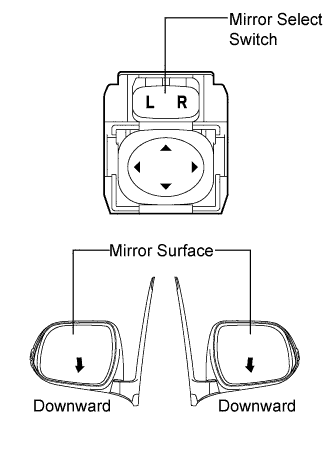
Turn the engine switch on (IG).
-
Set the mirror select switch to L or R.
-
Check that the mirror surface turns downward when the shift lever is moved to R.
-
Check that the mirror surface position returns to the original position when one of the following conditions is met:
-
Shift lever is moved to any position other than R.
-
Mirror select switch is in the neutral position (off).
-
Engine switch is turned off.
-
-
-
CHECK MEMORY CALL FUNCTION
-
Automatic Memory Call Operation Inspection
-
With the transmitter recognition code registered into the memory system, perform an entry unlock or wireless unlock operation. Open the driver door and check that the mirror surfaces automatically move to the positions recorded in the memory.
-
-
Memory Registration (w/ Wireless Function)
-
Prepare by recording the driving position through the seat memory switch (M1 switch, M2 switch or M3 switch).
-
With the engine switch off and the driver door closed, press and hold both of the following: a seat memory switch (M1 switch, M2 switch or M3 switch) and the transmitter unlock switch. Continue holding the switches until the answer back buzzer sounds.
Note
Do not bring 2 or more keys into the vehicle.
-
-
Memory Erasure (w/ Wireless Function)
-
With the engine switch off and the driver door closed, press and hold both of the SET switch and transmitter unlock switch. Continue holding the switches until the answer back buzzer sounds.
Note
Do not bring 2 or more keys into the vehicle.
-
-
-
EMERGENCY STOP FUNCTION
-
During the memory call operation, press a seat memory switch (M1 switch, M2 switch or M3 switch 3), or press the front power seat control switch of the position control ECU and switch. Check that the automatic memory call operation stops.
-
-
CHECK MIRROR HEATER OPERATION*
*: w/ Mirror Heater
-
When the engine switch is turned on (IG) and the defogger switch is pressed, check that the mirror heater operates.
Tech Tips
-
After 15 minutes, check that the mirror heaters automatically turn off.
-
If both of the following conditions are met approximately 15 minutes after the rear window defogger is activated, the rear window defogger continues to operate for up to 45 minutes. If the following conditions are not met, the rear window defogger stops operating immediately.
-
The outside temperature is -3°C (27°F) or below.
-
The vehicle speed is 45 km/h (28 mph) or more.
-
-