FRONT BLOWER MOTOR REMOVAL

-
REMOVE CENTER FLOOR CARPET COVER LH (for RHD)
-

Using a clip remover, remove the clip.
-
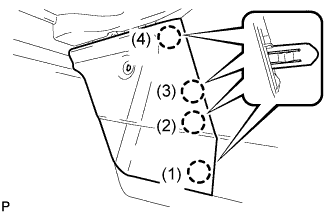
Disengage the 4 claws and remove the center floor carpet cover LH in the order shown in the illustration.
Tech Tips
Remove the center floor carpet cover LH while pushing on the instrument cluster finish panel.
-
-
REMOVE CENTER FLOOR CARPET COVER RH (for LHD)
-
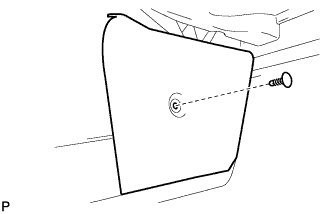
Using a clip remover, remove the clip.
-
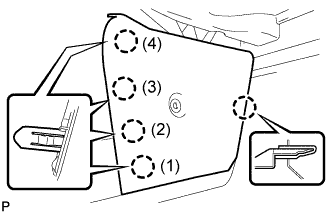
Disengage the 5 claws and remove the center floor carpet cover RH in the order shown in the illustration.
Tech Tips
Remove the center floor carpet cover RH while pushing on the instrument cluster finish panel.
-
-
REMOVE NO. 2 INSTRUMENT PANEL UNDER COVER SUB-ASSEMBLY
-
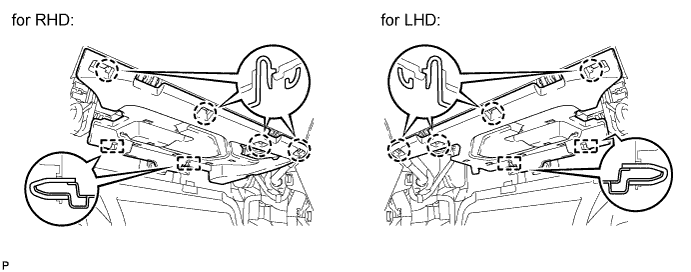
Disengage the 4 claws and 2 guides.
-
Disconnect the connector and remove the No. 2 instrument panel under cover sub-assembly.
-
-
REMOVE FRONT BLOWER MOTOR SUB-ASSEMBLY (except Cold Area)
-
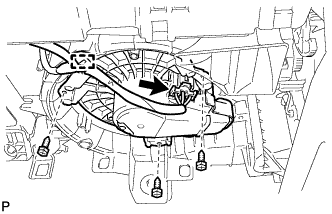
Disengage the clamp.
-
Disconnect the connector.
-
Remove the 3 screws and the front blower motor sub-assembly.
-
-
REMOVE FRONT BLOWER MOTOR SUB-ASSEMBLY (for Cold Area)
-
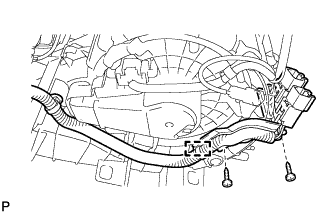
Remove the 2 screws and disengage the quick heater connector.
-
Disengage the clamp.
-
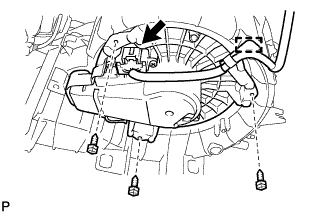
Disengage the clamp.
-
Disconnect the connector.
-
Remove the 3 screws and the front blower motor sub-assembly.
-