REAR NO. 1 SEAT INNER BELT ASSEMBLY (for Luxury Type Power Seat) INSTALLATION

-
INSTALL REAR NO. 1 SEAT INNER BELT ASSEMBLY
-
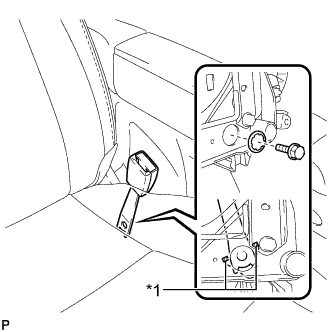
Text in Illustration *1 Protruding Part Install the rear No. 1 seat inner belt assembly with the bolt and washer.
- Torque:
- 42 N*m { 428 kgf*cm, 31 ft.*lbf }
Note
Do not allow the anchor part of the rear No. 1 seat inner belt assembly to overlap the protruding parts of the floor panel.
-
-
INSTALL REAR SEAT CUSHION MOULDING
-
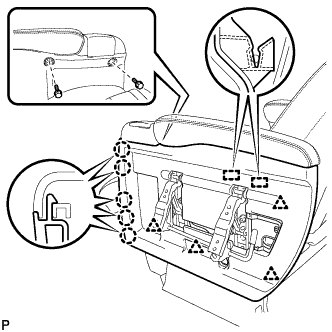
Engage the 2 guides.
-
Engage the 4 clips.
-
Engage the 5 claws.
-
Install the rear seat cushion moulding with the 2 bolts.
-
-
INSTALL NO. 4 SEAT ADJUSTER COVER CAP
-
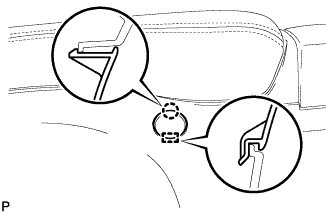
Engage the guide and the claw to install the No. 4 seat adjuster cover cap.
-
-
INSTALL NO. 3 SEAT ADJUSTER COVER CAP
-
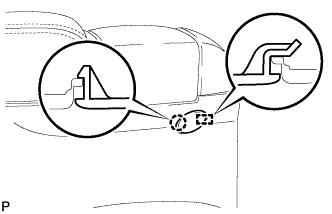
Engage the guide and the claw to install the No. 3 seat adjuster cover cap.
-
-
INSTALL SEAT ADJUSTER COVER
-
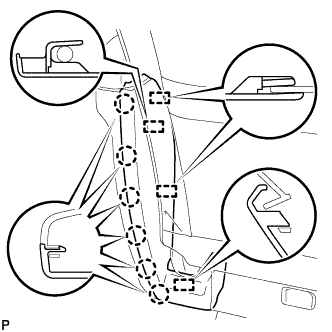
Engage the 4 guides.
-
Engage the 6 claws to install the seat adjuster cover cap LH.
-
-
INSTALL NO. 1 SEAT ADJUSTER COVER CAP (for RH Side)
-
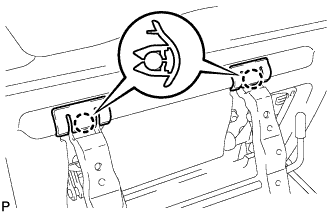
Engage the 2 claws to install the 2 No. 1 seat side adjuster cover caps.
-
-
INSTALL REAR SEAT SIDE TABLE (for RH Side)
-
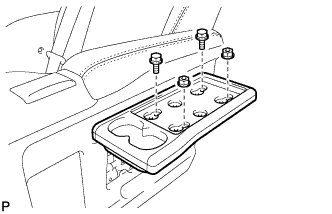
Install the rear seat side table with the 2 nuts and 2 bolts.
-
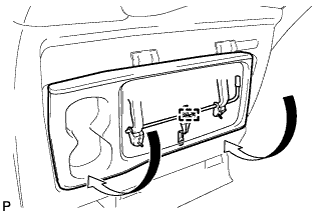
Engage the hook to store the table.
-
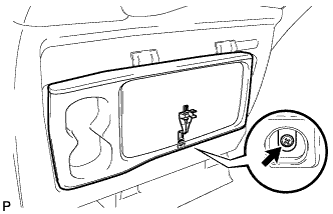
Secure the rear seat side table clip with the screw.
-
-
INSTALL REAR SEAT SIDE TABLE BOARD (for RH Side)
-
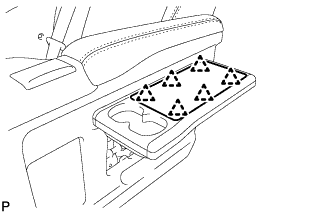
Engage the 6 clips to install the rear seat side table board.
-
-
INSTALL NO. 2 SEAT ADJUSTER COVER CAP (for RH Side)
-
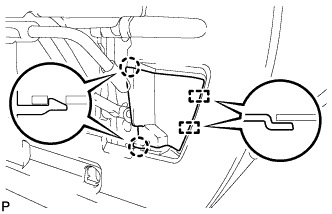
Engage the 2 claws and the 2 guides to install the No. 2 seat side adjuster cover cap.
-
-
INSTALL REAR SEAT SIDE TABLE COVER (for RH Side)
-
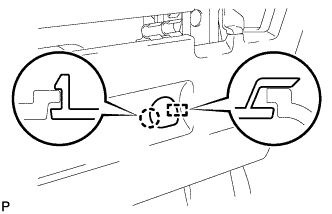
Engage the guide and the claw to install the rear seat side table cover.
-
-
INSTALL REAR NO. 1 SEAT ASSEMBLY