REAR POWER SEAT CONTROL SYSTEM (w/ Memory) OPERATION CHECK

-
CHECK REAR POWER SEAT FUNCTION
-
Check the basic functions.
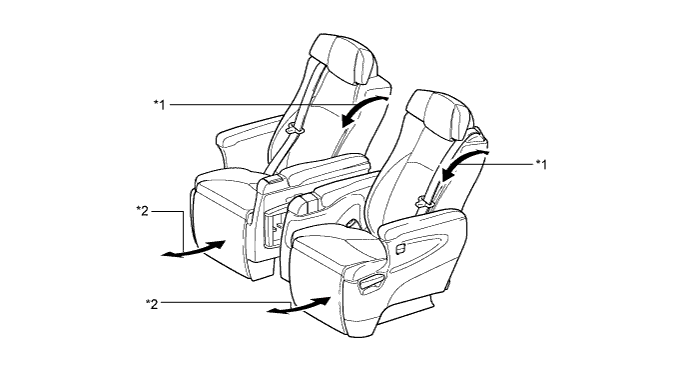
Text in Illustration *1 Reclining Function *2 Ottoman Function
-
Operate the rear power seat switch. Check that each seat function works:
-
Reclining function
-
Ottoman function
-
-
-
-
CHECK REAR POWER SEAT MOTOR (RECLINING AND OTTOMAN FUNCTIONS)
-
Check the PTC operation inside the power seat motor.
Tech Tips
The resistance of the PTC thermistor increases when a switch of the rear power seat switch is held down even after the seatback has been moved to the foremost or fully reclined position and the ottoman to the uppermost or fully stored position. If the resistance increases beyond a specified level, the current is shut off to prevent a short circuit.
Note
-
The inspection should be performed with the seat installed in the vehicle.
-
Perform the 4 steps below for the full range of motion for each power seat function.
-
Choose a power seat function. Operate a switch of the rear power seat switch and move the seatback to the foremost or fully reclined position and the ottoman to the uppermost or fully stored position. Keep the seat in that position for approximately 50 seconds.
-
Operate the switch of the rear power seat switch again and continue to try to move the seatback and ottoman in the same direction as in the previous step. Measure the time until the current is shut off (motor operation sound will stop).
-
After the current is shut off, release the switch of the rear power seat switch and wait for approximately 60 seconds.
-
Operate the same switch of the rear power seat switch and move the seatback and ottoman in the opposite direction. Check that the motor operates.
-
-
-
CHECK SEAT POSITION MEMORY AND RESTORING FUNCTION
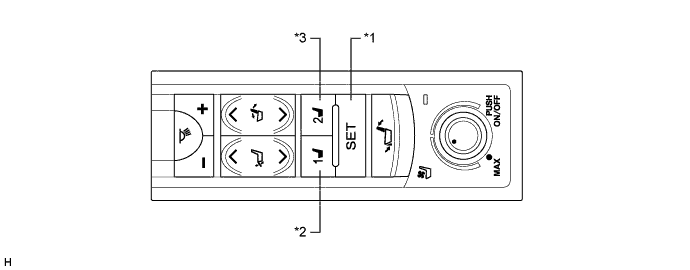
Text in Illustration *1 SET Switch *2 M1 Switch *3 M2 Switch - - Tech Tips
-
The seatback and ottoman positions will not be memorized when either of the following conditions is met:
-
The seatback and ottoman positions will not be recorded if the SET switch and 2 of the seat memory switches are pressed simultaneously.
-
The seatback and ottoman positions will not be stored when the SET switch and M1 switch or M2 switch are pressed simultaneously.
-
The buzzer sounds intermittently during reclining operation.
-
The ottoman will move to the memorized position only when operating backward.
-
Turn the engine switch on (IG).
-
Move the seatback to the foremost position and the ottoman to the uppermost position using the rear power seat switch.
-
Check that the buzzer sounds for 0.5 seconds and the seatback and ottoman positions are memorized when the M1 switch is pressed within 3 seconds after the SET switch is being pressed or M1 switch is pressed while the SET switch is being pressed.
Tech Tips
Press and hold the M1 switch until the buzzer sounds.
-
Move the seatback out of the foremost position and the ottoman out of the uppermost position using the rear power seat switch.
-
Check that the buzzer sounds for 0.5 seconds and the seatback and ottoman positions are memorized when the M2 switch is pressed within 3 seconds after the SET switch is being pressed or M2 switch is pressed while the SET switch is being pressed.
Tech Tips
Press and hold the M2 switch until the buzzer sounds.
-
Check that the buzzer sounds for 0.1 seconds and the seatback automatically moves into the foremost position and the ottoman into the uppermost position (memorized positions) when the M1 switch is pressed.
-
Check that the buzzer sounds for 0.1 seconds and the seatback automatically moves out of the foremost position and the ottoman out of the uppermost position (memorized positions) when the M2 switch is pressed.
-
-
CHECK RETURN FUNCTION
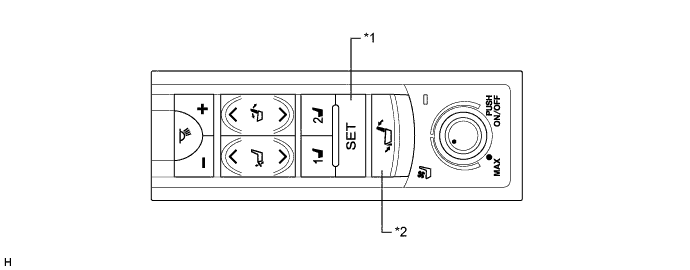
Text in Illustration *1 SET Switch *2 Return Switch Tech Tips
-
The seatback and ottoman positions will not be stored when the SET switch and return switch are pressed simultaneously.
-
The ottoman will move to the memorized position only when operating backward.
-
Turn the engine switch on (IG).
-
Move the seatback to the foremost position and the ottoman to the uppermost position using the rear power seat switch.
-
Check that the buzzer sounds for 0.5 seconds and the seatback and ottoman positions are memorized when the return switch is pressed within 3 seconds after the SET switch is being pressed or return switch is pressed while the SET switch is being pressed.
Tech Tips
Press and hold the return switch until the buzzer sounds.
-
Move the seatback out of the foremost position and the ottoman out of the uppermost position using the rear power seat switch.
-
Check that the buzzer sounds for 0.1 seconds and the seatback automatically moves into the foremost position and the ottoman into the uppermost position (memorized positions) when the return switch is pressed.
-
-
CHECK RETURN POSITION MEMORY CLEAR FUNCTION
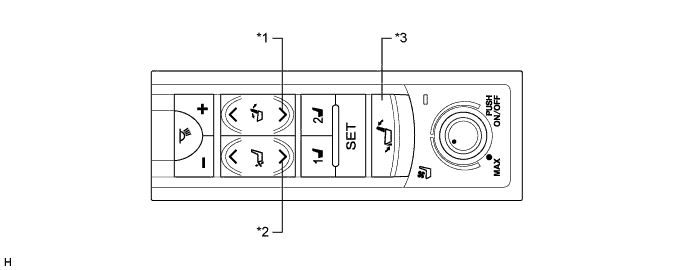
Text in Illustration *1 Reclining Switch (Backward) *2 Ottoman Switch (Store) *3 Return Switch - - Tech Tips
-
Move the seatback to the fully reclined position and the ottoman to the fully stored position before starting the seat return position memory clear operation.
-
If the return switch is pressed but not held on the 5th time, perform the procedure from the step marked *1 again.
-
If the ottoman switch (store) has not been pressed 5 times when 10 seconds have elapsed after the reclining switch (backward) was pressed and held, perform the procedure from the step marked *1 again.
-
If any operations other than the following are performed, perform the procedure from the step marked *1 again.
-
Press and hold the reclining switch (backward).*1
-
Press and hold the ottoman switch (store) while the reclining switch (backward) is being pressed.
-
Press the return switch 5 times (press and hold the switch on the 5th time) while the reclining switch (backward) and ottoman switch (store) are being pressed.
-
When 10 seconds have elapsed after the reclining switch (backward) was pressed and held, check that the buzzer sounds for 0.5 seconds twice and that the seat memory position has cleared.
-
-
CHECK EMERGENCY STOP FUNCTION
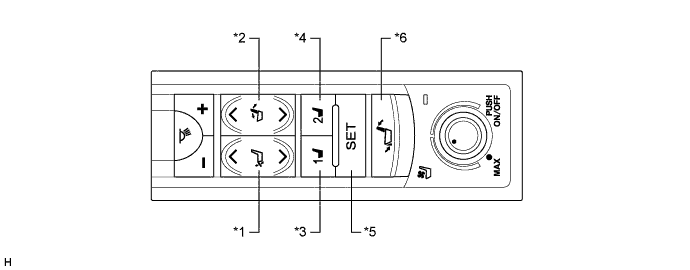
Text in Illustration *1 Ottoman Switch *2 Reclining Switch *3 M1 Switch *4 M2 Switch *5 SET Switch *6 Return Switch
-
During restoration, check that the operation stops when the ottoman switch, reclining switch, M1 switch, M2 switch, SET switch or return switch is pressed.
-