GLOVE BOX LIGHT INSTALLATION

-
INSTALL GLOVE BOX LIGHT ASSEMBLY
-
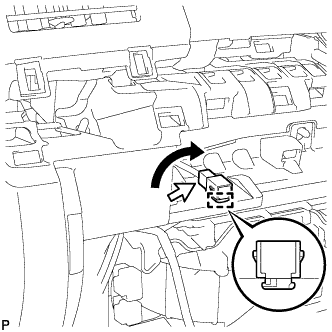
Engage the guide to install the glove box light assembly as shown in the illustration.
-
Connect the connector.
-
-
INSTALL INTERIOR ILLUMINATION LIGHT ASSEMBLY (for Side)
-
for RHD:
-
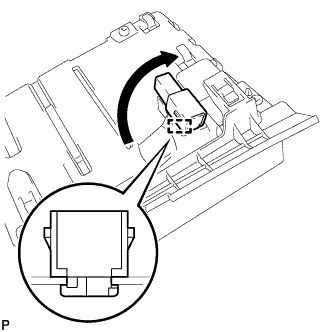
Engage the guide to install the interior illumination light assembly as shown in the illustration.
-
-
for LHD:
-
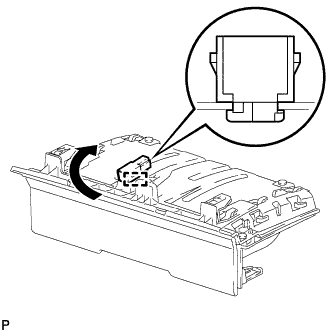
Engage the guide to install the interior illumination light assembly as shown in the illustration.
-
-
-
INSTALL NO. 1 INSTRUMENT PANEL BOX DOOR SUB-ASSEMBLY
-
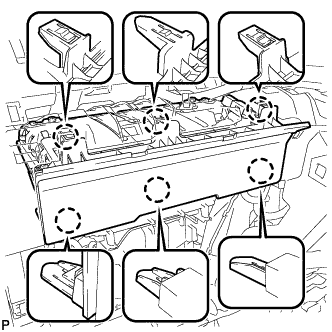
Engage the 6 claws to install the No. 1 instrument panel box door sub-assembly.
-
Connect the connector.
-
-
INSTALL NO. 3 INSTRUMENT CLUSTER FINISH PANEL GARNISH
-
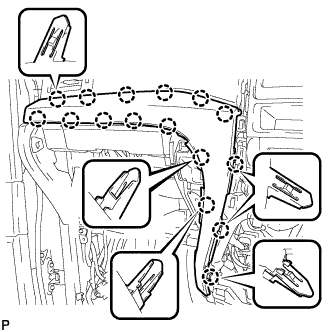
Engage the 16 claws to install the No. 3 instrument cluster finish panel garnish.
Note
Make sure that the claws are fully engaged.
-
-
INSTALL INSTRUMENT CLUSTER FINISH PANEL ASSEMBLY
-
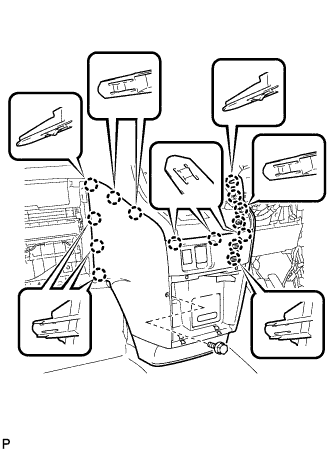
Engage the 15 claws.
Tech Tips
Before engaging the 15 claws, make sure that the claws are positioned correctly.
Note
Make sure that the claws are fully engaged.
-
Install the instrument cluster finish panel assembly with the bolt <C>.
-
-
INSTALL INSTRUMENT PANEL BOX ASSEMBLY
-
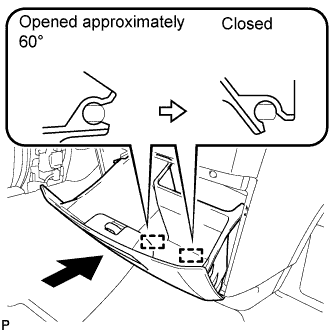
With the instrument panel box assembly opened approximately 60° from its closed position, engage the 2 hinges horizontally.
Note
Engaging the hinges from the top will deform the hinges. Be sure to install the instrument panel box assembly horizontally.
-
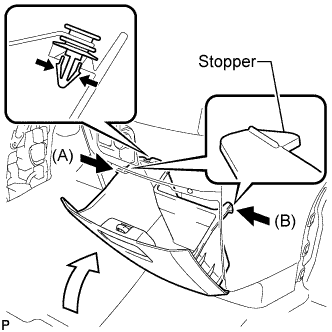
Install the damper clip.
-
Slightly bend stoppers (A) and (B) in the directions indicated by the arrows in the illustration and engage the stoppers to install the instrument panel box assembly.
-
-
INSTALL GLOVE COMPARTMENT DOOR ASSEMBLY
-
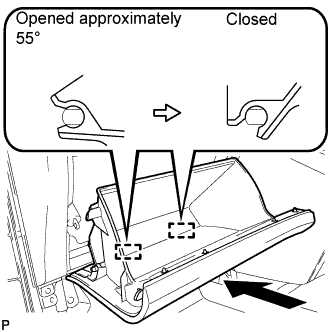
With the glove compartment door assembly opened approximately 55° from its closed position, engage the 2 hinges horizontally.
Note
Engaging the hinges from the top will deform the hinges. Be sure to install the glove compartment door assembly horizontally.
-
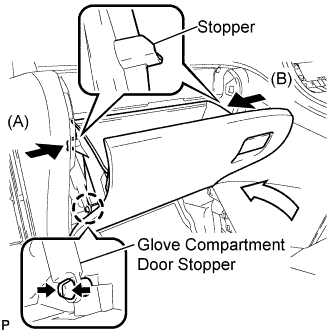
Slightly bend stoppers (A) and (B) in the directions indicated by the arrows in the illustration and engage the stoppers to install the glove compartment door assembly.
-
Engage the claw and connect the glove compartment door stopper.
-
-
INSTALL NO. 2 INSTRUMENT PANEL UNDER COVER SUB-ASSEMBLY
-
Connect the connector.
-
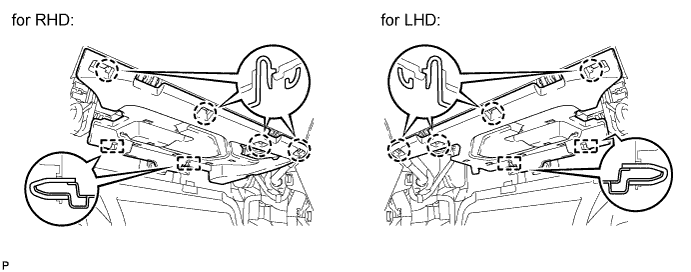
Engage the 2 guides.
-
Engage the 4 claws to install the No. 2 instrument panel under cover sub-assembly.
Note
Make sure that the claws are fully engaged.
-
-
INSTALL CENTER FLOOR CARPET COVER LH
-
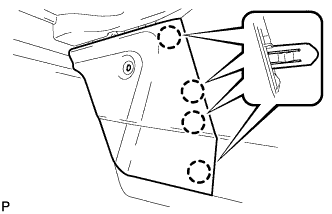
Engage the 4 claws.
-

Install the center floor carpet cover LH with the clip.
-
-
INSTALL CENTER FLOOR CARPET COVER RH (for RHD)
-
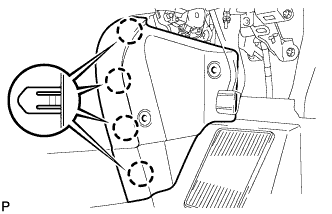
Engage the 4 claws.
-
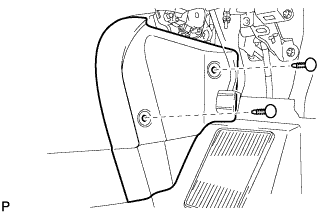
Install the center floor carpet cover RH with the 2 clips.
-
-
INSTALL CENTER FLOOR CARPET COVER RH (for LHD)
-
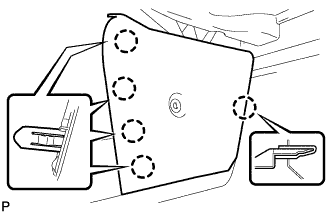
Engage the 5 claws.
-
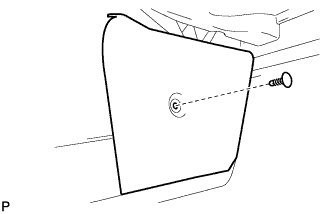
Install the center floor carpet cover RH with the clip.
-
-
INSTALL LOWER INSTRUMENT PANEL FINISH PANEL (for RHD)
-
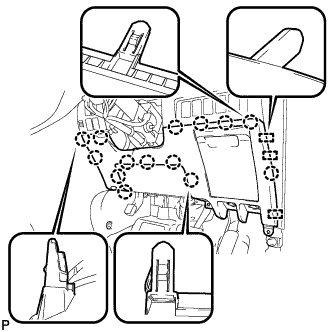
Engage the 3 guides and 14 claws.
Tech Tips
Make sure that all claws around the entire circumference of the driver side knee airbag assembly are fully engaged.
Note
Make sure that the claws are fully engaged.
-
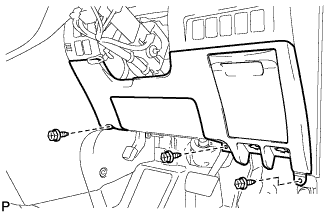
Install the lower instrument panel finish panel with the 3 screws <B>.
-
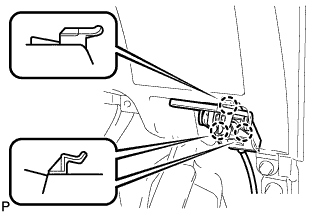
Engage the 3 claws and the fuel lid lock control cable assembly.
-
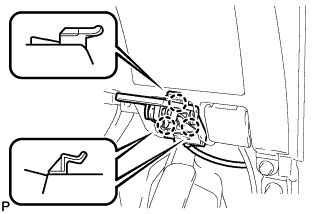
Engage the 3 claws and the hood lock control cable assembly.
-
-
INSTALL LOWER INSTRUMENT PANEL FINISH PANEL (for LHD)
-
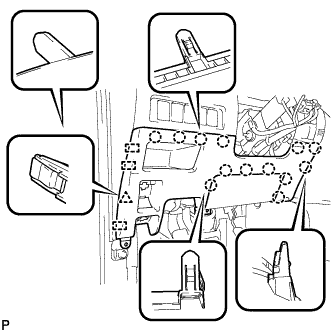
Engage the 3 guides, 13 claws and clip.
Tech Tips
Make sure that all claws around the entire circumference of the driver side knee airbag assembly are fully engaged.
Note
Make sure that the claws are fully engaged.
-
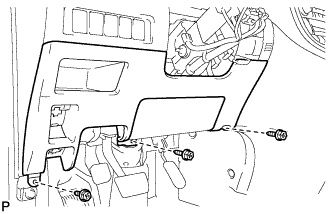
Install the lower instrument panel finish panel with the 3 screws <B>.
-
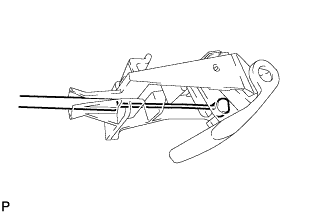
Connect the fuel filler opening lid lock sub-assembly to the fuel lid lock open lever sub-assembly.
-
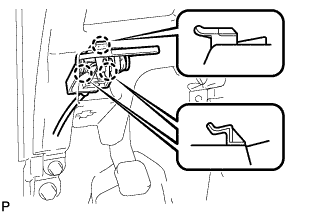
Engage the 3 claws and the fuel lid lock control cable assembly.
-
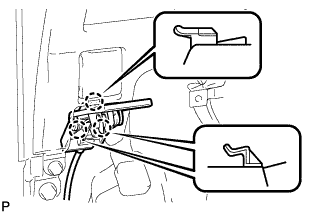
Engage the 3 claws and the hood lock control cable assembly.
-
-
INSTALL NO. 1 INSTRUMENT PANEL UNDER COVER SUB-ASSEMBLY (for RHD)
-
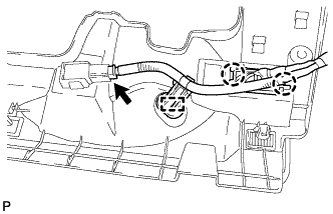
Engage the 2 claws and DLC3.
-
Engage the clamp.
-
Connect the connector.
-
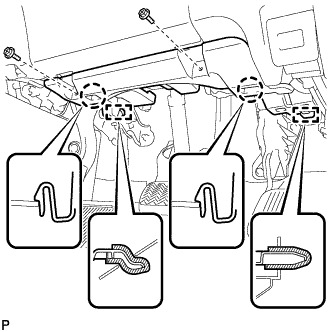
Engage the 2 claws and 2 guides.
Note
Make sure that the claws are fully engaged.
-
Install the No. 1 instrument panel under cover sub-assembly with the 2 screws <B>.
-
-
INSTALL NO. 1 INSTRUMENT PANEL UNDER COVER SUB-ASSEMBLY (for LHD)
-
Engage the clamp.
-
Connect each connector.
-
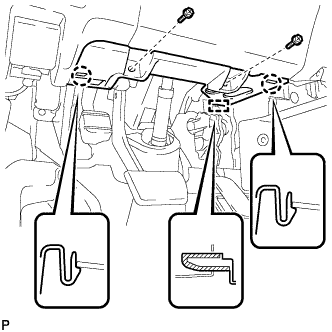
Engage the 2 claws and guide.
Note
Make sure that the claws are fully engaged.
-
Install the No. 1 instrument panel under cover sub-assembly with the 2 screws <B>.
-
-
INSTALL COWL SIDE TRIM BOARD RH (for RHD)
-
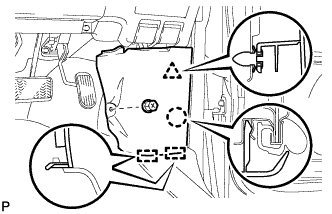
Engage the 2 guides, claw and clip to install the cowl side trim board RH.
-
Install the clip(A).
-
-
INSTALL COWL SIDE TRIM BOARD LH (for LHD)
-
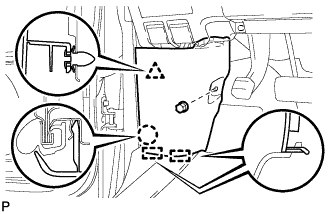
Engage the 2 guides, claw and clip to install the cowl side trim board LH.
-
Install the clip(A).
-
-
INSTALL INTERIOR ILLUMINATION LIGHT ASSEMBLY (for Center)
-
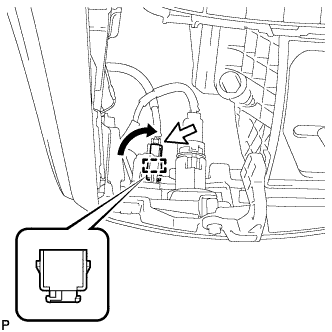
Engage the guide to install the interior illumination light assembly as shown in the illustration.
-
Connect the connector.
-
-
INSTALL CENTER INSTRUMENT CLUSTER FINISH PANEL SUB-ASSEMBLY
-
Connect the connector.
-
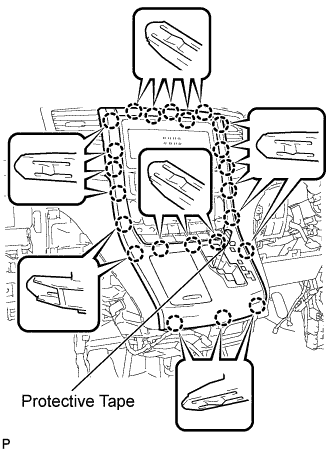
Engage the 23 claws to install the center instrument cluster finish panel sub-assembly.
Note
-
When installing the center instrument cluster finish panel sub-assembly, make sure to press the upper middle part firmly.
-
Make sure that the claws are fully engaged.
-
-
Remove the applied protective tape.
-
Move the shift lever to P.
-
-
INSTALL SHIFT LEVER KNOB SUB-ASSEMBLY
-
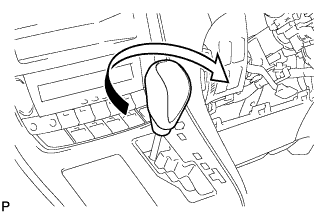
Turn the shift lever knob clockwise to install the shift lever knob sub-assembly.
-