ULTRASONIC SENSOR (for Rear Side) REMOVAL

Tech Tips
-
Use the same procedure for the LH side and RH side.
-
The following procedure is for the RH side.
-
REMOVE REAR BUMPER ASSEMBLY
-
REMOVE NO. 1 ULTRASONIC SENSOR (for Corner Sensor)
-
for RH side:
-
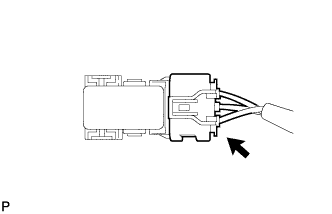
Disconnect the connector.
-
-
for LH side:
-
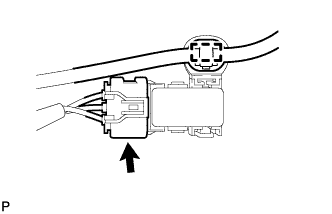
Disengage the clamp.
-
Disconnect the connector.
-
-
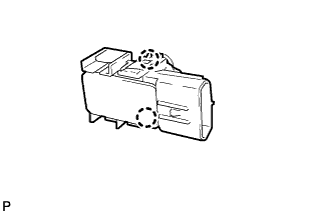
Disengage the 2 claws and remove the No. 1 ultrasonic sensor from the No. 2 ultrasonic sensor bezel.
Tech Tips
The illustration is for the RH side. The orientation for the LH side is the opposite of the RH side.
-
for LH side:
-
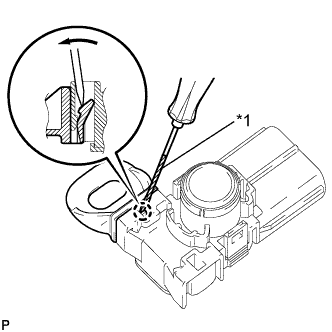
Text in Illustration *1 Protective Tape Using a screwdriver, disengage the claw and remove the ultrasonic sensor clip from the No. 1 ultrasonic sensor.
Tech Tips
Tape the screwdriver tip before use.
-
-
-
REMOVE NO. 2 ULTRASONIC SENSOR BEZEL (for Corner Sensor)
-
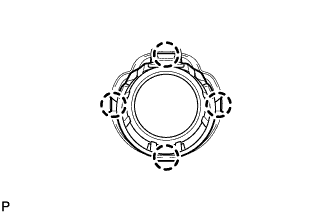
Disengage the 4 claws and remove the No. 2 ultrasonic sensor bezel from the rear bumper assembly.
Tech Tips
The illustration is for the RH side. The orientation for the LH side is the opposite of the RH side.
-
-
REMOVE NO. 1 ULTRASONIC SENSOR (for Back Sensor)
-
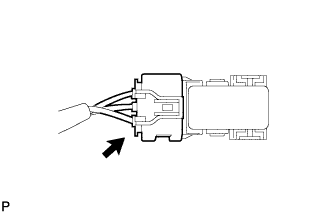
Disconnect the connector.
-
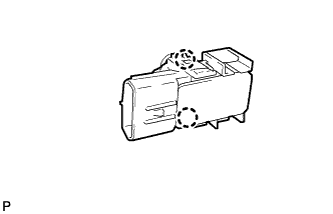
Disengage the 2 claws and remove the No. 1 ultrasonic sensor from the No. 3 ultrasonic sensor bezel.
-
-
REMOVE NO. 3 ULTRASONIC SENSOR BEZEL (for Back Sensor)
-
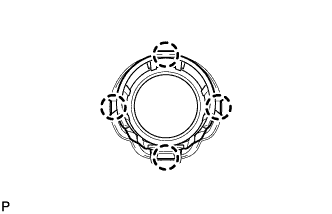
Disengage the 4 claws and remove the No. 3 ultrasonic sensor bezel from the rear bumper assembly.
-