NAVIGATION SYSTEM CD/DVD Sound Skips
INSPECTION PROCEDURE
Note
Depending on the parts that are replaced during vehicle inspection or maintenance, performing initialization, registration or calibration may be needed. Refer to Precaution for Navigation System Click here.
PROCEDURE
-
CHECK DISC
-
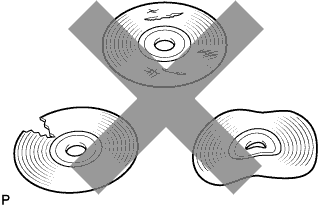
Check that the disc is not deformed or cracked.
OK No deformation or cracks on the disc
NG 
DISC IS FAULTY
OK 
-
-
CHECK DISC
-
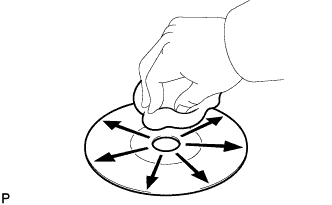
Check the disc.
OK The disc is clean. Note
Do not use a conventional record cleaner or anti-static preservative.
Tech Tips
If dirt is on the disc surface, wipe it clean with a soft cloth from the inside to the outside in a radial direction.
NG
CLEAN DISC
OK
-
-
REPLACE DISC AND RECHECK
-
Replace the disc with a known good one and check that the malfunction disappears.
OK Malfunction disappears.
NG 
CHECK NAVIGATION ECU SUB-ASSEMBLY Click here
OK 
END
-
-
CHECK NAVIGATION ECU SUB-ASSEMBLY
-
Check the navigation ECU sub-assembly installation condition.
-
Check that the navigation ECU sub-assembly is properly installed.
OK Navigation ECU sub-assembly is properly installed.
-
NG
REINSTALL NAVIGATION ECU SUB-ASSEMBLY
OK
REPLACE NAVIGATION ECU SUB-ASSEMBLY Click here
-