DESCRIPTION
| DTC No. | DTC Detection Condition | Trouble Area |
|---|---|---|
| 01-DD | The device that should be the master has been disconnected after engine start. |
|
| 01-E1 | The AMP device records that the AMP output does not function even while the source device operates. |
Even if no fault is present, this DTC may be stored depending on the battery condition or engine start voltage.
-
Before starting troubleshooting, be sure to clear the DTCs stored due to the reason described in the HINT above. Then, check for DTCs and troubleshoot according to the output DTCs.
-
The radio receiver assembly is the master unit.
-
Be sure to clear and recheck for DTCs after the inspection is completed to confirm that no DTCs are output.
INSPECTION PROCEDURE
Be sure to read Description before performing the following procedure.
PROCEDURE
- Click here
CHECK RADIO RECEIVER POWER SOURCE CIRCUIT
-
Refer to Radio Receiver Power Source Circuit (Click here).
If the power source circuit is operating normally, proceed to the next step.
- NEXTClick here
-
- Click here
INSPECT RADIO RECEIVER ASSEMBLY
-
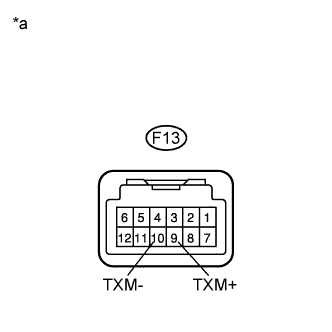
Disconnect the radio receiver assembly connectors.
-
Measure the resistance according to the value(s) in the table below.
Standard Resistance Tester Connection Condition Specified Condition F13-9 (TXM+) - F13-10 (TXM-) Always 60 to 80 Ω Table 1. Text in Illustration *a Component without harness connected
(Radio Receiver Assembly)
- OKClick here
- NGClick here
-
- Click here
IDENTIFY COMPONENT WHICH HAS STORED THIS CODE
-
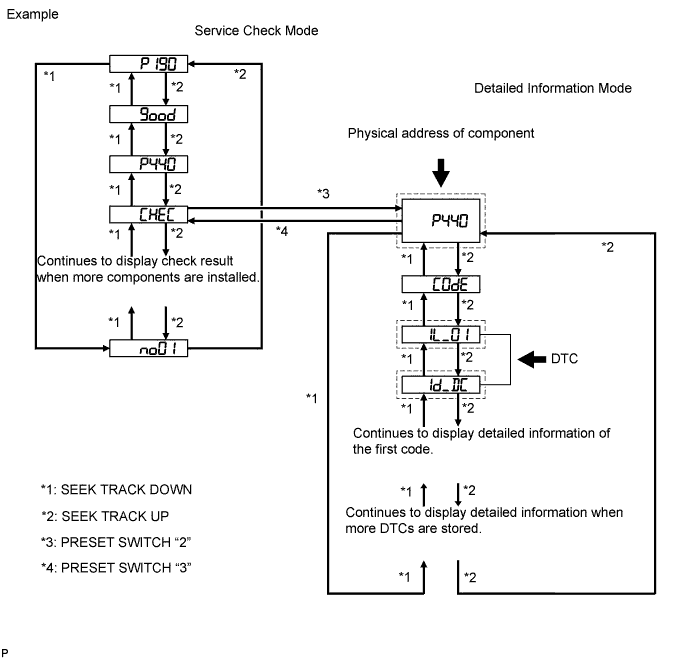
Enter diagnostic mode.
-
Press preset switch "2" to change the mode to "Detailed Information Mode".
-
Identify the component which has stored this code.
Table 2. Component Table Component Physical Address Television display assembly 1B0 Tip:
-
The physical address "P440" shown in the above example indicates the stereo component amplifier.
-
For details on DTCs and how to display/clear them, refer to DTC Check/Clear (Click here).
-
- NEXTClick here
-
- Click here
CHECK HARNESS AND CONNECTOR
Tip:For details of the connectors, refer to Terminals of ECU (Click here).
-
Referring to the following AVC-LAN wiring diagram, check the AVC-LAN circuit between the radio receiver assembly and component which has stored this code.
-
Disconnect all connectors between the radio receiver assembly and component which have stored this code.
-
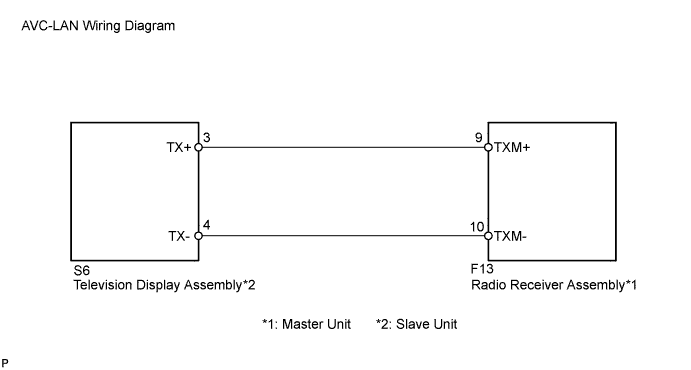
Check for an open or short in the AVC-LAN circuit between the radio receiver assembly and component which has stored this code.
OK There is no open or short circuit.
-
- OKClick here
- NGClick here
-
- Click here
END
- Click here
REPLACE RADIO RECEIVER ASSEMBLY
-
Replace the radio receiver assembly with a known good one (Click here).
- NEXTClick here
-
- Click here
CLEAR DTC
-
Clear the DTCs (Click here).
- NEXTClick here
-
- Click here
RECHECK FOR DTC
-
Recheck for DTCs and check if the same DTC is output again.
OK No DTCs are output.
- OKClick here
- NGClick here
-
- Click here
REPAIR OR REPLACE HARNESS OR CONNECTOR
- Click here
REPLACE COMPONENT WHICH HAS STORED THIS CODE
- Click here
REPLACE RADIO RECEIVER ASSEMBLYClick here