FRONT DOOR WINDOW FRAME MOULDING INSTALLATION

Tech Tips
-
Use the same procedure for the RH and LH sides.
-
The procedure listed below is for the LH side.
-
When installing the window frame moulding, heat the vehicle body and window frame moulding using a heat light.
Standard Item Temperature Vehicle Body 40 to 60°C (104 to 140°F) Window Frame Moulding 20 to 30°C (68 to 86°F)
Note
Do not heat the vehicle body or window frame moulding excessively.
-
INSTALL FRONT DOOR REAR WINDOW FRAME MOULDING LH
-
Clean the vehicle body surface.
-
Using a heat light, heat the vehicle body surface.
-
Remove the double-sided tape from the vehicle body surface.
-
Wipe off any tape adhesive residue with cleaner.
-
-
Install a new front door rear window frame moulding.
-
Using a heat light, heat a new front door rear window frame moulding and the vehicle body surface.
-
Remove the peeling paper from the face of the front door rear window frame moulding.
Tech Tips
After removing the peeling paper, keep the exposed adhesive free from foreign matter.
-
Attach the clip and double-sided tape to install the front door rear window frame moulding.
Tech Tips
Press the front door rear window frame moulding firmly to install it.
-
-
Install a new door window frame moulding clip.
-
-
INSTALL FRONT DOOR WEATHERSTRIP LH
-
Attach the 3 clips to install the upper part of the front door weatherstrip.
-
-
INSTALL FRONT DOOR BELT MOULDING LH
-
Attach the 6 claws to install the front door belt moulding.
-
-
INSTALL FRONT DOOR GLASS RUN LH
-
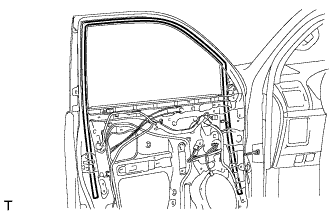
Install the front door glass run.
-
-
INSTALL FRONT DOOR GLASS SUB-ASSEMBLY LH
-
Connect the cable to the negative (-) battery terminal.
-
Connect the power window regulator master switch assembly and move the front door glass sub-assembly so that the door glass bolt installation locations can be seen.
-
Disconnect the cable from the negative (-) battery terminal and power window regulator master switch assembly.
CAUTION:
Wait at least 90 seconds after disconnecting the cable from the negative (-) battery terminal to disable the SRS system Click here.
-
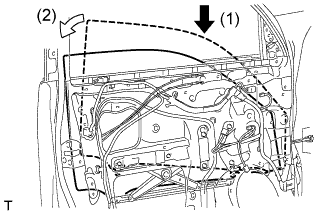
Insert the front door glass sub-assembly into the front door panel along the front door glass run as indicated by the arrows in the order shown in the illustration.
-
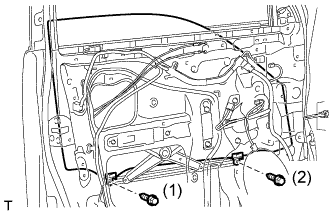
Install the front door glass sub-assembly with the 2 bolts.
- Torque:
- 5.5 N*m { 56 kgf*cm, 49 in.*lbf }
Tech Tips
Tighten the bolts in the order shown in the illustration.
-
-
INSTALL OUTER REAR VIEW MIRROR ASSEMBLY LH
-
Attach the claw to install the outer rear view mirror, and then install the 3 nuts.
- Torque:
- 8.0 N*m { 82 kgf*cm, 71 in.*lbf }
-
Connect the connector.
-
-
INSTALL FRONT DOOR SERVICE HOLE COVER LH
-
Apply new butyl tape to the front door panel.
-
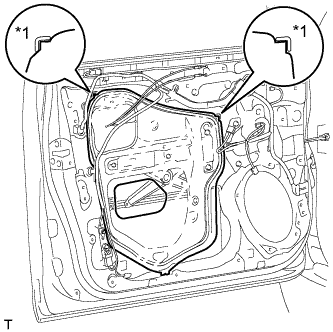
Text in Illustration *1 Reference Point Pass the front door lock remote control cable assembly and front door inside locking cable assembly through a new front door service hole cover.
-
Attach the front door service hole cover using the reference points on the front door panel.
Note
-
There should be no wrinkles or folds after attaching the service hole cover.
-
After attaching the service hole cover, check the seal quality.
Note
Securely install the front door service hole cover preventing wrinkles and air bubbles.
-
-
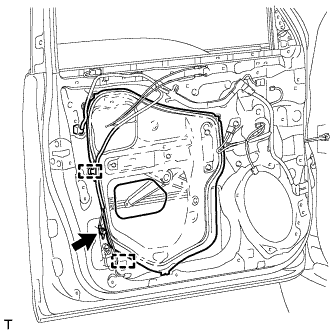
Attach the 2 clamps.
-
Install the bolt to the front door wire.
-
-
INSTALL FRONT DOOR INNER GLASS WEATHERSTRIP LH
-
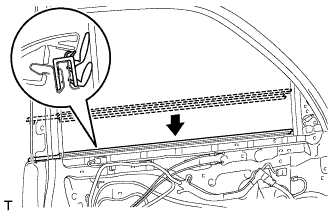
Install the front door inner glass weatherstrip.
-
-
INSTALL FRONT DOOR TRIM BOARD SUB-ASSEMBLY LH
-
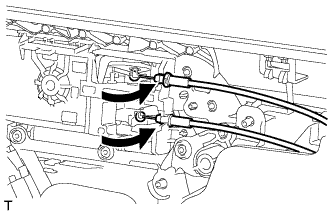
Connect the front door lock remote control cable assembly and front door inside locking cable assembly.
-
Connect 2 connectors.
-
w/ Seat Position Memory System:
-
Connect the connectors.
-
-
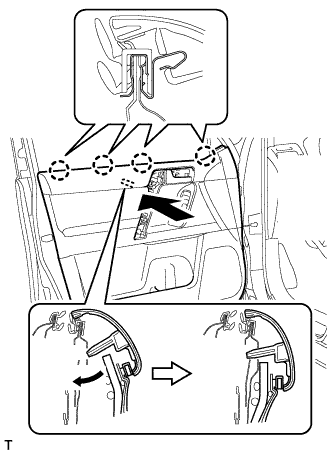
Attach the front door trim board sub-assembly by attaching the 4 claws of the front door inner glass weatherstrip as shown in the illustration.
-
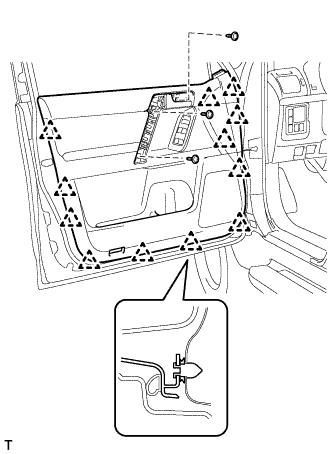
Attach the 12 clips and front door trim board retainer to install the front door trim board sub-assembly.
-
Install the 3 screws.
-
-
INSTALL ASSIST GRIP COVER LH
-
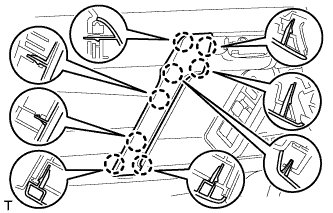
Attach the 8 claws to install the assist grip cover.
-
-
INSTALL NO. 2 DOOR INSIDE HANDLE BEZEL LH
-
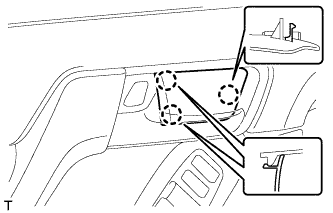
Attach the 3 claws to install the inside handle bezel.
-
-
INSTALL FRONT DOOR LOWER FRAME BRACKET GARNISH LH
-
Attach the 2 claws to install the front door lower frame bracket garnish.
-
-
CONNECT CABLE TO NEGATIVE BATTERY TERMINAL
Note
When disconnecting the cable, some systems need to be initialized after the cable is reconnected Click here.
-
ADJUST SIDE TELEVISION CAMERA ASSEMBLY (w/ Side Monitor System)
-
w/ Rear View Monitor System:
Adjust the side television camera Click here.
-
w/ Parking Assist Monitor System:
Adjust the side television camera Click here.
-