IGNITION KEY CYLINDER LIGHT INSTALLATION

Tech Tips
-
Use the same procedure for RHD and LHD vehicles.
-
The procedure listed below is for LHD vehicles.
-
INSTALL TRANSPONDER KEY AMPLIFIER
-
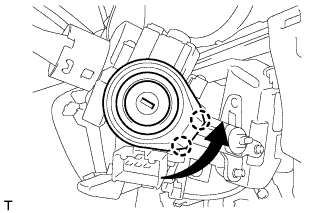
Connect the connector.
-
Turn the key amplifier as shown in the illustration to attach the 2 claws and install the key amplifier.
-
Install the cover with the screw.
-
-
INSTALL UPPER STEERING COLUMN COVER
-
Attach the claw to install the steering column upper cover.
-
Attach the 4 clips to install the steering column upper cover to the instrument cluster finish panel.
-
-
INSTALL LOWER STEERING COLUMN COVER
-
Attach the 2 claws to install the steering column lower cover.
-
Install the 2 screws.
-
-
INSTALL INSTRUMENT CLUSTER FINISH PANEL SUB-ASSEMBLY
-
Connect each connector and each cable.
-
w/o Knee Airbag:
-
Attach the 7 clips to install the lower instrument panel finish panel.
-
-
w/ Knee Airbag:
-
Attach the 14 clips to install the lower instrument panel finish panel.
-
-
Install the 2 bolts <C>.
-
Attach the 2 claws to close the cover.
-
-
INSTALL LOWER INSTRUMENT PANEL FINISH PANEL ASSEMBLY
-
Connect each connector.
-
Attach the 4 clips to install the instrument panel finish panel.
-
-
INSTALL INSTRUMENT CLUSTER FINISH PANEL ORNAMENT (for LHD)
-
Attach the 3 clips to install the instrument cluster finish panel ornament.
-
-
INSTALL INSTRUMENT PANEL FINISH PLATE GARNISH (for RHD)
-
Connect each connector.
-
Attach the 4 clips to install the instrument panel finish plate garnish.
-
-
INSTALL INSTRUMENT SIDE PANEL LH
-
Attach the 5 clips, claw and 3 guides to install the instrument side panel.
-