SIDE MONITOR SYSTEM (w/ Rear View Monitor System) DIAGNOSIS SYSTEM

-
SIDE MONITOR DIAGNOSIS SYSTEM
-
For side monitor system diagnosis, signals received by the parking assist ECU can be checked and the side monitor system can be calibrated, adjusted and checked using the accessory meter assembly.
Note
Depending on the parts that are replaced or operations that are performed during vehicle inspection or maintenance, calibration of other systems as well as the side monitor system may be needed Click here.
Tech Tips
The displayed screens and items may differ depending on vehicle specifications.
-
-
DIAGNOSIS SCREEN TRANSITION
-
w/o Multi-terrain Monitor
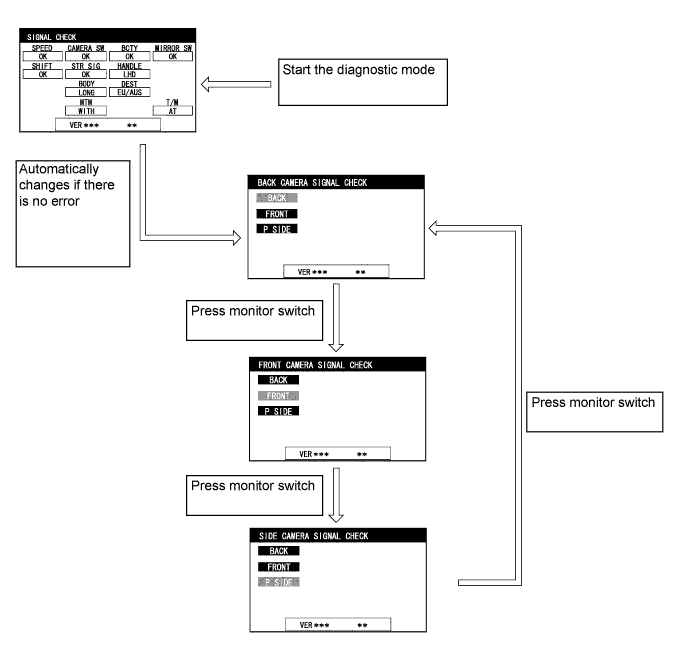
-
w/ Multi-terrain Monitor
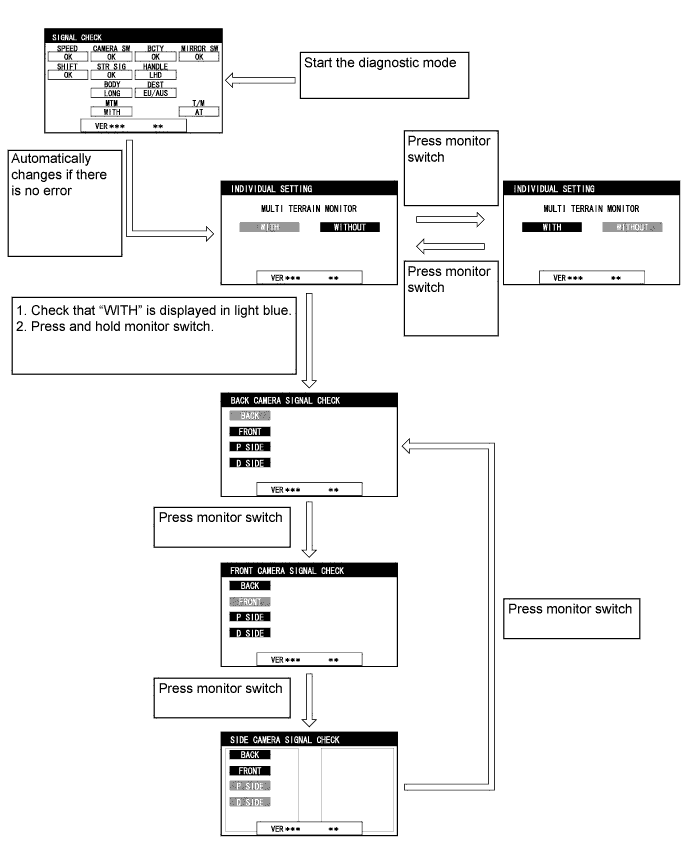
-
-
START DIAGNOSTIC MODE
-
Turn the accessory meter.
-
Retract the outer rear view mirrors.
-
Operate the light control switch within 10 seconds: Off → Turn on → Turn off → Turn on → Turn off → Turn on → Turn off.
-
-
FINISH DIAGNOSTIC MODE
-
There are 2 methods to finish diagnostic mode. Finish the mode by using either of them.
-
Method 1
-
Turn the ignition switch off.
-
-
Method 2
-
Press the MODE switch of the accessory meter assembly.
-
-
-
-
SIGNAL CHECK (parking assist ECU input signal)
-
Start diagnostic mode.
-
SIGNAL CHECK Click here
-
Finish diagnostic mode.
-
-
CALIBRATION WHEN SERVICING VEHICLE
Note
Depending on the parts that are replaced or operations that are performed during vehicle inspection or maintenance, calibration of other systems as well as the side monitor system may be needed Click here.