REAR VIEW MONITOR SYSTEM (w/ Side Monitor System) CALIBRATION

-
ADJUST PARKING ASSIST MONITOR SYSTEM
-
This rear view monitor system can be set from the diagnostic screen of the accessory meter assembly.
-
If the following operations are performed, it is necessary to perform adjustments and checks on the diagnostic screen.
Part Name Operation Adjustment Item Proceed to Parking assist ECU Replacement Parking assist ECU initialization Signal Check Rear television camera assembly
-
Replacement
-
Removal and installation of the rear television camera, etc. resulting in rear television camera installation angle change
Rear television camera position setting Camera Setting (w/o Multi-terrain Monitor)
Camera Setting (w/ Multi-terrain Monitor)
Tech Tips
The adjustment values stored while performing rear view monitor system calibration are stored in the parking assist ECU.
-
-
-
SIGNAL CHECK
-
Start diagnostic mode.
Note
Be sure to perform this procedure while the engine is running. Apply the parking brake, depress the brake pedal, move the shift lever to P and make sure that the vehicle is not moving.
Tech Tips
The displayed items may differ depending on vehicle specifications.
-
Turn on the screen of the accessory meter assembly.
-
Press the retract switch to move the mirrors to the retracted position.
-
Operate the light control switch:
Off → Turn on → Turn off → Turn on → Turn off → Turn on → Turn off.
Tech Tips
If this operation is not completed within 10 seconds of the first time the light control switch is turned on, the mode does not change.
-
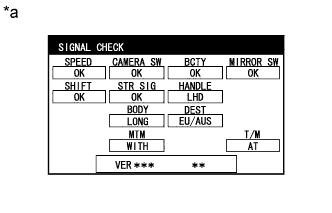
Text in Illustration *a Example The SIGNAL CHECK screen is displayed.
Note
-
When "CHK" (red) is displayed for any items on the SIGNAL CHECK screen, the screen does not change to the next screen.
-
When "CHK" (red) is displayed for any items on the SIGNAL CHECK screen, perform inspections using the SIGNAL CHECK screen Click here.
-
-
-
-
CAMERA SETTING (w/o Multi-terrain Monitor)
-
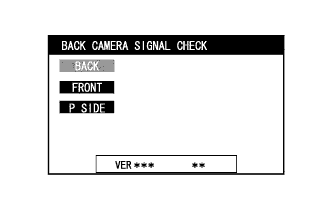
BACK CAMERA SIGNAL CHECK
-
Press the wide view front and side monitor switch on the steering pad switch assembly.
Tech Tips
If there is a camera malfunction, a black screen is displayed.
-
-
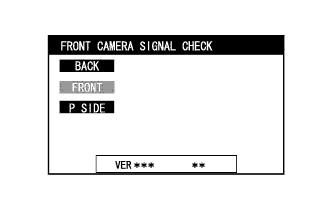
FRONT CAMERA SIGNAL CHECK
-
Press the wide view front and side monitor switch on the steering pad switch assembly.
Tech Tips
If there is a camera malfunction, a black screen is displayed.
-
-
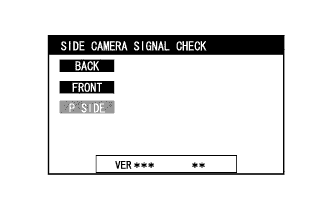
SIDE CAMERA SIGNAL CHECK
-
Press the wide view front and side monitor switch on steering pad switch assembly.
Tech Tips
If there is a camera malfunction, a black screen is displayed.
-
-
Finish diagnostic mode.
Tech Tips
There are 2 methods to finish diagnostic mode. Finish the mode by using either of them.
-
Method 1
-
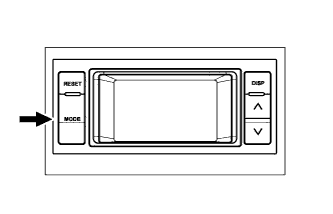
Press the MODE switch of the accessory meter assembly.
-
-
Method 2
-
Turn the ignition switch off.
-
-
Method 2
-
Turn the ignition switch off.
-
-
-
-
CAMERA SETTING (w/ Multi-terrain Monitor)
-
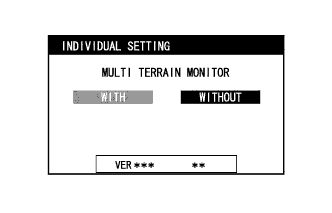
INDIVIDUAL SETTING
-
Check that the multi-terrain monitor has "WITH" selected.
Tech Tips
-
The setting can be changed by pressing and holding the wide view front and side monitor switch while "WITHOUT" is displayed in light blue.
-
If "WITHOUT" is selected, the "MULTI TERRAIN MONITOR" function is disabled.
-
-
Press the wide view front and side monitor switch on the steering pad switch assembly to proceed to the next signal check.
-
-
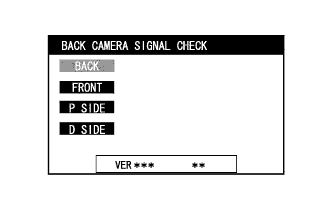
BACK CAMERA SIGNAL CHECK
-
Press the wide view front and side monitor switch on the steering pad switch assembly.
Tech Tips
If there is a camera malfunction, a black screen is displayed.
-
-
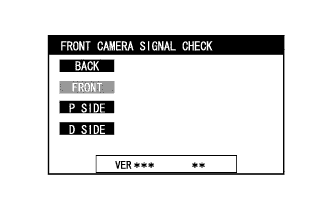
FRONT CAMERA SIGNAL CHECK
-
Press the wide view front and side monitor switch on the steering pad switch assembly.
Tech Tips
If there is a camera malfunction, a black screen is displayed.
-
-
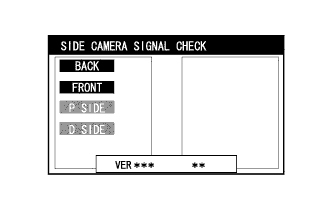
SIDE CAMERA SIGNAL CHECK
-
Press the wide view front and side monitor switch on the steering pad switch assembly.
Tech Tips
If there is a camera malfunction, only the side of the screen with the malfunctioning camera is black.
-
-
Finish diagnostic mode.
Tech Tips
There are 2 methods to finish diagnostic mode. Finish the mode by using either of them.
-
Method 1
-
Press the MODE switch of the accessory meter assembly.
-
-
Method 2
-
Turn the ignition switch off.
-
-
-