NAVIGATION SYSTEM (for HDD) Vehicle Position Mark is not Updated
INSPECTION PROCEDURE
PROCEDURE
-
CHECK HARD DISK DRIVE (OPERATION CHECK)
-
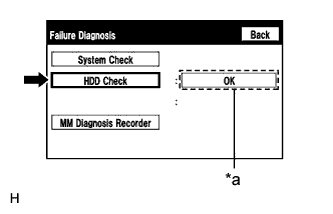
Text in Illustration *a Result Enter the "Failure Diagnosis" screen Click here.
-
Select "HDD Check" and check the result.
OK "OK" is displayed. Tech Tips
After "HDD Check" is selected, it may take a while until the result is displayed.
NG 
REPLACE DISPLAY AND NAVIGATION MODULE DISPLAY Click here
OK 
-
-
CHECK CABIN
-
Check that condensation is not likely to occur in the cabin, and that the temperature is not high or extremely low in the cabin.
Tech Tips
-
A humid cabin and a rapid change in temperature may lead to condensation. Condensation in the cabin may cause a short circuit.
-
The navigation system may not operate normally when the temperature is -20°C (-4°F) or less, or 65°C (149°F) or higher.
OK Condensation is not likely being produced and the temperature is not high or extremely low. -
NG
SET CABIN TO APPROPRIATE TEMPERATURE
OK
-
-
CHECK VEHICLE SENSOR (OPERATION CHECK)
-
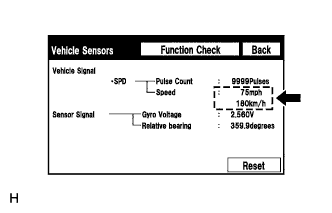
Enter the "Vehicle Sensors" screen Click here.
-
While driving the vehicle, compare the "Speed" indicator to the reading on the speedometer. Check if these readings are almost equal.
OK The readings are almost equal.
NG
CHECK DTC OUTPUT Click here
OK 
PROCEED TO NEXT SUSPECTED AREA SHOWN IN PROBLEM SYMPTOMS TABLE Click here
-