NAVIGATION SYSTEM (for HDD) AVC-LAN Circuit
DESCRIPTION
Each unit of the navigation system connected to the AVC-LAN (communication bus) transfers switch signals by the audio visual communication local area network.
If a short to +B or short to ground occurs in the AVC-LAN, the navigation system does not function normally as communication is stopped.
WIRING DIAGRAM
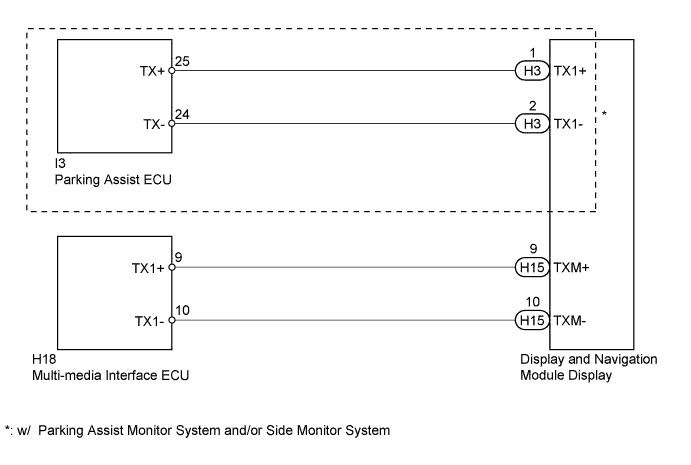
INSPECTION PROCEDURE
Note
The display and navigation module display is the master unit.
PROCEDURE
-
CHECK DISPLAY AND NAVIGATION MODULE DISPLAY
-
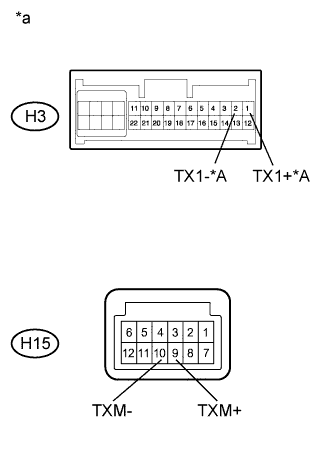
Text in Illustration *A w/ Parking Assist Monitor System and/or Side Monitor System *a Component without harness connected
(Display and Navigation Module Display)
Disconnect the H3 and H15 display and navigation module display connectors.
-
Measure the resistance according to the value(s) in the table below.
Standard Resistance Tester Connection Condition Specified Condition H3-1 (TX1+) - H3-2 (TX1-)* Always 60 to 80 Ω H15-9 (TXM+) - H15-10 (TXM-) Always 60 to 80 Ω
-
*: w/ Parking Assist Monitor System and/or Side Monitor System
-
NG 
REPLACE DISPLAY AND NAVIGATION MODULE DISPLAY Click here
OK 
-
-
CHECK HARNESS AND CONNECTOR (DISPLAY AND NAVIGATION MODULE DISPLAY - WHICH HAS STEREO THIS CODE)
Tech Tips
For details of the connectors, refer to Terminals of ECU Click here.
-
Referring to the AVC-LAN wiring diagram above, check all AVC-LAN circuits.
-
Disconnect all connectors in all AVC-LAN circuits.
-
Check for an open or short in all AVC-LAN circuits.
OK There is no open or short circuit.
-
NG
REPAIR OR REPLACE HARNESS OR CONNECTOR
OK
-
-
INSPECT MALFUNCTIONING PARTS
-
Disconnect and reconnect each slave unit one by one until the master unit returns to normal operation.
Tech Tips
-
Check all slave units.
-
If disconnecting a slave unit causes the master unit to return to normal operation, the slave unit is defective and should be replaced.
OK Master unit returns to normal operation. -
NG
REPLACE DISPLAY AND NAVIGATION MODULE DISPLAY Click here
OK 
REPLACE MALFUNCTIONING PARTS
-