NAVIGATION SYSTEM (for DVD) Voice is not Recognized
INSPECTION PROCEDURE
PROCEDURE
-
CHECK NAVIGATION SETTING
-
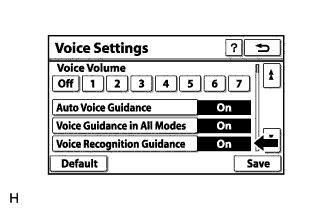
Enter the "Voice Settings" screen.
-
Check that "Voice Recognition Guidance" is not "Off".
OK "Voice Recognition Guidance" is not off.
NG 
TURN "Voice Recognition Guidance" ON
OK 
-
-
CHECK MAP DISC
-
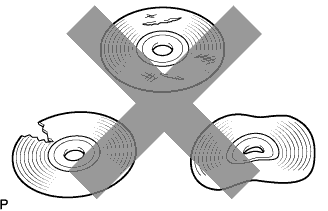
Check that the map disc is not deformed or cracked.
OK No deformations or cracks in the map disc.
NG
REPLACE MAP DISC
OK
-
-
CHECK MAP DISC
-
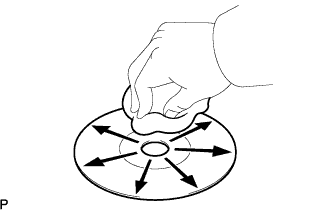
Check for dirt on the map disc surface.
OK No dirt is on the map disc surface. Tech Tips
If the disc is dirty, clean the disc by wiping the disc surface radially with a soft cloth.
Note
Do not use a conventional record cleaner or antistatic preservative.
NG
CLEAN MAP DISC
OK
-
-
CHECK MICROPHONE (OPERATION CHECK)
-
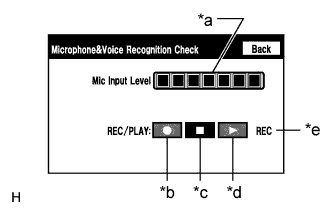
Text in Illustration *a Microphone Input Level Meter *b Recording Switch *c Stop Switch *d Play Switch *e Recording Indicator Enter "Microphone&Voice Recognition Check" (Check Mic & Voice Recognition) Click here.
-
When voice is input into the microphone, check that the microphone input level meter changes according to the input voice.
-
Push the recording switch and perform voice recording.
Tech Tips
-
Select the recording switch with the blower motor of the air conditioning system stopped. If an outlet of the air conditioning system is facing the microphone, noise may be recorded.
-
Voice can be recorded for up to 5 seconds.
-
-
Check that the recording indicator remains on while recording and that the recorded voice is played normally without noise or distortion.
OK All check results are normal.
NG
PROCEED TO NEXT SUSPECTED AREA SHOWN IN PROBLEM SYMPTOMS TABLE Click here
OK 
REPLACE DISPLAY AND NAVIGATION MODULE DISPLAY Click here
-