MULTI-MEDIA INTERFACE ECU INSTALLATION

-
INSTALL NO. 1 MULTI-MEDIA INTERFACE BRACKET
-
Install the No. 1 multi-media interface bracket with the bolt.
-
-
INSTALL NO. 2 MULTI-MEDIA INTERFACE BRACKET
-
Install the No. 2 multi-media interface bracket with the bolt.
-
-
INSTALL MULTI-MEDIA INTERFACE ECU
-
Install the multi-media interface ECU with the 2 nuts.
- Torque:
- 5.5 N*m { 56 kgf*cm, 49 in.*lbf }
-
Connect the 3 connectors.
-
-
INSTALL GLOVE COMPARTMENT DOOR ASSEMBLY
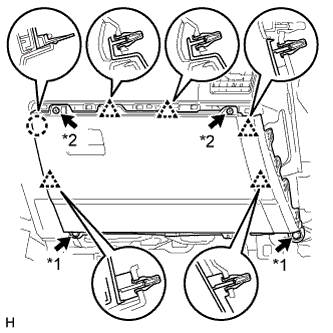
Text in Illustration *1 Bolt *2 Screw
-
Connect each connector.
-
Attach the 5 clips and claw to install the glove compartment door.
-
Install the 2 bolts <C> and 2 screws <A> or <B>.
-
-
INSTALL NO. 2 INSTRUMENT PANEL UNDER COVER SUB-ASSEMBLY
-
Attach the 3 clips and 2 guides to install the No. 2 instrument panel under cover.
-
Install the screw.
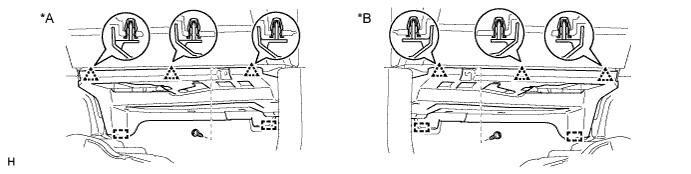
Text in Illustration *A for LHD *B for RHD
-
-
INSTALL INSTRUMENT PANEL ORNAMENT
-
Attach the 5 clips to install the instrument panel ornament.
-
-
INSTALL INSTRUMENT SIDE PANEL RH
-
Connect the connector.
-
Attach the 5 clips, claw and 3 guides to install the instrument side panel.
-
-
CONNECT CABLE TO NEGATIVE BATTERY TERMINAL
Note
When disconnecting the cable, some systems need to be initialized after the cable is reconnected Click here.