TELEVISION DISPLAY INSTALLATION

-
INSTALL TELEVISION DISPLAY BRACKET
-
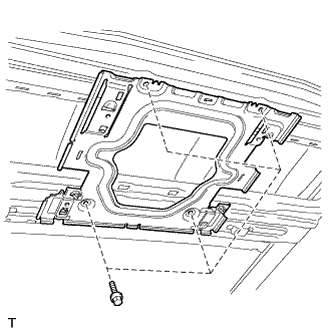
Install the bracket with the 4 bolts.
-
-
INSTALL ROOF HEADLINING ASSEMBLY
-
Install the roof headlining Click here.
-
-
INSTALL TELEVISION DISPLAY ASSEMBLY
-
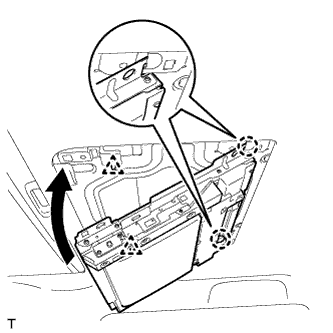
Attach the display to the 2 claws on the front side of the bracket by moving it in the direction of the arrow in the illustration, and then attach the 2 clips to temporarily install the display.
-
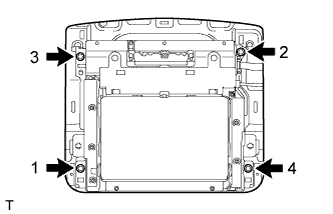
Install the television display with the 4 bolts.
- Torque:
- 8.5 N*m { 87 kgf*cm, 75 in.*lbf }
Tech Tips
Install the bolts in the order shown in the illustration.
-
Connect the connectors.
-
-
INSTALL TELEVISION BASE
-
Attach the 6 claws and 4 clips to install the television base.
-
-
CONNECT CABLE TO NEGATIVE BATTERY TERMINAL
Note
When disconnecting the cable, some systems need to be initialized after the cable is reconnected Click here.