DOWNHILL ASSIST CONTROL SWITCH REMOVAL

-
REMOVE NO. 2 INSTRUMENT PANEL FINISH PANEL CUSHION
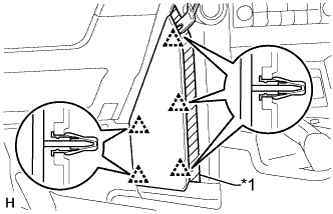
Text in Illustration *1 Protective Tape
-
Put protective tape around the No. 2 instrument panel finish panel cushion.
-
Using a moulding remover, detach the 5 clips and remove the No. 2 instrument panel finish panel cushion.
-
-
REMOVE NO. 1 INSTRUMENT PANEL FINISH PANEL CUSHION
Tech Tips
Use the same procedure described for the No. 2 instrument panel finish panel cushion.
-
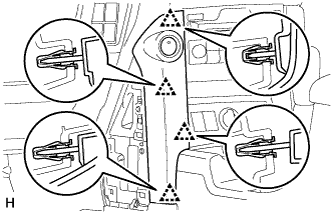
REMOVE INSTRUMENT PANEL FINISH PANEL END LH
-
Detach the 4 clips and remove the instrument panel finish panel end.
-
-
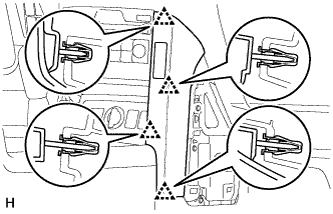
REMOVE INSTRUMENT PANEL FINISH PANEL END RH
-
Detach the 4 clips.
-
Disconnect the connector and remove the instrument panel finish panel end.
-
-
REMOVE FRONT CONSOLE UPPER PANEL GARNISH
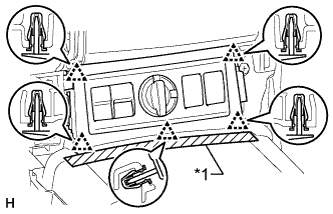
Text in Illustration *1 Protective Tape
-
Put protective tape around the front console upper panel garnish.
-
Detach the 5 clips.
-
Disconnect each connector and remove the front console upper panel garnish.
-
-
REMOVE DOWNHILL ASSIST CONTROL SWITCH
-
Disconnect the connector.
-
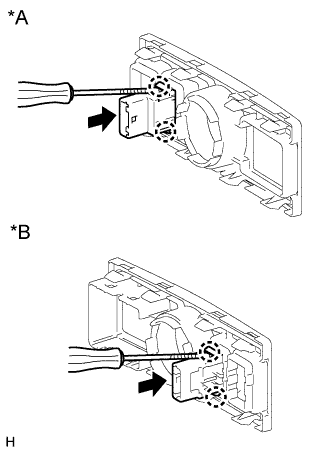
Text in Illustration *A for LHD *B for RHD Using a screwdriver, detach the 2 claws and remove the downhill assist control switch from the front console upper panel garnish.
Tech Tips
Tape the screwdriver tip before use.
-