AIR SUSPENSION SYSTEM DTC CHECK / CLEAR

-
CHECK DTC (When Using Intelligent Tester)
-
Connect the intelligent tester to the DLC3.
-
Turn the ignition switch to ON.
-
Turn the intelligent tester on.
-
Enter the following menus: Chassis / Air suspension / DTC.
-
Read the output DTCs by following the prompts on the intelligent tester screen.
Tech Tips
Refer to the intelligent tester operator's manual for further details.
-
Refer to the Diagnostic Trouble Code Chart for DTC information Click here.
-
-
CHECK DTC (When Using SST Check Wire)
-
Turn the ignition switch off.
-
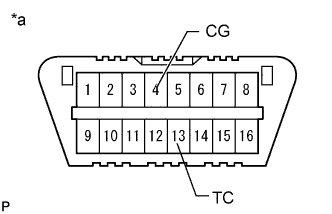
Text in Illustration *a Front view of DLC3 Using SST, connect terminals 13 (TC) and 4 (CG) of the DLC3.
- SST
- 09843-18040
Note
Do not connect the incorrect terminals as this will cause damage.
-
Turn the ignition switch to ON.
-
Read the output DTCs from the multi-information display on the combination meter.
-
Refer to the Diagnostic Trouble Code Chart for DTC information Click here.
-
-
CLEAR DTC (When Using Intelligent Tester)
Tech Tips
After repairing the malfunctions, clear the DTCs.
-
Connect the intelligent tester to the DLC3.
-
Turn the ignition switch to ON.
-
Turn the intelligent tester on.
-
Enter the following menus: Chassis / Air suspension / DTC.
-
Clear the DTCs by following the prompts on the intelligent tester screen.
Tech Tips
Refer to the intelligent tester operator's manual for further details.
-
-
CLEAR DTC (When Using SST Check Wire)
-
Turn the ignition switch off.
-
Text in Illustration *a Front view of DLC3 Using SST, connect terminals 13 (TC) and 4 (CG) of the DLC3.
- SST
- 09843-18040
Note
Do not connect the incorrect terminals as this will cause damage.
-
Turn the ignition switch to ON.
-
Clear the DTCs stored in the ECU by depressing the brake pedal 8 times or more within 5 seconds.
-
Check that no DTCs are output to the multi-information display.
-
Turn the ignition switch off.
-
Remove SST from the terminals of the DLC3.
Note
As data for other systems may be cleared and DTCs may be stored, be sure to check for DTCs.
-