AIR SUSPENSION SYSTEM REGISTRATION

Note
-
CAN communication system must be functioning normally.
-
Make sure that the ECM is the correct type, normally functioning and correctly installed.
Tech Tips
-
If the suspension control ECU is replaced with a new one, perform registration of vehicle identification information.
-
Vehicle identification information is obtained automatically through CAN communication when in test mode.
-
REGISTRATION OF VEHICLE IDENTIFICATION INFORMATION (WHEN USING INTELLIGENT TESTER)
-
Turn the ignition switch off.
-
Connect the intelligent tester to the DLC3.
-
Turn the ignition switch to ON.
-
Turn the intelligent tester on.
-
Enter the following menus: Chassis / Air suspension / Utility / Signal Check.
-
Check the display of the multi-information display and confirm that the system is in test mode.
Tech Tips
-
When the vehicle identification information is stored, the multi-information display indicates that the system is in test mode.
-
When vehicle identification information is not stored, the height control OFF indicator blinks at 1 second intervals (1 second on and 1 second off).
-
-
-
REGISTRATION OF VEHICLE IDENTIFICATION INFORMATION (WHEN USING SST CHECK WIRE)
-
Turn the ignition switch off.
-
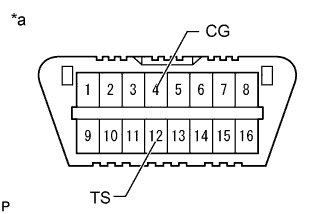
Text in Illustration *a Front view of DLC3 Using SST, connect terminals 12 (TS) and 4 (CG) of the DLC3.
- SST
- 09843-18040
Note
Do not connect the incorrect terminals as this will cause damage.
-
Turn the ignition switch to ON.
-
Check the display of the multi-information display and confirm that the system is in test mode.
Tech Tips
-
When the vehicle identification information is stored, the multi-information display indicates that the system is in test mode.
-
When vehicle identification information is not stored, the height control OFF indicator blinks at 1 second intervals (1 second on and 1 second off).
-
-