WINDSHIELD GLASS INSTALLATION

-
INSTALL NO. 1 WINDSHIELD GLASS STOPPER
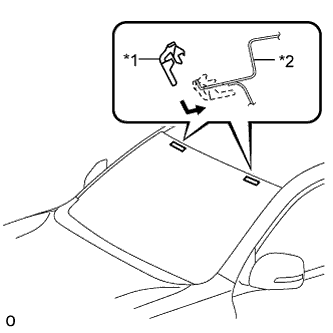
Text in Illustration *1 No. 1 Windshield Glass Stopper *2 Vehicle Body
-
Install 2 new stoppers to the vehicle body as shown in the illustration.
-
-
INSTALL NO. 2 WINDSHIELD GLASS STOPPER
-
Apply Primer G to the glass where the stopper will be installed.
Note
-
Allow the primer to dry for 3 minutes or more.
-
Throw away any leftover primer.
-
Do not apply too much primer.
-
-
Install 2 new stoppers to the glass as shown in the illustration.
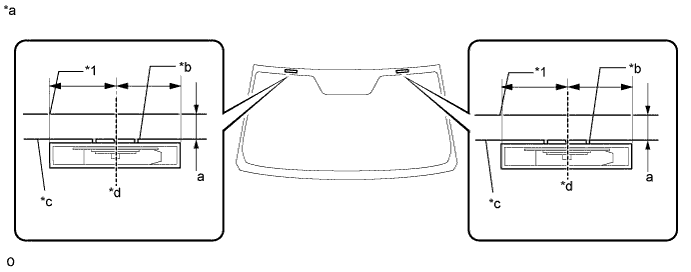
Text in Illustration *1 Windshield Glass - *a Backside *b Ceramic Notch *c Ceramic Line *d Center Standard Area Specified Condition a 14.1 mm (0.555 in.)
-
-
INSTALL WINDSHIELD OUTSIDE MOULDING
-
Using a brush or sponge, coat the contact surface of the glass and moulding with Primer G as shown in the illustration.
Note
-
Allow the primer coating to dry for 3 minutes or more.
-
Do not coat the adhesive with Primer G.
-
Throw away any leftover primer.
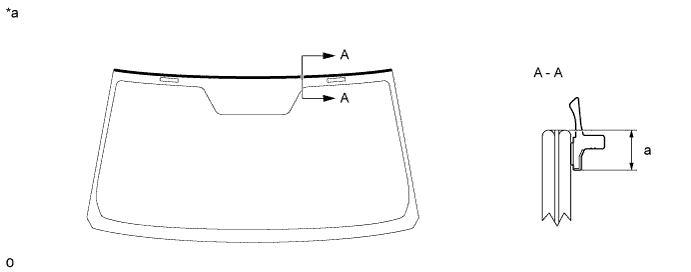
Text in Illustration *a Backside - - Standard Area Specified Condition a 6.9 mm (0.271 in.) -
-
Remove the peeling paper from a new windshield outside moulding and install the moulding as shown in the illustration.
-
-
INSTALL WINDSHIELD GLASS ADHESIVE DAM
-
Apply Primer G to the glass where the new adhesive dam will be installed.
Note
-
Allow the primer to dry for 3 minutes or more.
-
Throw away any leftover primer.
-
Do not apply too much primer.
-
-
Remove the peeling paper from the adhesive part of the dam. Install the dam (adhesive side) to the glass (Primer G area), but exclude the area above the notches on the upper part of the glass.
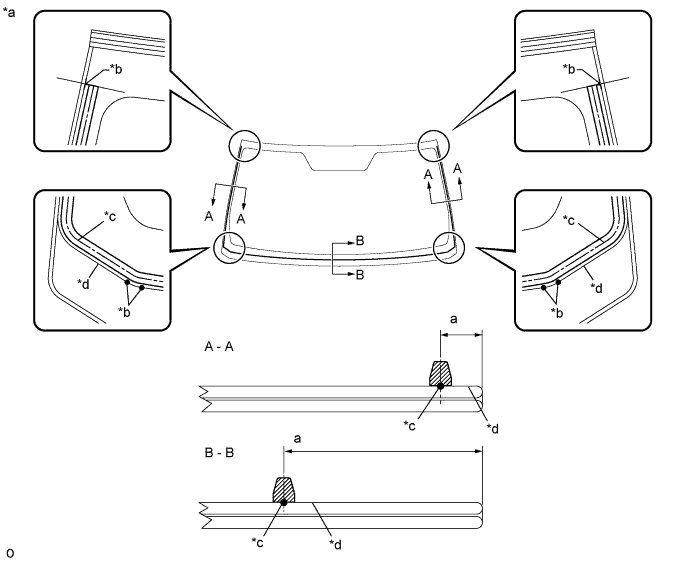
Text in Illustration *a Backside *b Ceramic Notch *c Dam Center Line *d Adhesive Center Line Standard Area Specified Condition a 6.5 mm (0.256 in.)
-
-
INSTALL WINDSHIELD GLASS
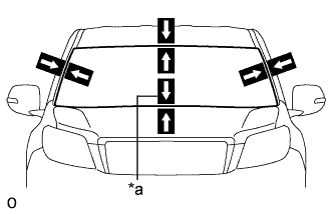
Text in Illustration *a Matchmark
-
Position the glass.
-
Using suction cups, place the glass in the correct position.
-
Check that the entire contact surface of the glass rim is perfectly even.
-
Place matchmarks on the glass and vehicle body at the locations indicated in the illustration.
Tech Tips
-
Placing matchmarks is only necessary when installing new glass. When reusing the glass, matchmarks should already be present.
-
When reusing the glass, check and correct the matchmark positions.
Note
Check that the stoppers are attached to the vehicle body correctly.
-
-
Using suction cups, remove the glass.
-
-
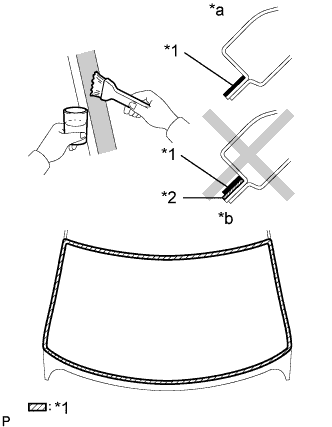
Text in Illustration *1 Primer M *2 Adhesive *a CORRECT *b INCORRECT Using a brush, apply Primer M to the exposed part of the vehicle body.
Note
-
Allow the primer to dry for 3 minutes or more.
-
Do not apply primer to the adhesive.
-
Throw away any leftover primer.
-
Do not apply too much primer.
-
-
Using a brush or sponge, apply Primer G to the contact surface of the glass.
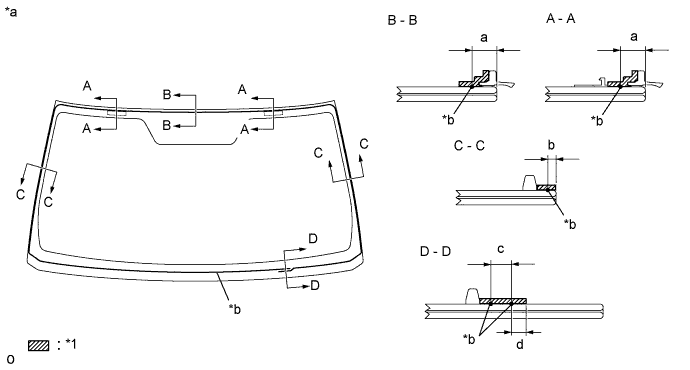
Text in Illustration *a Backside *b Adhesive Center Line Standard Area Specified Condition a 9.5 mm (0.374 in.) b 3.0 mm (0.118 in.) c 8.0 mm (0.315 in.) d 7.0 mm (0.276 in.) Tech Tips
If the primer is applied to an area that is not specified, apply non-residue solvent to a clean cloth and wipe off the excess primer before it dries.
Note
-
Allow the primer to dry for 3 minutes or more.
-
Throw away any leftover primer.
-
Do not apply too much primer.
-
-
Apply adhesive to the glass.
Adhesive Toyota Genuine Windshield Glass Adhesive or equivalent
-
Cut off the tip of a cartridge nozzle as shown in the illustration.
Tech Tips
After cutting off the tip, use all adhesive within the time written in the table below.
Usage Time Frame Temperature Usage Time Frame 35°C (95°F) 15 minutes 20°C (68°F) 1 hour 40 minutes 5°C (41°F) 8 hours -
Load a sealer gun with the cartridge.
-
Apply adhesive to the glass as shown in the illustration.
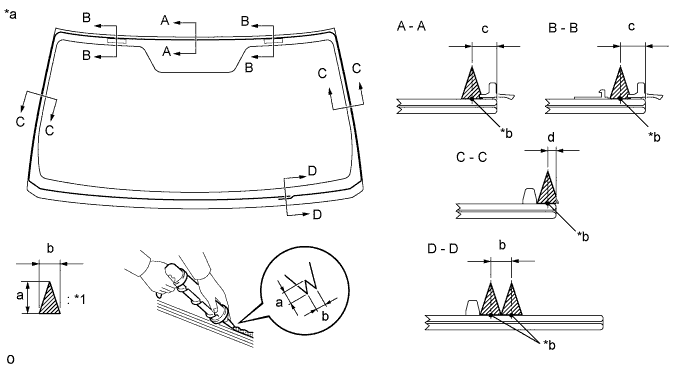
Text in Illustration *1 Adhesive - - *a Backside *b Adhesive Center Line Standard Area Specified Condition a 12.0 mm (0.472 in.) b 8.0 mm (0.315 in.) c 9.5 mm (0.374 in.) d 3.0 mm (0.118 in.)
-
-
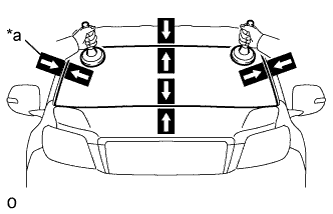
Text in Illustration *a Matchmark Install the glass to the vehicle body.
-
Using suction cups, position the glass so that the matchmarks are aligned. Press it in gently along the rim.
-
Lightly press the outer surface of the glass to ensure that it is securely installed to the vehicle body.
Note
-
Check that the stoppers are attached to the vehicle body correctly.
-
Check that the vehicle body and glass have a small gap between them.
-
-
Hold the glass in place securely with protective tape or equivalent until the adhesive hardens.
Note
Do not drive the vehicle within the time written in the table below.
Minimum Time Temperature Minimum Time Prior to Driving Vehicle 35°C (95°F) 1 hour 30 minutes 20°C (68°F) 5 hours 5°C (41°F) 24 hours
-
-
w/ Windshield Deicer System:
Connect the windshield deicer connector.
-
-
CHECK FOR LEAK AND REPAIR
-
Conduct a leak test after the adhesive has completely hardened.
-
Seal any leaks with auto glass sealer.
-
-
INSTALL ROOF HEADLINING ASSEMBLY
-
for 5 Door:
-
Return the roof headlining to its original position. Refer to the following procedures Click here.
-
-
for 3 Door:
-
Return the roof headlining to its original position. Refer to the following procedures Click here.
-
-
-
INSTALL INNER REAR VIEW MIRROR ASSEMBLY (w/o EC Mirror)
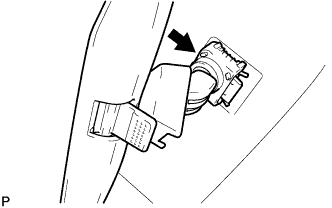
-
Slide and install the inner rear view mirror as shown in the illustration.
-
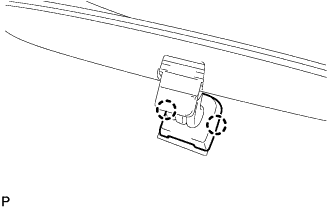
Attach the 2 claws to install the cover.
-
-
INSTALL INNER REAR VIEW MIRROR ASSEMBLY (w/ EC Mirror)
-
Using a T20 "TORX" socket wrench, install the inner rear view mirror with the screw.
-
Connect the connector.
-
-
INSTALL INNER REAR VIEW MIRROR STAY HOLDER COVER (w/ EC Mirror)
-
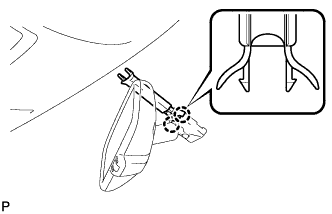
Attach the 2 claws.
-
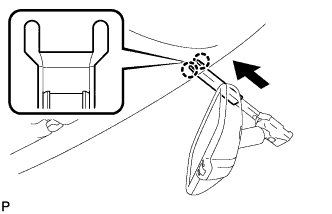
Attach the 2 claws as shown in the illustration to install the inner rear view mirror stay holder cover.
-
-
INSTALL RAIN SENSOR TAPE (w/ Rain Sensor)
Note
The rain sensor tape is reusable. Only replace the tape if it is damaged or contaminated.
-
Clean the rain sensor sensing portion with a piece of cloth, etc.
-
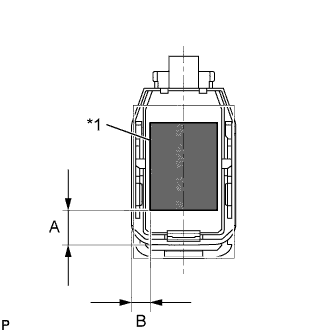
Text in Illustration *1 Rain Sensor Tape Peel off the smaller release sheet, and then attach the rain sensor tape on the rain sensor sensing portion as shown in the illustration.
Standard Area Measurement A 13.5 mm (0.532 in.) B 7.5 mm (0.295 in.) Note
Use your fingers to push out any air bubbles from under the tape.
-
-
INSTALL RAIN SENSOR (w/ Rain Sensor)
-
Clean the windshield glass with a piece of cloth, etc.
Note
-
Make sure that there is no rain sensor tape residue remaining on the windshield glass. If there is, remove the residue.
-
If there is any rain sensor tape residue remaining on the windshield glass, replace the tape.
-
-
When installing a new rain sensor or replacing the rain sensor tape:
-
Peel off the release sheet.
Tech Tips
Do not touch the silicon coated surfaces.
-
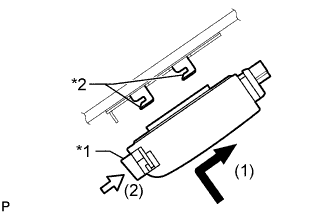
Text in Illustration *1 Stopper *2 Guide Attach the 2 guides, and then carefully install the rain sensor to the glass surface so that there are no air bubbles from forming between the contact surfaces.
Note
Do not touch the silicon coated or glass surfaces.
-
Push in the stopper.
-
Connect the connector.
-
-
-
INSTALL RAIN SENSOR COVER (w/ Rain Sensor)
-
Attach the 2 claws to install the rain sensor cover.
-
-
INSTALL MAP LIGHT ASSEMBLY
-
Connect the connector.
-
Attach the 4 clips to install the map light.
-
-
INSTALL VISOR HOLDER
Tech Tips
Use the same procedure for the other visor holder.
-
Attach the 2 claws.
-
Push in the visor holder to install it.
-
-
INSTALL VISOR ASSEMBLY LH
-
Install the visor with the 2 screws.
-
-
INSTALL VISOR ASSEMBLY RH
Tech Tips
Use the same procedure described for the LH side.
-
INSTALL VISOR BRACKET COVER LH
Tech Tips
Use the same procedure for the other visor bracket cover.
-
Attach the 4 claws to install the visor bracket cover.
-
-
INSTALL VISOR BRACKET COVER RH
Tech Tips
Use the same procedure described for the LH side.
-
INSTALL FRONT PILLAR GARNISH LH
-
Attach the 3 guides to install the front pillar garnish.
-
-
INSTALL FRONT PILLAR GARNISH RH
Tech Tips
Use the same procedure described for the LH side.
-
INSTALL NO. 1 ASSIST GRIP
Tech Tips
Use the same procedure for the other No. 1 assist grip.
-
Attach the 2 claws to install the No. 1 assist grip.
-
Install the 2 bolts.
-
-
INSTALL FRONT NO. 1 ASSIST GRIP PLUG LH
Tech Tips
Use the same procedure for the other front No. 1 assist grip plug.
-
Attach the 2 claws to install the front No. 1 assist grip plug.
-
-
INSTALL FRONT NO. 1 ASSIST GRIP PLUG RH
Tech Tips
Use the same procedure described for the LH side.
-
INSTALL FRONT DOOR OPENING TRIM WEATHERSTRIP LH
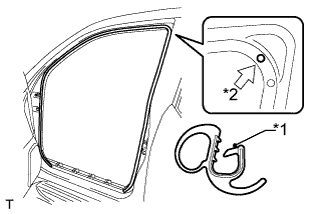
Text in Illustration *1 Paint Mark *2 Mark Position
-
Align the paint mark on the front door opening trim weatherstrip with the mark position on the vehicle and install the front door opening trim weatherstrip as shown in the illustration.
-
-
INSTALL FRONT DOOR OPENING TRIM WEATHERSTRIP RH
Tech Tips
Use the same procedure described for the LH side.
-
INSTALL COWL SIDE TRIM BOARD LH
-
Attach the clip and claw to install the cowl side trim board.
-
Install the clip.
-
-
INSTALL COWL SIDE TRIM BOARD RH
Tech Tips
Use the same procedure described for the LH side.
-
INSTALL DOOR SCUFF PLATE ASSEMBLY LH
-
Attach the 4 clips, 10 claws and 2 guides to install the door scuff plate.
-
-
INSTALL DOOR SCUFF PLATE ASSEMBLY RH
Tech Tips
Use the same procedure described for the LH side.
-
INSTALL NO. 3 WINDSHIELD OUTSIDE MOULDING CLIP
Tech Tips
Perform the following procedures if replacing any No. 3 windshield outside moulding clips.
-
Install a nose piece to an air riveter or hand riveter.
-
Insert the mandrel part of a new No. 3 windshield outside moulding clip into the nose piece.
-
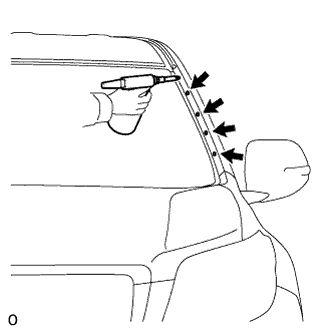
Using the riveter, install the No. 3 windshield outside moulding clips shown in the illustration.
Tech Tips
If the clip cannot be cut, pull it once and cut it.
Note
Do not pry the clip with the riveter as this will cause damage to the riveter and mandrel.
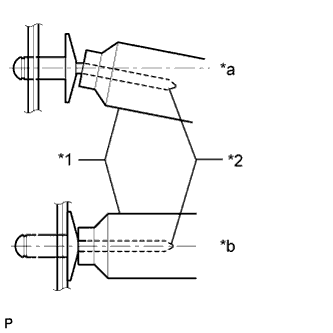
Text in Illustration *1 Riveter *2 Mandrel *a INCORRECT *b CORRECT Note
-
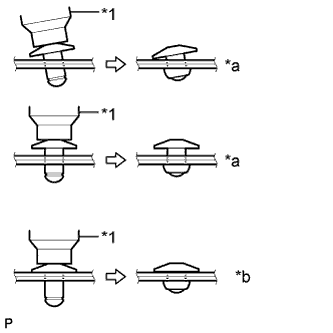
Confirm that the clips are seated properly against the moulding.
-
Do not tilt the riveter when installing the clip to the moulding.
-
Do not leave any space between the clip head and moulding.
Text in Illustration *1 Riveter *a INCORRECT *b CORRECT Note
Do not leave any space between the moulding and body. Firmly hold together the 2 items while installing the clip.
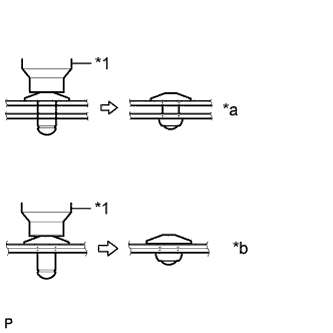
Text in Illustration *1 Riveter *a INCORRECT *b CORRECT -
-
-
INSTALL NO. 1 WINDSHIELD OUTSIDE MOULDING CLIP
-
Install the 5 No. 1 moulding clips.
Tech Tips
Use the same procedure to install the 5 No. 1 moulding clips on the other side.
-
-
INSTALL WINDSHIELD LOWER OUTSIDE MOULDING LH
-
Attach the 5 clips to install a new moulding.
-
Remove the protective tape from the edges of the moulding.
-
-
INSTALL WINDSHIELD LOWER OUTSIDE MOULDING RH
Tech Tips
Use the same procedure described for the LH side.
-
INSTALL COWL TOP VENTILATOR LOUVER SUB-ASSEMBLY
-
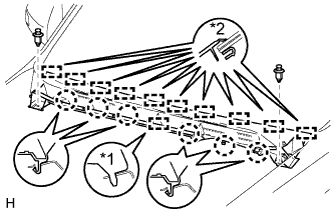
Text in Illustration *1 Guide A *2 Guide B Attach the 10 guides (B).
-
Attach the 6 claws and guide (A) as shown in the illustration.
-
Install the 2 clips to the cowl top ventilator louver sub-assembly.
-
-
INSTALL FRONT WIPER ARM AND BLADE ASSEMBLY RH
-
Operate the wiper and stop the windshield wiper motor at the automatic stop position.
-
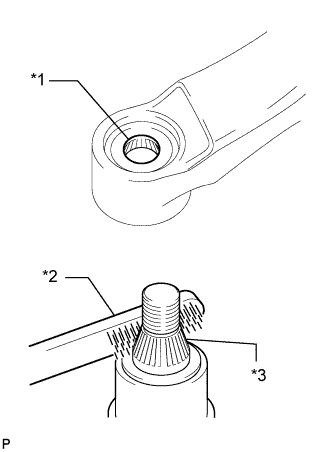
Text in Illustration *1 Wiper Arm Serration *2 Wire Brush *3 Wiper Pivot Serration When reusing the front wiper arm and blade assembly RH:
-
Clean the wiper arm serrations.
-
-
When reusing the windshield wiper link assembly:
-
Clean the wiper pivot serrations with a wire brush.
-
-
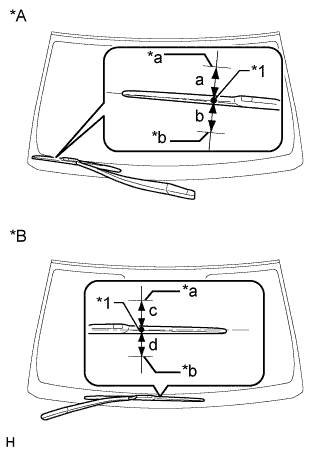
Text in Illustration *A for LHD *B for RHD *1 Ceramic Dot *a Upper Limit *b Lower Limit Install the front wiper arm and blade assembly RH with the nut to the position shown in the illustration.
- Torque:
- 25 N*m { 255 kgf*cm, 18 ft.*lbf }
Standard Area Standard Condition a 7.5 mm (0.295 in.) b 7.5 mm (0.295 in.) c 7.5 mm (0.295 in.) d 7.5 mm (0.295 in.) Tech Tips
-
Hold the wiper arm by hand while tightening the nut.
-
Raise and lower the wiper arm a few times to confirm that it has settled to the specified position.
-
-
INSTALL FRONT WIPER ARM AND BLADE ASSEMBLY LH
-
Text in Illustration *1 Wiper Arm Serration *2 Wire Brush *3 Wiper Pivot Serration When reusing the front wiper arm and blade assembly LH:
-
Clean the wiper arm serrations.
-
-
When reusing the windshield wiper link assembly:
-
Clean the wiper pivot serrations with a wire brush.
-
-
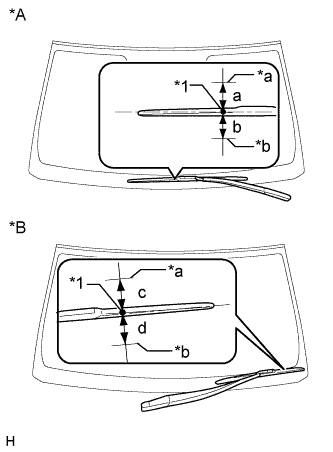
Text in Illustration *A for LHD *B for RHD *1 Ceramic Dot *a Upper Limit *b Lower Limit Install the front wiper arm and blade assembly LH with the nut to the position shown in the illustration.
- Torque:
- 25 N*m { 255 kgf*cm, 18 ft.*lbf }
Standard Area Standard Condition a 7.5 mm (0.295 in.) b 7.5 mm (0.295 in.) c 7.5 mm (0.295 in.) d 7.5 mm (0.295 in.) Tech Tips
-
Hold the wiper arm by hand while tightening the nut.
-
Raise and lower the wiper arm a few times to confirm that it has settled to the specified position.
-
Operate the front wipers while spraying washer fluid on the windshield glass. Make sure that the front wipers function properly and there is no interference with the vehicle body.
-
-
INSTALL WINDSHIELD WIPER ARM COVER
-
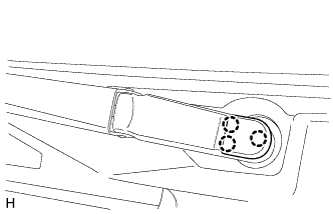
Attach the 3 claws to install the wiper arm cover.
Tech Tips
Use the same procedure described for the LH side.
-
-
INSTALL FRONT FENDER TO COWL SIDE SEAL LH
-
Attach the 5 claws to install the front fender to cowl side seal LH.
-
-
INSTALL FRONT FENDER TO COWL SIDE SEAL RH
Tech Tips
Use the same procedure described for the LH side.
-
INSTALL FRONT FENDER SIDE PANEL PROTECTOR LH
-
Attach the 4 clips and 2 guides to install the fender side panel.
-
-
INSTALL FRONT FENDER SIDE PANEL PROTECTOR RH
Tech Tips
Use the same procedure described for the LH side.
-
INSTALL UPPER RADIATOR SUPPORT SEAL
-
Install the upper radiator support seal with the 13 clips.
-
-
CONNECT CABLE TO NEGATIVE BATTERY TERMINAL
Note
When disconnecting the cable, some systems need to be initialized after the cable is reconnected Click here.