AIR CONDITIONING PANEL DISASSEMBLY

Tech Tips
-
Use the same procedure for RHD and LHD vehicles.
-
The procedure listed below is for LHD vehicles.
-
REMOVE NO. 2 CENTER CLUSTER MODULE CIRCUIT SUB-ASSEMBLY
-
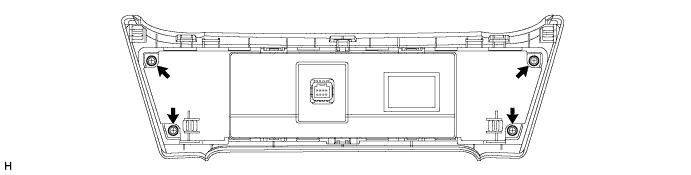
Remove the 4 screws.
-
Using a screwdriver, detach the 4 claws as shown in the illustration.
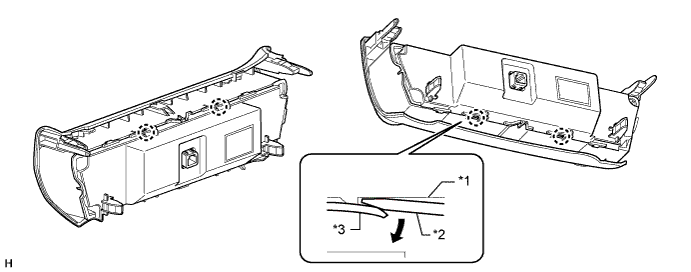
Text in Illustration *1 Rear Air Conditioning Panel Sub-assembly *2 Screwdriver *3 Front Air Conditioning Panel Sub-assembly - - Note
Do not pull the rear air conditioning panel sub-assembly as the flexible ribbon cable is connected to it.
-
Disconnect the connector and remove the rear case with No. 2 center cluster module circuit sub-assembly.
-
Pull back the lock of the connector.
-
Disconnect the flexible ribbon cable.
-
Remove the rear air conditioning panel sub-assembly.
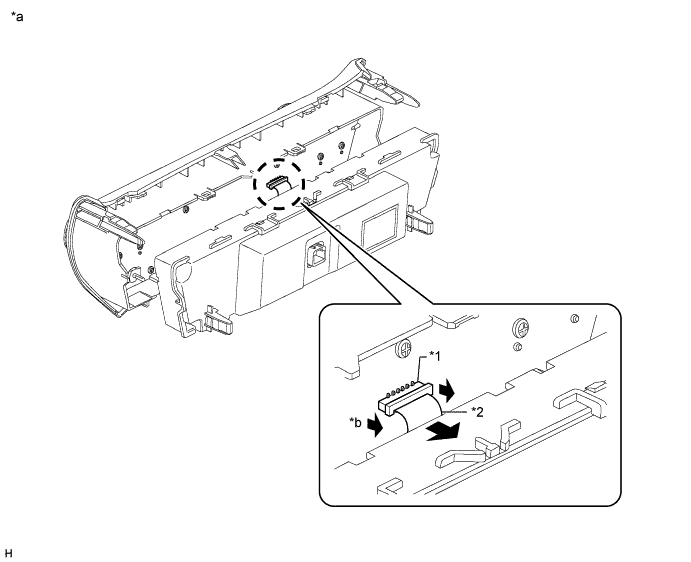
Text in Illustration *1 Connector *2 Flexible Ribbon Cable *a Procedure Necessary to Prevent Electrostatic Discharge *b Pull back lock Note
-
Be sure to disconnect the flexible ribbon cable after pulling back the lock of the connector
-
When disconnecting the connector, do not pull it with excessive force.
-
Do not pull the flexible ribbon cable when it is connected.
-
Do not touch any IC, circuit trace or circuit element without taking measures to prevent electrostatic discharge.
-
-
-
Remove the 3 screws.
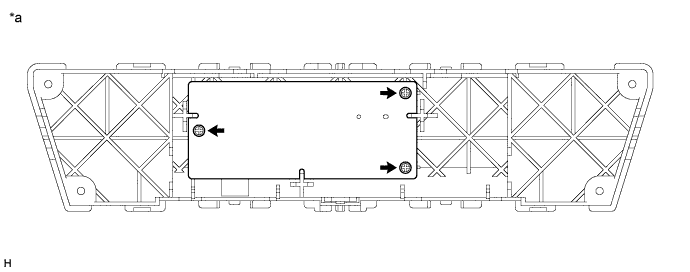
Text in Illustration *a Procedure Necessary to Prevent Electrostatic Discharge - - Note
-
Do not touch any IC, circuit trace or circuit element without taking measures to prevent electrostatic discharge.
-
-
Remove the No. 2 center cluster module circuit sub-assembly.
Note
-
Do not pull the flexible ribbon cable.
-
Do not touch any IC, circuit trace or circuit element without taking measures to prevent electrostatic discharge.
-
-
-
REMOVE CONTROL KNOB SUB-ASSEMBLY
-
for Automatic Air Conditioning System:
Remove the control knob sub-assembly.
-
Remove the 6 screws, front air conditioning panel sub-assembly and switch No. 2 center cluster module circuit sub-assembly with control knob sub-assembly.
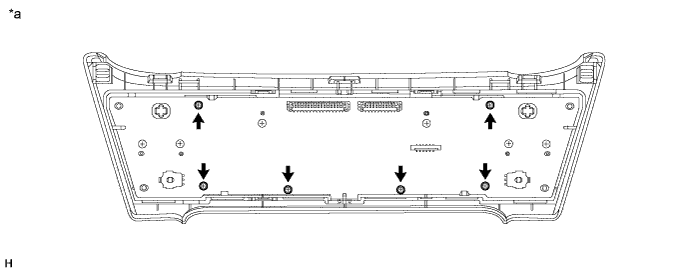
Text in Illustration *a Procedure Necessary to Prevent Electrostatic Discharge - - Note
-
Do not remove any screws except for the 6 indicated by arrows in the illustration.
-
Be sure not to allow skin oils, grease, foreign matter, etc. to adhere to the LCD and be sure not to damage the LCD.
-
Do not touch any IC, circuit trace or circuit element without taking measures to prevent electrostatic discharge.
-
-
Remove the No. 1 center cluster module circuit sub-assembly and control knob sub-assembly.
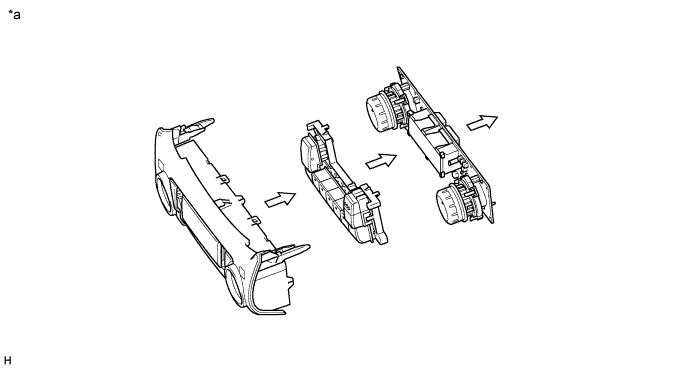
Text in Illustration *a Procedure Necessary to Prevent Electrostatic Discharge - - Note
-
Be sure not to allow skin oils, grease, foreign matter, etc. to adhere to the LCD and be sure not to damage the LCD.
-
Do not apply excessive force to the knobs when removing the knob sub-assembly as the knobs break easily.
-
Do not touch any IC, circuit trace or circuit element without taking measures to prevent electrostatic discharge.
-
-
-
for Manual Air Conditioning System:
Remove the control knob sub-assembly.
-
Remove the 6 screws, front air conditioning panel sub-assembly and No. 1 center cluster module circuit sub-assembly with control knob sub-assembly.
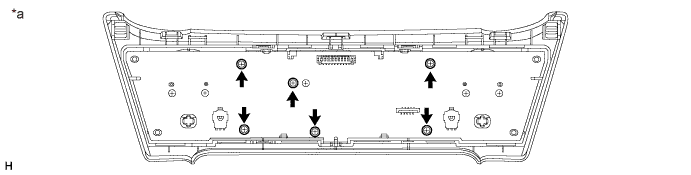
Text in Illustration *a Procedure Necessary to Prevent Electrostatic Discharge - - Note
-
Do not remove any screws except for the 6 indicated by arrows in the illustration.
-
Be sure not to allow skin oils, grease, foreign matter, etc. to adhere to the LCD and be sure not to damage the LCD.
-
Do not touch any IC, circuit trace or circuit element without taking measures to prevent electrostatic discharge.
-
-
Remove the No. 1 center cluster module circuit sub-assembly and the control knob sub-assembly.
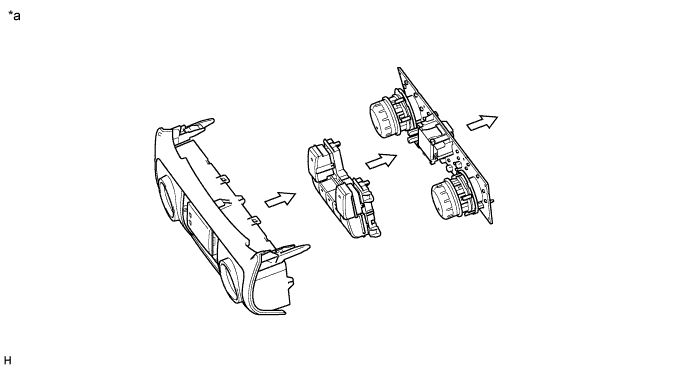
Text in Illustration *a Procedure Necessary to Prevent Electrostatic Discharge - - Note
-
Be sure not to allow skin oils, grease, foreign matter, etc. to adhere to the LCD and be sure not to damage the LCD.
-
Do not apply excessive force to the knobs when removing the knob sub-assembly as the knobs break easily.
-
Do not touch any IC, circuit trace or circuit element without taking measures to prevent electrostatic discharge.
-
-
-