HEADLIGHT CLEANER SWITCH REMOVAL

Tech Tips
-
Use the same procedure for RHD and LHD vehicles.
-
The procedure listed below is for LHD vehicles.
-
REMOVE DOOR SCUFF PLATE ASSEMBLY LH
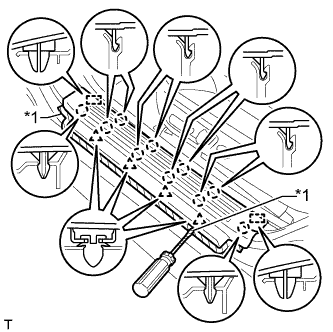
Text in Illustration *1 Protective Tape
-
Put protective tape around the door scuff plate.
-
Using a screwdriver, detach the 4 clips, 10 claws and 2 guides and remove the door scuff plate.
Tech Tips
Tape the screwdriver tip before use.
-
-
REMOVE COWL SIDE TRIM BOARD LH
-
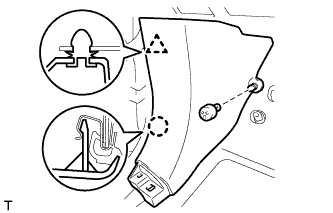
Remove the clip.
-
Detach the clip and claw and remove the cowl side trim board.
-
-
REMOVE NO. 1 INSTRUMENT PANEL UNDER COVER SUB-ASSEMBLY
-
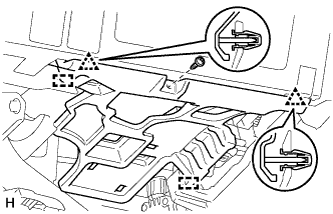
for LHD:
-
Remove the screw.
-
Detach the 2 clips and 2 guides and remove the No. 1 instrument panel under cover.
-
-
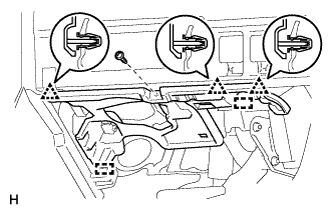
for RHD:
-
Remove the screw.
-
Detach the 3 clips and 2 guides and remove the No. 1 instrument panel under cover.
-
-
-
REMOVE INSTRUMENT SIDE PANEL LH
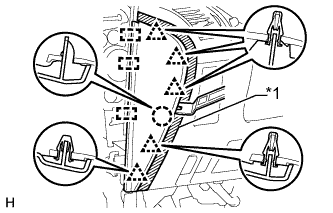
Text in Illustration *1 Protective Tape
-
Put protective tape around the instrument side panel.
-
Using a moulding remover, detach the 5 clips, claw and 3 guides and remove the instrument side panel.
-
-
REMOVE INSTRUMENT CLUSTER FINISH PANEL ORNAMENT (for LHD)
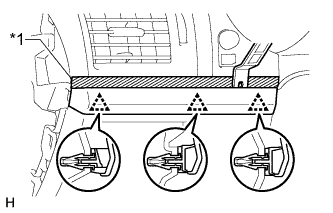
Text in Illustration *1 Protective Tape
-
Put protective tape around the instrument cluster finish panel ornament.
-
Using a moulding remover, detach the 3 clips and remove the instrument cluster finish panel ornament.
-
-
REMOVE LOWER INSTRUMENT PANEL FINISH PANEL ASSEMBLY (for LHD)
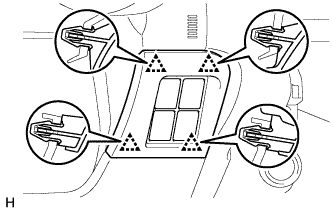
-
Detach the 4 clips.
-
Disconnect each connector and remove the instrument panel finish panel.
-
-
REMOVE INSTRUMENT PANEL FINISH PLATE GARNISH (for RHD)
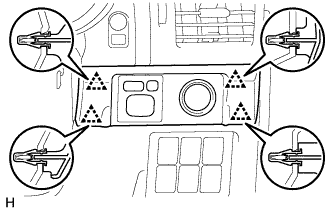
-
Detach the 4 clips.
-
Disconnect each connector and remove the instrument panel finish plate garnish.
-
-
REMOVE LOWER INSTRUMENT PANEL FINISH PANEL SUB-ASSEMBLY
-
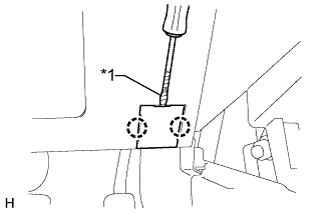
Using a screwdriver, detach the 2 claws and open the cover.
Tech Tips
Tape the screwdriver tip before use.
Text in Illustration *1 Protective Tape -
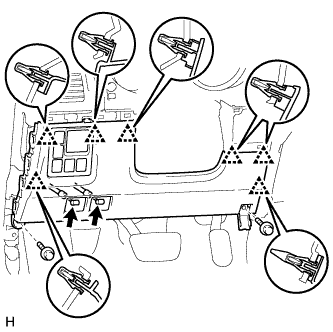
w/o Knee Airbag:
-
Remove the 2 bolts <C>.
-
Detach the 7 clips.
-
Disconnect each connector and each cable and remove the lower instrument panel finish panel.
-
-
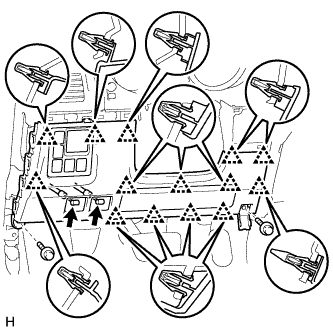
w/ Knee Airbag:
-
Remove the 2 bolts <C>.
-
Detach the 14 clips.
-
Disconnect each connector and each cable and remove the lower instrument panel finish panel.
-
-
-
REMOVE HEADLIGHT CLEANER SWITCH ASSEMBLY (for LHD)
-
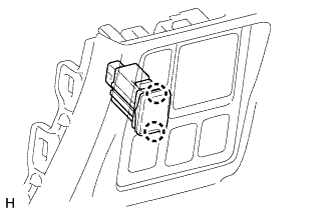
Detach the 2 claws and remove the switch.
-
-
REMOVE HEADLIGHT CLEANER SWITCH ASSEMBLY (for RHD)
-
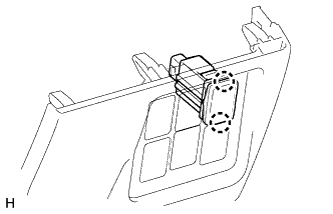
Detach the 2 claws and remove the switch.
-