ENGINE IMMOBILISER SYSTEM (w/ Smart Key System) REGISTRATION

-
DESCRIPTION OF CODE REGISTRATION
Tech Tips
-
Registering an ID code enables the entry and start function, wireless door lock control function and engine immobiliser function to be operated.
-
Code registration is needed when the certification ECU (smart key ECU assembly), steering lock ECU (steering lock actuator assembly) or electrical key transmitter sub-assembly is replaced with a new one.
-
This vehicle does not have a key slot. Therefore, while facing the logo side of the electrical key transmitter sub-assembly towards the engine switch, hold the transmitter near the engine switch as shown in the illustration to register the electrical key transmitter sub-assembly.
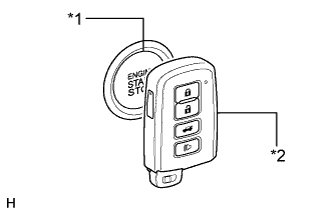
Text in Illustration *1 Engine Switch *2 Electrical Key Transmitter Sub-assembly -
-
KEY REGISTRATION PROCEDURES WHEN ADDING OR REPLACING KEY OR WHEN KEY IS LOST
Tech Tips
-
The following procedures require the use of the Techstream:
-
- New key ID registration
-
- Additional key ID registration
-
- Key ID erasure
-
A maximum of 7 keys can be registered (this includes any keys registered when the vehicle was purchased).
-
In the chart below, the numbers in the "Procedure" column (1, 2, 3, etc.) indicate the step numbers. Perform the steps in numerical order.
Customer Request/Condition Registration Procedure Condition Procedure Refer to Registering additional key Customer must bring at least 1 key 1. Register additional keys as necessary (additional key ID registration) PROCEDURE "C" -
Replacing a key (e.g., when replacing an old key with a new one)
-
Making a lost key unusable
Note
If the customer brings at least 1 key, it is possible to perform these procedures. However, if any additional keys are registered before reregistering the customer's keys, the customer's keys cannot be reregistered and become unusable. Therefore, if the customer does not bring all of their keys, be sure to explain to them that any keys not brought will become unusable after additional keys are registered.
Tech Tips
After key ID erasure, any remaining keys that are not reregistered at this time cannot be used. Therefore, immediately after key ID erasure, be sure to reregister all available remaining keys.
Customer must bring at least 1 key 1. Using remaining key, clear all registered keys except one (key ID erasure) PROCEDURE "D" 2. Register additional keys as necessary (additional key ID registration) PROCEDURE "C" All keys are lost - 1. Reset all keys (all keys ID erasure (key code reset)) PROCEDURE "E" 2. Register all keys (new key ID registration) PROCEDURE "A" -
-
PART REPLACEMENT AND KEY REGISTRATION PROCEDURES
-
If a malfunctioning ECU is discovered through troubleshooting of the smart key system, use the ECU replacement and key registration procedures in the table below.
Tech Tips
-
The following procedures require the use of the Techstream:
-
- New key ID registration
-
- Additional key ID registration
-
- Key ID erasure
-
- ECU code registration
-
A maximum of 7 keys can be registered (this includes any keys registered when the vehicle was purchased).
-
In the chart below, the numbers in the "Procedure" column (1, 2, 3, etc.) indicate the step numbers. Perform the steps in numerical order.
Malfunctioning ECU Condition Procedure Refer to Certification ECU (smart key ECU assembly) Customer has brought all keys 1. Replace certification ECU (smart key ECU assembly) - 2. Reregister all customer's keys PROCEDURE "B"*1 3. ECU communication ID registration PROCEDURE "G"*1 4. Remote engine starter ID registration*2 Some keys are lost Key ID codes can be registered and cleared 1. Clear key codes (key ID erasure) PROCEDURE "D" 2. Perform additional key registration procedure (additional key ID registration)
Tech Tips
If some keys are not registered during above step, they will be disabled because they cannot be registered later.
PROCEDURE "C"*1 3. Replace certification ECU (smart key ECU assembly) - 4. Reregister all keys PROCEDURE "B" 5. ECU communication ID registration PROCEDURE "G" 6. Remote engine starter ID registration*2 Key ID codes cannot be either registered or cleared 1. Replace certification ECU (smart key ECU assembly) - 2. Replace steering lock ECU (steering lock actuator assembly) - 3. Reregister all keys (new key ID registration)
Tech Tips
If some keys are not registered during above step, they will be disabled because they cannot be registered later.
PROCEDURE "A" 4. ECU communication ID registration PROCEDURE "G" 5. Remote engine starter ID registration*2 Certification ECU (smart key ECU assembly) All keys are lost 1. Replace certification ECU (smart key ECU assembly) - 2. Replace steering lock ECU (steering lock actuator assembly) - 3. Register all keys (new key ID registration) PROCEDURE "A" 4. ECU communication ID registration PROCEDURE "G" 5. Remote engine starter ID registration*2 Steering lock ECU (steering lock actuator assembly) Customer has brought at least 1 key 1. Replace steering lock ECU (steering lock actuator assembly) - 2. Register recognition codes in ECUs (ECU code registration) PROCEDURE "F" All keys are lost 1. Replace certification ECU (smart key ECU assembly) - 2. Replace steering lock ECU (steering lock actuator assembly) - 3. Register all keys (new key ID registration) PROCEDURE "A" 4. ECU communication ID registration PROCEDURE "G" 5. Remote engine starter ID registration*2 -
*1 : It is only necessary to perform processes 1 through 3.
-
*2 : w/ Remote Engine Starter System
-
-
-
KEY REGISTRATION (PROCEDURE "A")
-
New key ID registration:
Tech Tips
In the chart below, the numbers in the "Procedure" column (1, 2, 3, etc.) indicate the step numbers. Perform the steps in numerical order.
Process Procedure 1. Start of registration -
Prepare all new keys to be registered and place them outside vehicle. Bring 1 new key inside vehicle.
-
Connect Techstream to DLC3
-
While holding new key, turn engine switch on (IG)
Tech Tips
Engine switch cannot be turned on (IG) more than 10 times. To continue key registration procedure with engine switch off, use either method below:
-
Connect Techstream to DLC3 and turn courtesy light switch on and off at interval of 1.5 seconds until communication between Techstream and vehicle begins (Techstream screen changes when communication begins).
-
Connect Techstream to DLC3 and select "Manual" from initial screen on Techstream. Then select "Key Code Registration" under model code.
-
-
Turn Techstream on
-
Enter following menus: Smart Key / Utility / Smart Code Registration
2. Confirmation of ECU code -
Perform operation according to prompts on Techstream screen
Tech Tips
Mode is automatically selected by Techstream (new registration mode or add mode)
3. Verification of unregistered key* -
While facing logo side of unregistered transmitter toward engine switch, hold transmitter near engine switch.
-
Confirm that wireless door lock buzzer sounds twice (short beep)
-
Bring key for which operations have been completed outside vehicle. Then bring another new key for which operations are to be performed into vehicle.
4. Registration of ID code -
Perform operation according to prompts on Techstream screen
5. End of registration -
Finish new key ID code registration
-
*: Repeat this process for each key which is to be registered to the vehicle. Finish the procedure for each key within 30 seconds. If the procedure for any of the keys is not finished within the specified time, perform the registration from process 1 again.
-
If "Smart Key System" is canceled, registration cannot be performed Click here.
-
-
-
KEY REGISTRATION (PROCEDURE "B")
-
New key ID registration:
Tech Tips
In the chart below, the numbers in the "Procedure" column (1, 2, 3, etc.) indicate the step numbers. Perform the steps in numerical order.
Process Procedure 1. Start of registration -
Prepare all registered keys and any keys to be registered and place them outside vehicle. Bring 1 registered key inside vehicle.
-
Connect Techstream to DLC3
-
While holding registered key, turn engine switch on (IG)
Tech Tips
Engine switch cannot be turned on (IG) more than 10 times. To continue key registration procedure with engine switch off, use either method below:
-
Connect Techstream to DLC3 and turn courtesy light switch on and off at interval of 1.5 seconds until communication between Techstream and vehicle begins (Techstream screen changes when communication begins).
-
Connect Techstream to DLC3 and select "Manual" from initial screen on Techstream. Then select "Key Code Registration" under model code.
-
-
Turn Techstream on
-
Enter following menus: Smart Key / Utility / Smart Code Registration
2. Confirmation of ECU code -
Perform operation according to prompts on Techstream screen
Tech Tips
Mode is automatically selected by Techstream (new registration mode or add mode)
3. Confirmation of all registered keys*1 -
While facing logo side of registered transmitter toward engine switch, hold transmitter near engine switch.
-
Confirm that wireless door lock buzzer sounds once (short beep)
-
Bring key for which operations have been completed outside vehicle. Then bring another key for which operations are to be performed into vehicle.
4. Confirmation of ECU code -
Perform operation according to prompts on Techstream screen
5. Verification of unregistered key*2 -
While facing logo side of unregistered transmitter toward engine switch, hold transmitter near engine switch.
-
Confirm that wireless door lock buzzer sounds twice (short beep)
-
Bring key for which operations have been completed outside vehicle. Then bring another key for which operations are to be performed into vehicle.
6. Registration of ID code -
Perform operation according to prompts on Techstream screen
7. End of registration -
Finish new key ID code registration
-
*1: Repeat this process for each key registered to the vehicle. Finish the procedure for each key within 30 seconds. If the procedure for any of the keys is not finished within the specified time, perform the registration from process 1 again. When performing the key confirmation procedure for a key, the security indicator light comes on and remains on until all the keys are confirmed.
-
*2: Repeat this process for each key which is to be registered to the vehicle. Finish the procedure for each key within 30 seconds. If the procedure for any of the keys is not finished within the specified time, perform the registration from process 1 again.
-
If "Smart Key System" is canceled, registration cannot be performed Click here.
-
-
-
KEY REGISTRATION (PROCEDURE "C")
-
Additional key ID registration:
Tech Tips
In the chart below, the numbers in the "Procedure" column (1, 2, 3, etc.) indicate the step numbers. Perform the steps in numerical order.
Process Procedure 1. Start of registration -
Prepare all keys to be registered and place them outside vehicle. Then bring 1 registered key into vehicle.
-
Connect Techstream to DLC3
-
While holding registered key, turn engine switch on (IG)
-
Turn Techstream on
-
Enter following menus: Smart Key / Utility / Smart Code Registration
2. Confirmation of registered key*1 -
Perform operation according to prompts on Techstream screen
-
While facing logo side of registered transmitter toward engine switch, hold transmitter near engine switch.
-
Confirm that wireless door lock buzzer sounds once (short beep)
3. Confirmation of ECU code -
Perform operation according to prompts on Techstream screen
4. Verification of unregistered key*2 -
While facing logo side of unregistered transmitter toward engine switch, hold transmitter near engine switch.
-
Confirm that wireless door lock buzzer sounds twice (short beep)
5. Registration of ID code -
Perform operation according to prompts on Techstream screen
6. End of registration -
Finish key ID code registration
-
*1: Perform this process for one of the keys registered to the vehicle. Finish the procedure within 30 seconds. If the procedure is not finished within the specified time, perform the registration from process 1 again.
-
*2: Repeat this process for each key which is to be registered to the vehicle. Finish the procedure for each key within 30 seconds. If the procedure for any of the keys is not finished within the specified time, perform the registration from process 1 again.
-
If "Smart Key System" is canceled, registration cannot be performed Click here.
-
-
-
KEY REGISTRATION (PROCEDURE "D")
-
Key ID erasure:
Tech Tips
-
This procedure clears all the registered key codes except one master key code.
-
In the chart below, the numbers in the "Procedure" column (1, 2, 3, etc.) indicate the step numbers. Perform the steps in numerical order.
Process Procedure 1. Start of erasure -
Connect Techstream to DLC3
-
While holding registered key, turn engine switch on (IG)
-
Turn Techstream on
-
Enter following menus: Smart Key / Utility / Smart Code Erasure
2. Confirmation of registered key* -
Perform operation according to prompts on Techstream screen
-
While facing logo side of registered transmitter toward engine switch, hold transmitter near engine switch.
-
Confirm that wireless door lock buzzer sounds once (short beep)
3. Confirmation of ECU code -
Perform operation according to prompts on Techstream screen
4. Erasure of ID code -
Perform operation according to prompts on Techstream screen
5. End of erasure -
Finish key ID code erasure
-
*: Perform this process for one of the keys registered to the vehicle. Finish the procedure within 30 seconds. If the procedure is not finished within the specified time, perform the erasure from process 1 again.
-
If "Smart Key System" is canceled, registration cannot be performed Click here.
-
-
-
KEY REGISTRATION (PROCEDURE "E")
-
All keys ID erasure:
Tech Tips
In the chart below, the numbers in the "Procedure" column (1, 2, 3, etc.) indicate the step numbers. Perform the steps in numerical order.
Process Procedure 1. Start of erasure -
Connect Techstream to DLC3
-
While holding registered key, turn engine switch on (IG)
-
Turn Techstream on
-
Enter following menus: Smart Key / Utility / Smart Code Reset
-
Read "Seed Number" sent from TIS according to Techstream screen
-
Input "Pass-Code Number" sent from TIS according to Techstream screen
2. Confirmation of ECU code -
Perform operation according to prompts on Techstream screen
3. Erasure of ID code -
Perform operation according to prompts on Techstream screen
-
Wait for 15 minutes
4. End of erasure -
Finish key ID code erasure
-
If "Smart Key System" is canceled, registration cannot be performed Click here.
-
-
-
KEY REGISTRATION (PROCEDURE "F")
-
ECU code registration:
Tech Tips
In the chart below, the numbers in the "Procedure" column (1, 2, 3, etc.) indicate the step numbers. Perform the steps in numerical order.
Process Procedure 1. Start of registration -
Connect Techstream to DLC3
-
While holding registered key, turn engine switch on (IG)
Tech Tips
Engine switch cannot be turned on (IG) more than 10 times. To continue key registration procedure with engine switch off, use either method below:
-
Connect Techstream to DLC3 and turn courtesy light switch on and off at interval of 1.5 seconds or less until communication between Techstream and vehicle begins (Techstream screen changes when communication begins).
-
Connect Techstream to DLC3 and select "Manual" from initial screen on Techstream. Then select "Key Code Registration" under model code.
-
-
Turn Techstream on
-
Enter following menus: Smart Key / Utility / ECU Communication ID Registration / ID code box and Steering Lock
2. Confirmation of registered key* -
While facing logo side of registered transmitter toward engine switch, hold transmitter near engine switch.
-
Confirm that wireless door lock buzzer sounds once (short beep)
3. Erasure of ECU code -
Perform operation according to prompts on Techstream screen
4. End of registration -
Finish ECU code registration
-
*: Perform this process for one of the keys registered to the vehicle. Finish the procedure within 30 seconds. If the procedure is not finished within the specified time, perform the registration from process 1 again.
-
If "Smart Key System" is canceled, registration cannot be performed Click here.
-
If there are any electronic devices near the driver seat which may cause wave interference, such as cell phones, personal computers, portable music players, other electrical key transmitter sub-assemblies, etc., turn them off or move them away from the driver seat.
-
-
-
KEY REGISTRATION (PROCEDURE "G")
- SST
- 09843-18040
-
ECU communication ID registration:
Note
-
The ECU communication ID should be registered when the certification ECU (smart key ECU assembly) is replaced in order for the ECU communication ID to match.
-
The engine cannot be started unless the ECU communication ID is registered.
-
After registration, pressing the engine switch may not start the engine on the first try. If so, press the engine switch again.
-
After the engine is started, clear DTC B2799 (code for ECM immobiliser communication error) using either of the following methods:
- Use the Techstream.
- Disconnect the cable from the negative (-) battery terminal for 30 seconds.
-
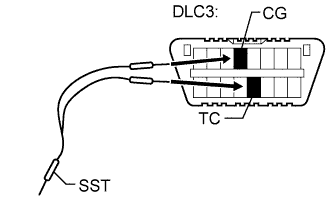
Using SST, connect terminals 13 (TC) and 4 (CG) of the DLC3.
-
Turn the engine switch on (IG) (do not start the engine) and leave it as is for 30 minutes.
-
Turn the engine switch off and disconnect terminals 13 (TC) and 4 (CG).
-
Check that the engine starts and stays on for more than 3 seconds.
-