INTUITIVE PARKING ASSIST SYSTEM OPERATION CHECK

-
MALFUNCTION DISPLAY (MULTI-INFORMATION DISPLAY)
-
Open circuit indication
-
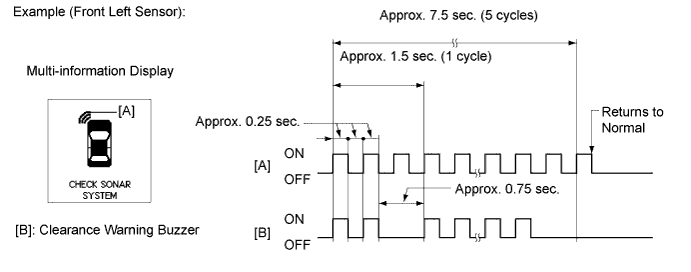
If there is an open circuit between the ultrasonic sensor and the clearance warning ECU assembly or a sensor is malfunctioning, the malfunction is displayed as shown in the illustration.
Tech Tips
-
The example shows an open circuit in the ultrasonic sensor (front left sensor).
-
If a sensor has an open circuit, check for DTCs and troubleshoot according to each inspection procedure Click here.
-
-
-
Frozen indication
-
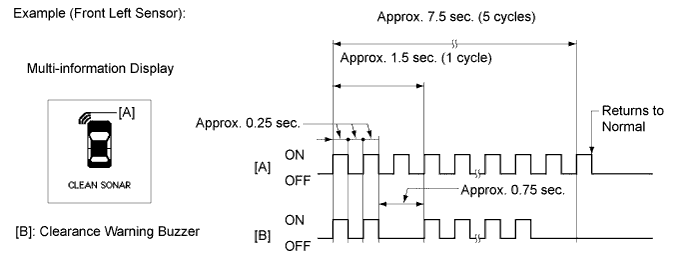
If a sensor is covered with foreign matter, such as mud or snow, the affected sensor is displayed as shown in the illustration.
Tech Tips
-
The example shows that the ultrasonic sensor (front left sensor) is covered with foreign matter.
-
If "CLEAN SONAR" is displayed, refer to "Frozen indication is displayed in self-check function" on Problem Symptoms Table to inspect it Click here.
-
-
-
-
DETECTION RANGE MEASUREMENT AND DISPLAY INSPECTION
-
Detection range measurement:
Note
Make sure that the vehicle does not move by applying the parking brake firmly.
-
Turn the engine switch on (IG).
-
Move the shift lever to R to check the ultrasonic sensors.
-
-
Turn the clearance sonar main switch on.
-
Move a 60 mm (2.36 in.) diameter pole near each sensor to measure its detection range.
Note
These detection ranges are applicable when positioning the 60 mm (2.36 in.) diameter pole parallel or perpendicular to the ground. The detection range varies depending on the measuring method and type of obstacle (such as walls).
Tech Tips
Have an assistant move the pole.
-
Clearance Sonar
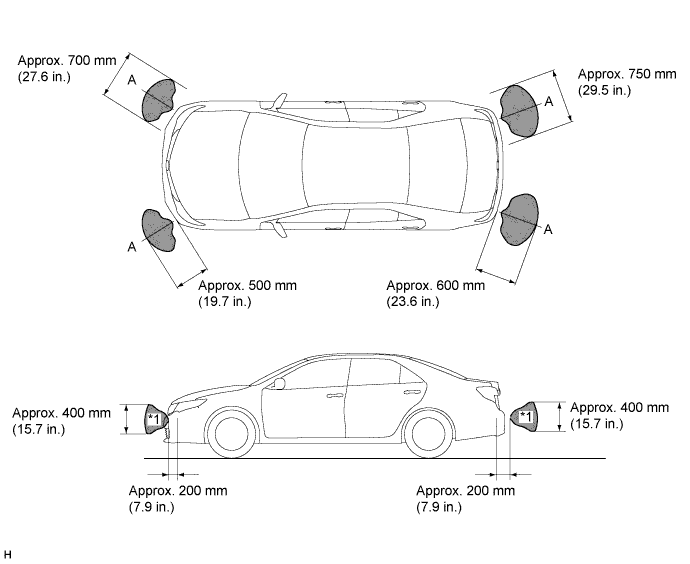
Text in Illustration 
Hatched Area - - Note
The No. 1 ultrasonic sensor side view detection range hatched area (labeled *1) represents the cross section of the top view of the lines of detection range A. The hatched area *1 does not represent the entire side view detection range.
-
Back Sonar
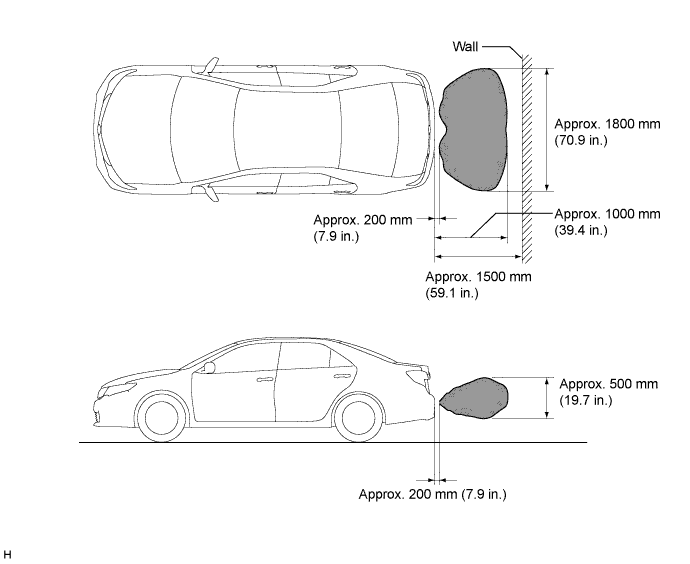
Text in Illustration Hatched Area - -
-
-
When the ultrasonic sensors (front corner sonar) have detected an obstacle, check the displays and check that the buzzer sounds.
Operation Condition Engine Switch Clearance Sonar Main Switch Shift Lever Position Vehicle Speed On (IG) On In any position other than P -
Less than approximately 13 km/h (8.1 mph) if speed is increasing
-
Less than approximately 9 km/h (5.6 mph) if speed is decreasing
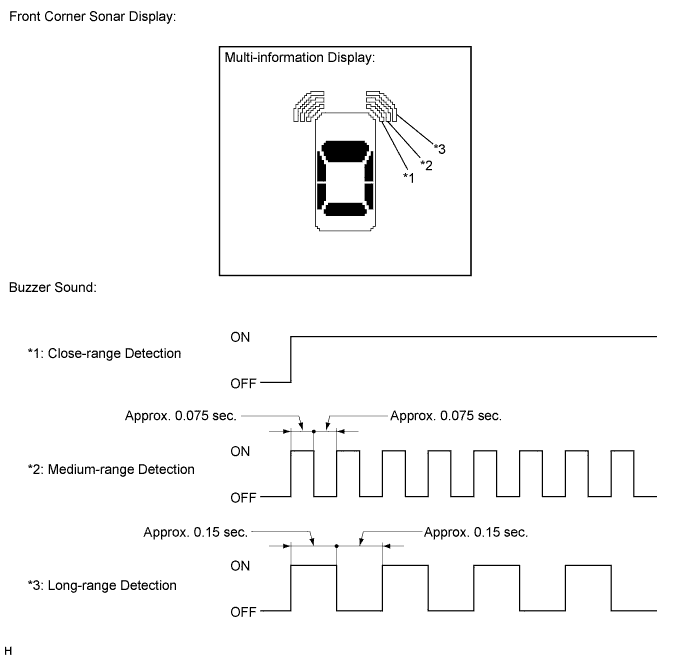
Tech Tips
Ultrasonic waves are used to measure the detection range; however, the detection range may vary depending on the ambient temperature.
-
-
When the ultrasonic sensors (rear corner sonar) have detected an obstacle, check the displays and check that the buzzer sounds.
Operation Condition Engine Switch Clearance Sonar Main Switch Shift Lever Position Vehicle Speed On (IG) On R - 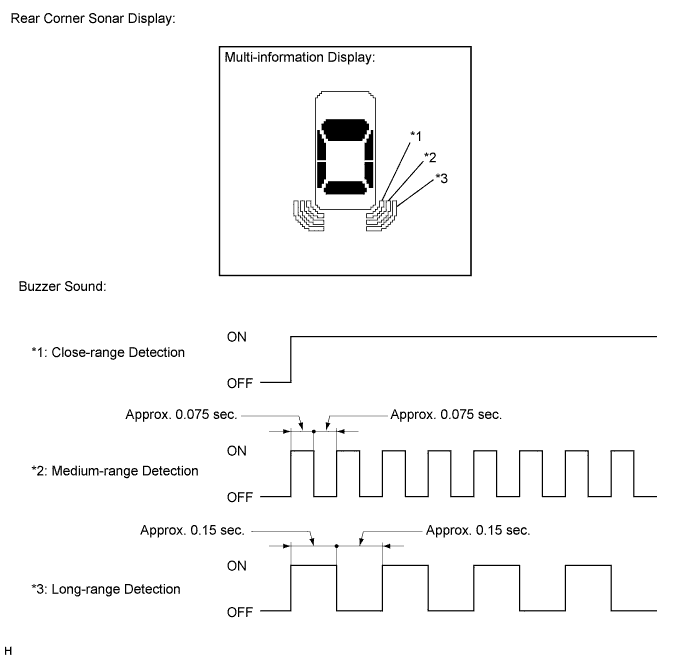
Tech Tips
Ultrasonic waves are used to measure the detection range; however, the detection range may vary depending on the ambient temperature.
-
When the ultrasonic sensors (back sonar) have detected an obstacle, check the displays and check that the buzzer sounds.
Operation Condition Engine Switch Clearance Sonar Main Switch Shift Lever Position Vehicle Speed On (IG) On R - 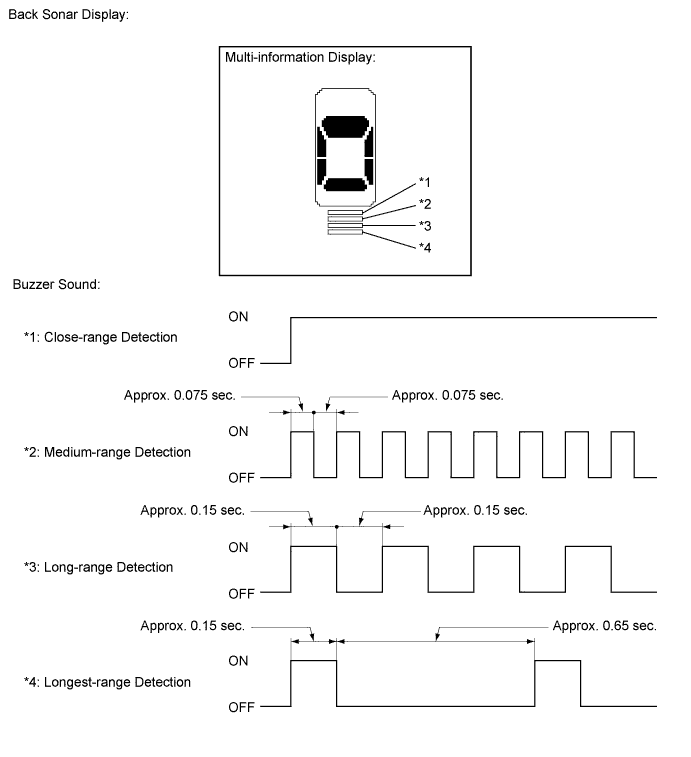
Tech Tips
Ultrasonic waves are used to measure the detection range; however, the detection range may vary depending on the ambient temperature.
-