NAVIGATION SYSTEM (for Navigation Receiver Type) Satellite Radio Broadcast cannot be Received
INSPECTION PROCEDURE
Note
-
Some satellite radio broadcasts require payment. A contract must be made between a satellite radio company and the user. If the contract expires, it will not be possible to listen to the broadcast.
-
After replacing the navigation ECU sub-assembly of vehicles subscribed to pay-type satellite radio broadcasts, registration of the XM radio ID is necessary.
PROCEDURE
-
CHECK SURROUNDINGS
-
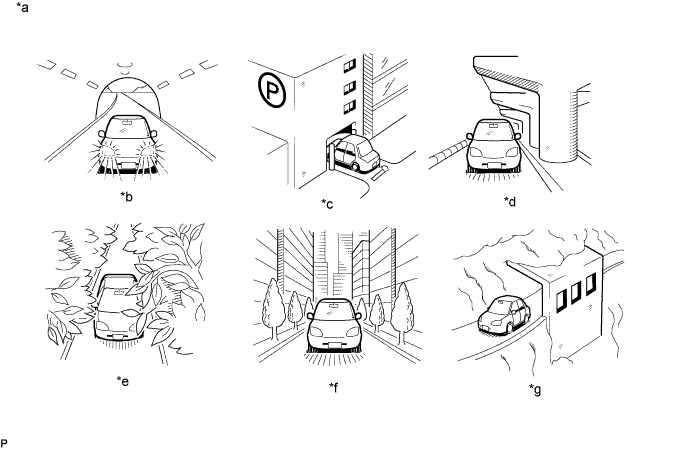
Check if the vehicle is in an environment where reception is difficult due to something blocking the area above the vehicle.
Tech Tips
If the area above the vehicle is blocked, such as when in a building or tunnel, reception may not be possible.
OK Area above vehicle is not blocked. Text in Illustration *a Example *b In a tunnel *c In a building *d Under an overpass *e On a forest or tree-lined path *f Between tall buildings *g Under a cliff or overhang - -
NG 
END (MOVE VEHICLE TO LOCATION WHERE RECEPTION IS BETTER)
OK 
-
-
CHECK NAVIGATION ECU SUB-ASSEMBLY
-
Check if CH001 (free broadcast) can be received.
OK CH001 can be received.
NG 
CHECK DISPLAY Click here
OK
-
-
CHECK DISPLAY SETTING
-
Check the display screen.
Result Result Proceed to "Updating" is displayed A "-----" is displayed B None of the displays above are shown C
B
THERE IS NO SONG/PROGRAM TITLE OR ARTIST NAME/FEATURE ASSOCIATED WITH CHANNEL AT THAT TIME
C
CHECK DISPLAY Click here
A
-
-
CHECK CONTRACT CONDITIONS
-
Check if the pay-type contract has been extended, or if the contract period has ended.
OK Pay-type contract is valid.
NG
TO RECEIVE PAY-TYPE BROADCASTS, CONTRACT MUST BE MADE WITH SATELLITE RADIO COMPANY
OK
-
-
PERFORM ACTIVATION REFRESH
-
Perform activation refresh by referring to the satellite radio company web site (http://www.xmradio.com/refresh/).
OK Malfunction disappears. Tech Tips
The XM radio ID that is necessary to perform activation refresh is displayed when CH000 is selected on the satellite radio.
NG
PROCEED TO NEXT SUSPECTED AREA SHOWN IN PROBLEM SYMPTOMS TABLE Click here
OK 
END
-
-
CHECK DISPLAY
-
Check the display screen.
Result Result Proceed to "Ck Antenna" is displayed A "No Signal" is displayed B "Loading" is displayed B "Ch Off Air" is displayed C After "---" is displayed, display automatically switches to CH001 D None of the displays above are shown E
B
END (MOVE VEHICLE TO LOCATION WHERE RECEPTION IS BETTER)
C
CHANNEL IS CURRENTLY NOT BEING BROADCAST. BROADCAST CAN BE LISTENED TO OR VIEWED WHEN IT IS BACK ON AIR. (CONFIRM WITH RADIO STATION)
D
CHANNEL BROADCAST HAS ENDED (CONFIRM WITH RADIO STATION)
E
CONFIRM CURRENTLY SELECTED CHANNEL Click here
A
-
-
REPLACE ANTENNA CORD SUB-ASSEMBLY
-
Replace the antenna cord sub-assembly and check if radio broadcasts can be received normally Click here.
OK Radio broadcasts can be received normally.
NG
INSPECT NO. 2 ANTENNA CORD SUB-ASSEMBLY Click here
OK
END
-
-
INSPECT NO. 2 ANTENNA CORD SUB-ASSEMBLY
-
Disconnect the No. 2 antenna cord sub-assembly.
-
Measure the resistance of the No. 2 antenna cord sub-assembly to check for an open circuit in the No. 2 antenna cord sub-assembly.
Standard Resistance Below 1 Ω -
Measure the resistance between the No. 2 antenna cord sub-assembly and body ground to check for a short circuit in the No. 2 antenna cord sub-assembly.
Standard Resistance 10 kΩ or higher
NG
REPLACE NO. 2 ANTENNA CORD SUB-ASSEMBLY Click here
OK
-
-
REPLACE HARNESS OR CONNECTOR (NO. 2 ANTENNA CORD SUB-ASSEMBLY - ROOF ANTENNA ASSEMBLY)
-
Replace the harness or connector and check if radio broadcasts can be received normally.
OK Radio broadcasts can be received normally.
NG
REPLACE ROOF ANTENNA ASSEMBLY Click here
OK
END
-
-
REPLACE ROOF ANTENNA ASSEMBLY
-
Replace the roof antenna assembly and check if radio broadcasts can be received normally Click here.
OK Radio broadcasts can be received normally.
NG
CONFIRM CURRENTLY SELECTED CHANNEL Click here
OK
END
-
-
CONFIRM CURRENTLY SELECTED CHANNEL
-
Confirm if CH000 is currently selected.
OK CH000 is selected.
NG
PROCEED TO NEXT SUSPECTED AREA SHOWN IN PROBLEM SYMPTOMS TABLE Click here
OK
END (CH000 HAS NO SOUND. SELECT ANOTHER CHANNEL.)
-