AUDIO AND VISUAL SYSTEM (for Radio and Display Type without Intuitive Parking Assist System) Display does not Dim when Light Control Switch is Turned ON
INSPECTION PROCEDURE
Note
After replacing the radio and display receiver assembly of vehicles subscribed to pay-type satellite radio broadcasts, XM radio ID registration is necessary (w/ SDARS System).
PROCEDURE
-
CHECK IMAGE QUALITY SETTING
-
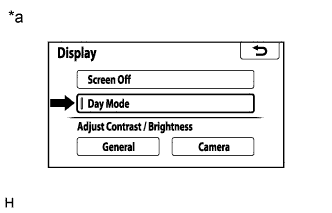
Display the "Display" screen.
-
Turn the light control switch to the tail or head position.
-
Check if "Day Mode" on the display adjustment screen is on.
Result Result Proceed to "Day Mode" setting is on A "Day Mode" setting is off B Text in Illustration *a Example
B 
CHECK VEHICLE SIGNAL (OPERATION CHECK) Click here
A 
TURN "Day Mode" SETTING OFF
-
-
CHECK VEHICLE SIGNAL (OPERATION CHECK)
-
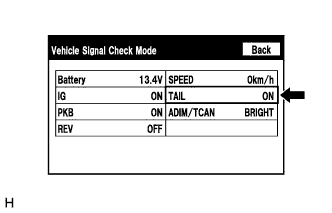
Enter the "Vehicle Signal Check Mode" screen. Refer to Check Vehicle Signal in Operation Check Click here.
-
Check that the display changes between ON and OFF according to the light control switch operation.
OK Light Control Switch Display Tail or head ON Off OFF Tech Tips
The display is updated once per second. It is normal for the display to lag behind the actual switch operation.
NG 
PROCEED TO NEXT SUSPECTED AREA SHOWN IN PROBLEM SYMPTOMS TABLE Click here
OK
REPLACE RADIO AND DISPLAY RECEIVER ASSEMBLY Click here
-