TIRE PRESSURE WARNING SYSTEM TEST MODE PROCEDURE

-
TEST MODE (SIGNAL CHECK MODE) PROCEDURE
Tech Tips
-
When entering test mode (signal check mode), the tire pressure warning ECU and receiver sets all the test mode (signal check mode) DTCs first.
After the tire pressure warning ECU and receiver completes the signal check for each inspection item, the DTCs for systems that are determined to be normal will be cleared.
The DTCs for other inspection items may not be cleared when only a certain signal is inspected.
-
When test mode (signal check mode) returns to normal mode, all the test mode (signal check mode) DTCs will be cleared.
-
Turn the ignition switch off.
-
Connect the Techstream to the DLC3.
-
Turn the ignition switch to ON and the Techstream on.
-
Enter the following menus: Chassis / Tire Pressure Monitor / Utility / Signal Check.
Tech Tips
Every time the test mode (signal check mode) DTC clear conditions are satisfied, the tire pressure warning light illuminated for 1 second. Following this, the tire pressure warning light blinks at 0.125 second intervals.
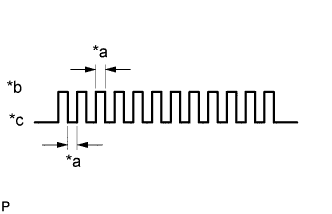
Text in Illustration *a 0.125 sec. *b ON *c OFF -
Wait for 1.5 minutes with the vehicle stopped, or drive the vehicle for 1 minute (C2181/81 to C2184/84).
Tech Tips
The tire pressure warning valve and transmitters send signals to the tire pressure warning ECU and receiver once every 1.5 minutes while the vehicle is stopped and once every minute while driving.
-
Check that the tire pressure warning system test mode (signal check mode) DTCs are cleared.
Test Mode (Signal Check Mode) DTC Test Signal Test Mode (Signal Check Mode) DTC Clear Condition C2181/81 to C2184/84 Transmitter Data Data is received from the relevant transmitter which has a registered ID in the tire pressure warning ECU and receiver. -
Result
Tech Tips
After the signal check is completed, check for test mode (signal check mode) DTCs to confirm the system status.
Condition Procedure Test mode (signal check mode) DTC is output Repair the faulty part and enter Signal Check again Test mode (signal check mode) DTCs are cleared No problem -
End of test mode (signal check mode)
-
After completing the test mode (signal check mode), turn the ignition switch off and disconnect the Techstream.
-
-
Test mode (signal check mode) DTCs
-
If a trouble code is displayed during the test mode (signal check mode) DTC check, check the diagnosis procedure listed for that code. For details of each code, refer to See page below.
DTC No. Detection Item Trouble Area See page C2181/81 Transmitter ID1 not received -
Tire pressure warning valve and transmitter
-
Harness or connector
-
Tire pressure warning ECU and receiver
C2182/82 Transmitter ID2 not received -
Tire pressure warning valve and transmitter
-
Harness or connector
-
Tire pressure warning ECU and receiver
C2183/83 Transmitter ID3 not received -
Tire pressure warning valve and transmitter
-
Harness or connector
-
Tire pressure warning ECU and receiver
C2184/84 Transmitter ID4 not received -
Tire pressure warning valve and transmitter
-
Harness or connector
-
Tire pressure warning ECU and receiver
-
-
-