SFI SYSTEM, Diagnostic DTC:P2610

| DTC Code | DTC Name |
|---|---|
| P2610 | ECM / PCM Internal Engine Off Timer Performance |
DTC SUMMARY
| DTC No. | Monitoring Item | Malfunction Detection Condition | Trouble Area | Detection Timing | Detection Logic |
|---|---|---|---|---|---|
| P2610 | Soak timer (built into ECM) | ECM internal malfunction. | ECM | Engine running | 2 trip |
DESCRIPTION
The soak timer operates after the engine switch is turned off. When a certain amount of time has elapsed after turning the engine switch off, the soak timer activates the ECM to perform malfunction checks which can only be performed after the engine is stopped. The soak timer is built into the ECM.
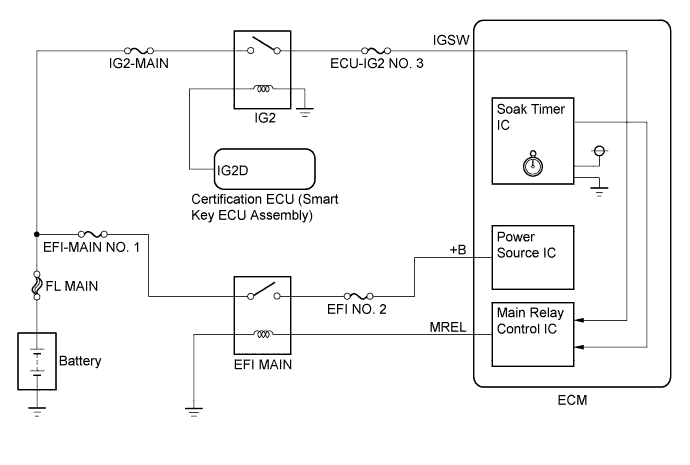
MONITOR DESCRIPTION
-
While the engine is running, the ECM monitors the synchronization of the soak timer and the CPU clock. If these two are not synchronized, the ECM interprets this as a malfunction, illuminates the MIL and stores the DTC.
-
If the soak timer activates the ECM even though only a short amount of time has elapsed since the engine switch was turned off, or if the soak timer does not activate the ECM even though a considerable amount of time has elapsed since the engine switch was turned off, the ECM determines that the soak timer is malfunctioning, illuminates the MIL and stores a DTC the next time the engine switch is turned on (IG).
MONITOR STRATEGY
| Related DTC | P2610: ECM internal engine off timer performance |
| Required Sensors/Components (Main) | ECM |
| Required Sensors/Components (Related) | - |
| Frequency of Operation | Once per driving cycle |
| Duration | - |
| MIL Operation | 2 driving cycles |
| Sequence of Operation | None |
TYPICAL ENABLING CONDITIONS
| Monitor runs whenever the following DTCs are not stored | None |
| All of the following conditions are met | - |
| Engine | Running |
| Battery voltage | 8 V or higher |
| Engine switch | On (IG) |
| Starter | Off |
| CPU clock elapsed time | 10 minutes or more |
| All of the following conditions are met | - |
| Internal engine off timer (elapsed time from engine stop) | 10 minutes or more, and less than 30 minutes |
| Battery voltage | 8 V or higher |
| Engine switch | On (IG) |
| Starter | Off |
| All of the following conditions are met | - |
| Internal engine off timer (elapsed time from engine stop) | 40 minutes or more |
| Battery voltage | 8 V or higher |
| Engine switch | On (IG) |
| Starter | Off |
TYPICAL MALFUNCTION THRESHOLDS
| Internal engine off timer (elapsed time from engine start) | Less than 7 minutes, or more than 13 minutes |
| ECM started by internal engine off timer last trip | Yes |
| ECM started by internal engine off timer last trip | No |
CONFIRMATION DRIVING PATTERN
-
Connect the Techstream to the DLC3.
-
Turn the engine switch on (IG) and turn the Techstream on.
-
Clear the DTCs (even if no DTCs are stored, perform the clear DTC procedure).
-
Turn the engine switch off and wait for at least 30 seconds.
-
Turn the engine switch on (IG) and turn the Techstream on.
-
Start the engine.
-
Idle the engine for 10 minutes or more.
-
Enter the following menus: Powertrain / Engine / Trouble Codes.
-
Read the pending DTCs.
Tech Tips
-
If a pending DTC is output, the system is malfunctioning.
-
If a pending DTC is not output, perform the following procedure.
-
-
Enter the following menus: Powertrain / Engine / Utility / All Readiness.
-
Input the DTC: P2610.
-
Check the DTC judgment result.
Techstream Display Description NORMAL -
DTC judgment completed
-
System normal
ABNORMAL -
DTC judgment completed
-
System abnormal
INCOMPLETE -
DTC judgment not completed
-
Perform driving pattern after confirming DTC enabling conditions
N/A -
Unable to perform DTC judgment
-
Number of DTCs which do not fulfill DTC preconditions has reached ECU memory limit
Tech Tips
-
If the judgment result shows NORMAL, the system is normal.
-
If the judgment result shows ABNORMAL, the system has a malfunction.
-
-
If the judgment result is INCOMPLETE or N/A and no pending DTC is output, perform a universal trip and check for permanent DTCs Click here.
Tech Tips
-
If a permanent DTC is output, the system is malfunctioning.
-
If no permanent DTC is output, the system is normal.
-
INSPECTION PROCEDURE
Tech Tips
-
DTC P2610 is set if an internal ECM problem is detected. Diagnostic procedures are not required. ECM replacement is required.
-
Read freeze frame data using the Techstream. The ECM records vehicle and driving condition information as freeze frame data the moment a DTC is stored. When troubleshooting, freeze frame data can help determine if the vehicle was moving or stationary, if the engine was warmed up or not, if the air fuel ratio was lean or rich, and other data from the time the malfunction occurred.
PROCEDURE
-
REPLACE ECM
-
Replace the ECM Click here.
NEXT 
-
-
CHECK WHETHER DTC OUTPUT RECURS (DTC P2610)
-
Connect the Techstream to the DLC3.
-
Turn the engine switch on (IG).
-
Turn the Techstream on.
-
Clear the DTCs Click here.
-
Turn the engine switch off and wait for at least 30 seconds.
-
Turn the engine switch on (IG).
-
Turn the Techstream on.
-
Start the engine and wait for 10 minutes or more.
-
Enter the following menus: Powertrain / Engine / Trouble Codes / Pending.
-
If no pending DTC is output, the repair has been successfully completed.
NEXT 
END
-