SFI SYSTEM, Diagnostic DTC:P219A, P219B

| DTC Code | DTC Name |
|---|---|
| P219A | Bank 1 Air-Fuel Ratio Imbalance |
| P219B | Bank 2 Air-Fuel Ratio Imbalance |
DESCRIPTION
Refer to DTC P0300 Click here.
Refer to DTC P2195, P2197 Click here.
| DTC No. | DTC Detection Condition | Trouble Area |
|---|---|---|
| P219A P219B |
The difference in air fuel ratios between the cylinders exceeds the threshold (2 trip detection logic). |
|
MONITOR DESCRIPTION
Fuel System Air Fuel Ratio Cylinder Imbalance MonitorThe ECM uses the air fuel ratio sensor and crankshaft position sensor to monitor the difference in air fuel ratios between the cylinders caused by differences in injection volumes between the cylinders, leakage in the intake or exhaust system, etc.
When the air fuel ratios of the cylinders are lean or rich with respect to each other, the ECM determines that a problem is present and stores a DTC.
Air Fuel Ratio Sensor Monitoring MethodWhen the system detects a difference in air fuel ratios between the cylinders due to fluctuation in the air fuel ratio sensor output over 1 engine cycle (2 crankshaft revolutions), the system determines that there is a problem.
Crankshaft Position Sensor Monitoring MethodThe system monitors the engine speed variation and when the variation becomes large, the system determines that there is a difference in air fuel ratios between the cylinders, which it determines to be a problem.
MONITOR STRATEGY
| Related DTCs | P219A: Air fuel ratio cylinder imbalance monitor (bank 1) P219B: Air fuel ratio cylinder imbalance monitor (bank 2) |
| Required Sensors/Components (Main) | Air fuel ratio sensor Crankshaft position sensor |
| Required Sensors/Components (Related) | Mass air flow meter sub-assembly Engine coolant temperature sensor Vehicle speed sensor |
| Frequency of Operation | Once per driving cycle |
| Duration | 10 seconds: Air fuel ratio sensor monitoring method 10 seconds: Crankshaft position sensor monitoring method |
| MIL Operation | 2 driving cycles |
| Sequence of Operation | None |
TYPICAL ENABLING CONDITIONS
| Monitor runs whenever the following DTCs are not stored | P0010, P0020 (Camshaft timing oil control valve bank 1, 2) P0011, P0021 (VVT system bank 1, 2 - advance) P0012, P0022 (VVT system bank 1, 2 - retard) P0013, P0023 (Exhaust camshaft timing oil control valve bank 1, 2) P0014, P0024 (Exhaust VVT system bank 1, 2 - advance) P0015, P0025 (Exhaust VVT system bank 1, 2 - retard) P0016, P0018 (VVT system bank 1, 2 - misalignment) P0017, P0019 (Exhaust VVT system bank 1, 2 - misalignment) P0031, P0032, P0051, P0052, P101D, P103D (Air fuel ratio sensor heater) P0102, P0103 (Mass air flow meter) P0115, P0117, P0118 (Engine coolant temperature sensor) P0120, P0121, P0122, P0123, P0220, P0222, P0223, P2135 (Throttle position sensor) P0125 (Insufficient coolant temperature for closed loop fuel control) P0327, P0328, P0332, P0333 (Knock control sensor) P0335 (Crankshaft position sensor) P0340, P0342, P0343, P0345, P0347, P0348 (VVT sensor) P0351, P0352, P0353, P0354, P0355, P0356 (Igniter) P0365, P0367, P0368, P0390, P0392, P0393 (Exhaust VVT sensor) P0500 (Vehicle speed sensor) |
| Air fuel ratio sensor status | Activated |
| Engine speed | 1200 rpm or higher, and less than 2400 rpm |
| Engine coolant temperature | 75°C (167°F) or higher |
| Atmospheric pressure | 76 kPa(abs) [570 mmHg(abs)] or higher |
| Fuel system status | Closed loop |
| Mass air flow | 20 gm/sec. or more, and less than 35 gm/sec. |
| Vehicle speed | More than 10 km/h (6.21 mph) |
| Engine speed | 1400 rpm or higher, and less than 2200 rpm |
| Engine coolant temperature | 75°C (167°F) or higher |
| Air fuel ratio sensor status | Activated |
| Fuel system status | Closed loop |
| Battery voltage | 11 V or higher |
| Engine load | 37% or higher |
TYPICAL MALFUNCTION THRESHOLDS
| Air fuel ratio sensor monitoring method criteria (rich side imbalance) | 0.13 or more (bank 1) 0.125 or more (bank 2) |
| Crankshaft position sensor monitoring method criteria (lean side imbalance) | 1 or more |
MONITOR RESULT
Refer to detailed information in Checking Monitor Status Click here.
| Monitor ID | Test ID | Scaling | Unit | Description |
|---|---|---|---|---|
| $81 | $81 | Multiply by 0.00003 | No dimension | Monitoring method using air fuel ratio sensor |
| Monitor ID | Test ID | Scaling | Unit | Description |
|---|---|---|---|---|
| $81 | $82 | Multiply by 0.001 | No dimension | Monitoring method using crank position sensor |
| Monitor ID | Test ID | Scaling | Unit | Description |
|---|---|---|---|---|
| $82 | $81 | Multiply by 0.00003 | No dimension | Monitoring method using air fuel ratio sensor for bank 2 |
| Monitor ID | Test ID | Scaling | Unit | Description |
|---|---|---|---|---|
| $82 | $82 | Multiply by 0.001 | No dimension | Monitoring method using crank position sensor for bank 2 |
CONFIRMATION DRIVING PATTERN
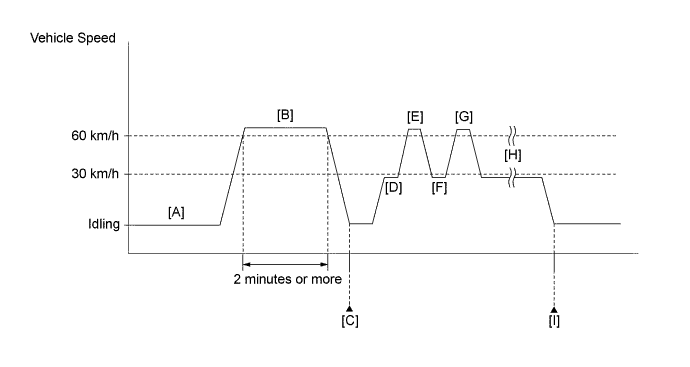
-
Connect the Techstream to the DLC3.
-
Turn the engine switch on (IG).
-
Turn the Techstream on.
-
Start the engine and warm it up until the engine coolant temperature reaches 75°C (167°F) or higher [A].
Tech Tips
The A/C switch and all accessory switches should be off and the shift lever should be in P or N.
-
Clear the DTCs (even if no DTCs are stored, perform the clear DTC procedure).
-
Drive the vehicle at 60 km/h (37 mph) or higher for 2 minutes or more [B].
CAUTION:
When performing the confirmation driving pattern, obey all speed limits and traffic laws.
Tech Tips
It is acceptable to turn electrical loads on while driving.
-
Enter the following menus: Powertrain / Engine / Trouble Codes [C].
-
Read the pending DTCs.
Tech Tips
-
If a pending DTC is output, the system is malfunctioning.
-
If a pending DTC is not output, perform the following procedure.
-
-
Drive the vehicle at less than 30 km/h (19 mph) for 5 seconds or more [D].
CAUTION:
When performing the confirmation driving pattern, obey all speed limits and traffic laws.
-
Accelerate the vehicle from 30 to 60 km/h (19 to 37 mph) over a period of approximately 10 to 20 seconds.
CAUTION:
When performing the confirmation driving pattern, obey all speed limits and traffic laws.
Tech Tips
Refer to the values of mass air flow and engine speed in Typical Enabling Conditions before accelerating the vehicle from 30 to 60 km/h (19 to 37 mph).
-
Drive the vehicle at 60 km/h (37 mph) or more for 5 seconds or more [E].
CAUTION:
When performing the confirmation driving pattern, obey all speed limits and traffic laws.
-
Drive the vehicle at less than 30 km/h (19 mph) for 5 seconds or more [F].
CAUTION:
When performing the confirmation driving pattern, obey all speed limits and traffic laws.
-
Accelerate the vehicle from 30 to 60 km/h (19 to 37 mph) over a period of approximately 10 to 20 seconds.
CAUTION:
When performing the confirmation driving pattern, obey all speed limits and traffic laws.
Tech Tips
Refer to the values of mass air flow and engine speed in Typical Enabling Conditions before accelerating the vehicle from 30 to 60 km/h (19 to 37 mph).
-
Drive the vehicle at 60 km/h (37 mph) or more for 5 seconds or more [G].
CAUTION:
When performing the confirmation driving pattern, obey all speed limits and traffic laws.
-
Repeat steps [F] and [G] above at least 2 times [H].
-
Enter the following menus: Powertrain / Engine / Trouble Codes [I].
-
Read the pending DTCs.
Tech Tips
-
If a pending DTC is output, the system is malfunctioning.
-
If a pending DTC is not output, perform the following procedure.
-
-
Enter the following menus: Powertrain / Engine / Utility / All Readiness.
-
Input the DTC: P219A or P219B.
-
Check the DTC judgment result.
Techstream Display Description NORMAL -
DTC judgment completed
-
System normal
ABNORMAL -
DTC judgment completed
-
System abnormal
INCOMPLETE -
DTC judgment not completed
-
Perform driving pattern after confirming DTC enabling conditions
N/A -
Unable to perform DTC judgment
-
Number of DTCs which do not fulfill DTC preconditions has reached ECU memory limit
Tech Tips
-
If the judgment result shows NORMAL, the system is normal.
-
If the judgment result shows ABNORMAL, the system has a malfunction.
-
If the judgment result shows INCOMPLETE or N/A, perform the following procedure.
-
-
If no pending DTC is output, perform a universal trip and check for permanent DTCs Click here.
Tech Tips
-
If a permanent DTC is output, the system is malfunctioning.
-
If no permanent DTC is output, the system is normal.
-
WIRING DIAGRAM
Refer to Fuel Injector Circuit Click here.
INSPECTION PROCEDURE
Tech Tips
-
Read freeze frame data using the Techstream. The ECM records vehicle and driving condition information as freeze frame data the moment a DTC is stored. When troubleshooting, freeze frame data can help determine if the vehicle was moving or stationary, if the engine was warmed up or not, if the air fuel ratio was lean or rich, and other data from the time the malfunction occurred.
-
Refer to A/F Sensor Determination (worst value) #1, A/F Sensor Determination (worst value) #2, Engine Speed Fluctuation Avg (worst value) #1 to #6, Cylinder #1 to #6 Misfire Count, Short FT #1, Short FT #2, Long FT #1 and long FT #2 in the Data List / Active Test Click here.
-
Bank 1 refers to the bank that includes the No. 1 cylinder*.
*: The No. 1 cylinder is the cylinder which is farthest from the transaxle.
-
Bank 2 refers to the bank that does not include the No. 1 cylinder.
-
Sensor 1 refers to the sensor closest to the engine assembly.
-
Sensor 2 refers to the sensor farthest away from the engine assembly.
PROCEDURE
-
CHECK ANY OTHER DTCS OUTPUT (IN ADDITION TO DTC P219A AND/OR P219B)
-
Connect the Techstream to the DLC3.
-
Turn the engine switch on (IG).
-
Turn the Techstream on.
-
Enter the following menus: Powertrain / Engine / Trouble Codes.
-
Read the DTCs.
Result Result Proceed to DTC P219A and/or P219B is output A DTC P219A and/or P219B and other DTCs are output B Tech Tips
If any DTCs other than P219A and/or P219B are output, troubleshoot those DTCs first.
B 
GO TO DTC CHART Click here
A 
-
-
READ VALUE USING TECHSTREAM (FREEZE FRAME DATA)
-
Connect the Techstream to the DLC3.
-
Turn the engine switch on (IG).
-
Using the Techstream, confirm the vehicle conditions recorded in the freeze frame data which were present when the DTC was stored Click here.
-
Vehicle Speed
-
Engine Speed
-
Calculate Load
-
Accelerator Idle Position
-
Short FT #1 or #2
-
Long FT #1 or #2
-
Cylinder #1 Misfire Count to Cylinder #6 Misfire Count
-
A/F Sensor Determination (worst value) #1 or #2
-
Engine Speed Fluctuation Avg (worst value) #1 to #6
Freeze Frame Data Items for DTC P219A or P219B
Tech Tips
When the sum of Short FT and Long FT is positive, the engine is running lean, and when the sum is negative, the engine is running rich.
-
NEXT
-
-
READ VALUE USING TECHSTREAM (MONITOR RESULT)
-
Connect the Techstream to the DLC3.
-
Turn the engine switch on (IG).
-
Turn the Techstream on.
-
Drive the vehicle in accordance with the driving pattern described in Confirmation Driving Pattern.
Tech Tips
-
If any misfire count ("Cylinder #1 Misfire Count" to "Cylinder #6 Misfire Count) increases while driving the vehicle, proceed to step 6.
-
Perform inspections while focusing on the cylinder whose misfire count has increased.
-
-
Enter the following menus: Powertrain / Engine / Monitor / Current Monitor / Fuel System / Details / A/F SENSOR DETERMINATION B1, A/F SENSOR DETERMINATION B2, ENGINE SPEED FLUCTUATION AVERAGE B1 and ENGINE SPEED FLUCTUATION AVERAGE B2.
-
Check the Test Result (A/F SENSOR DETERMINATION B1, A/F SENSOR DETERMINATION B2, ENGINE SPEED FLUCTUATION AVERAGE B1 and ENGINE SPEED FLUCTUATION AVERAGE B2).
Result Result Proceed to A/F SENSOR DETERMINATION is Fail A A/F SENSOR DETERMINATION and ENGINE SPEED FLUCTUATION AVERAGE are Fail B ENGINE SPEED FLUCTUATION AVERAGE is Fail B* Tech Tips
-
When the results of A/F SENSOR DETERMINATION and ENGINE SPEED FLUCTUATION AVERAGE are both Pass, drive the vehicle in accordance with the driving pattern described in Confirmation Driving Pattern again.
If both results are still Pass, proceed to step 4.
-
*: Perform inspections while focusing on the cylinder whose engine speed fluctuation value ("Engine Speed Fluctuation Avg (worst value) #1" to "Engine Speed Fluctuation Avg (worst value) #6") was the largest.
-
B 
CHECK INTAKE SYSTEM Click here
A
-
-
PERFORM ACTIVE TEST USING TECHSTREAM (CONTROL THE INJECTION VOLUME)
-
Connect the Techstream to the DLC3.
-
Start the engine.
-
Turn the Techstream on.
-
Warm up the engine.
Tech Tips
The A/C switch and all accessory switches should be off and the shift lever should be in P or N.
-
Enter the following menus: Powertrain / Engine / Active Test / Control the Injection Volume / Gas Misfire / Cylinder #1 to #6 Misfire Count.
Tech Tips
When the "Control the Injection Volume" Active Test is selected (injection volume is 0%), if a misfire count increases, proceed to step 6 (Check Intake System).
-
Perform the Control the Injection Volume operation with the engine idling.
-
Check the misfire counts ("Cylinder #1 Misfire Count" to "Cylinder #6 Misfire Count") while decreasing the injection volume in 5% increments.
Note
Do not decrease the injection volume by higher than 20%.
Result The cylinder whose misfire count has not increased can be assumed to be running rich. Therefore, perform inspections while focusing on that cylinder.
NEXT
-
-
CHECK FOR EXHAUST GAS LEAK
-
Check for exhaust gas leaks.
OK No gas leaks. Tech Tips
Perform "Inspection After Repair" after repairing or replacing the exhaust system Click here.
NG
REPAIR OR REPLACE EXHAUST SYSTEM
OK
-
-
CHECK INTAKE SYSTEM
-
Check the intake system for vacuum leaks Click here.
OK No leaks in the intake system. Tech Tips
Perform "Inspection After Repair" after repairing or replacing the intake system Click here.
NG
REPAIR OR REPLACE INTAKE SYSTEM
OK
-
-
INSPECT SPARK PLUG
-
Inspect the spark plug of the cylinder causing the imbalance Click here.
Tech Tips
Perform "Inspection After Repair" after replacing the spark plug Click here.
NG
REPLACE SPARK PLUG Click here
OK
-
-
CHECK FOR SPARK (SPARK TEST)
-
Perform a spark test Click here.
Tech Tips
-
If the result of the spark test is normal, proceed to the next step.
-
Perform "Inspection After Repair" after replacing the spark plug or ignition coil assembly Click here.
-
NEXT
-
-
CHECK CYLINDER COMPRESSION PRESSURE
-
Measure the cylinder compression pressure of the misfiring cylinder Click here.
Tech Tips
Perform "Inspection After Repair" after repairing or replacing the engine assembly Click here.
NG
CHECK ENGINE TO DETERMINE CAUSE OF LOW COMPRESSION
OK
-
-
CHECK TERMINAL VOLTAGE (POWER SOURCE OF FUEL INJECTOR ASSEMBLY)
-
Disconnect the fuel injector assembly connectors.
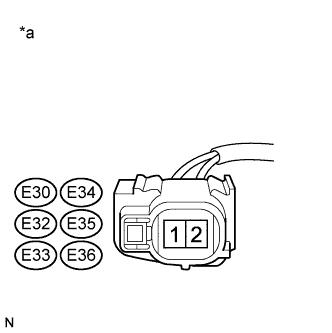
-
Turn the engine switch on (IG).
-
Measure the voltage according to the value(s) in the table below.
Standard Voltage Tester Connection Switch Condition Specified Condition E30-2 - Body ground Engine switch on (IG) 11 to 14 V E34-2 - Body ground Engine switch on (IG) 11 to 14 V E32-2 - Body ground Engine switch on (IG) 11 to 14 V E35-2 - Body ground Engine switch on (IG) 11 to 14 V E33-2 - Body ground Engine switch on (IG) 11 to 14 V E36-2 - Body ground Engine switch on (IG) 11 to 14 V Text in Illustration *a Front view of wire harness connector
(to Fuel Injector Assembly)
NG
GO TO FUEL INJECTOR CIRCUIT Click here
OK
-
-
CHECK HARNESS AND CONNECTOR (FUEL INJECTOR ASSEMBLY - ECM)
-
Disconnect the fuel injector assembly connectors.
-
Disconnect the ECM connector.
-
Measure the resistance according to the value(s) in the table below.
Standard Resistance Tester Connection Condition Specified Condition E30-1 - E26-58 (#10) Always Below 1 Ω E34-1 - E26-54 (#20) Always Below 1 Ω E32-1 - E26-57 (#30) Always Below 1 Ω E35-1 - E26-53 (#40) Always Below 1 Ω E33-1 - E26-56 (#50) Always Below 1 Ω E36-1 - E26-55 (#60) Always Below 1 Ω E30-1 or E26-58 (#10) - Body ground Always 10 kΩ or higher E34-1 or E26-54 (#20) - Body ground Always 10 kΩ or higher E32-1 or E26-57 (#30) - Body ground Always 10 kΩ or higher E35-1 or E26-53 (#40) - Body ground Always 10 kΩ or higher E33-1 or E26-56 (#50) - Body ground Always 10 kΩ or higher E36-1 or E26-55 (#60) - Body ground Always 10 kΩ or higher
NG
REPAIR OR REPLACE HARNESS OR CONNECTOR
OK
-
-
CHECK FUEL INJECTOR ASSEMBLY OF CYLINDER CAUSING IMBALANCE
-
Check the fuel injector assembly injection [whether fuel volume is high or low, and whether injection pattern is poor] Click here.
Tech Tips
Perform "Inspection After Repair" after replacing the fuel injector assembly Click here.
NG
REPLACE FUEL INJECTOR ASSEMBLY Click here
OK
-
-
CHECK FOR CAUSE OF FAILURE
-
If the cause of the problem has not been found even after performing the troubleshooting procedure, perform the inspection below.
-
Check the intake valve for deposits.
Tech Tips
As the DTC may have been stored due to deposits on the intake valve, remove the cylinder head and check the intake valve.
NEXT
-
-
CONFIRM WHETHER MALFUNCTION HAS BEEN SUCCESSFULLY REPAIRED
-
Connect the Techstream to the DLC3.
-
Turn the engine switch on (IG).
-
Turn the Techstream on.
-
Clear the DTCs Click here.
-
Turn the engine switch off and wait for at least 30 seconds.
-
Turn the engine switch on (IG).
-
Turn the Techstream on.
-
Drive the vehicle in accordance with the driving pattern described in Confirmation Driving Pattern.
-
Enter the following menus: Powertrain / Engine / Trouble Codes.
-
Check for DTCs.
Result DTC P219A and/or P219B is not output.
NEXT 
END
-