SFI SYSTEM, Diagnostic DTC:P2195, P2196

| DTC Code | DTC Name |
|---|---|
| P2195 | Oxygen (A/F) Sensor Signal Stuck Lean (Bank 1 Sensor 1) |
| P2196 | Oxygen (A/F) Sensor Signal Stuck Rich (Bank 1 Sensor 1) |
DESCRIPTION
Tech Tips
-
Although the DTC titles say oxygen sensor, these DTCs relate to the air fuel ratio sensor.
-
Sensor 1 refers to the sensor mounted in front of the three-way catalytic converter and located near the engine assembly.
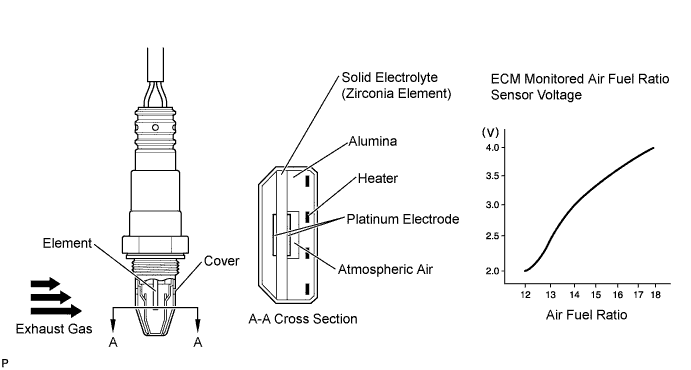
The air fuel ratio sensor generates a voltage* that corresponds to the actual air fuel ratio. This sensor voltage is used to provide the ECM with feedback so that it can control the air fuel ratio. The ECM determines the deviation from the stoichiometric air fuel ratio level, and regulates the fuel injection duration. If the air fuel ratio sensor malfunctions, the ECM is unable to control the air fuel ratio accurately.
The air fuel ratio sensor is a planar type and is integrated with the heater, which heats the solid electrolyte (zirconia element). This heater is controlled by the ECM. When the intake air volume is low (the exhaust gas temperature is low), a current flows into the heater to heat the sensor, in order to facilitate accurate oxygen concentration detection. In addition, the sensor and heater portions are a narrow type. The heat generated by the heater is conducted to the solid electrolyte through the alumina, and therefore sensor activation is accelerated.
In order to obtain a high purification rate of the carbon monoxide (CO), hydrocarbon (HC) and nitrogen oxide (NOx) components in the exhaust gas, a three-way catalytic converter is used. For the most efficient use of the three-way catalytic converter, the air fuel ratio must be precisely controlled so that it is always close to the stoichiometric level.
*: Value changes inside the ECM. Since the air fuel ratio sensor is a current output element, the current is converted into a voltage inside the ECM. Any measurements taken at the air fuel ratio sensor or ECM connectors will show a constant voltage.
| DTC No. | DTC Detection Condition | Trouble Area |
|---|---|---|
| P2195 | Conditions (a) and (b) continue for 5 seconds or more (2 trip detection logic):
|
|
| While the fuel-cut operation is performed (during vehicle deceleration), the air fuel ratio sensor current is 2.2 mA or higher for 3 seconds (2 trip detection logic). |
|
|
| P2196 | Conditions (a) and (b) continue for 5 seconds or more (2 trip detection logic):
|
|
| While the fuel-cut operation is performed (during vehicle deceleration), the air fuel ratio sensor current is less than 0.7 mA for 3 seconds (2 trip detection logic). |
|
Tech Tips
-
When any of these DTCs is stored, check the air fuel ratio sensor voltage output by entering the following menus on the Techstream: Powertrain / Engine and ECT / Data List / Gas AF Control / AFS Voltage B1S1.
-
Short-term fuel trim values can also be read using the Techstream.
-
The ECM regulates the voltages at the A1A+ and A1A- terminals of the ECM to a constant level. Therefore, the air fuel ratio sensor voltage output cannot be confirmed without using the Techstream.
-
If an air fuel ratio sensor malfunction is detected, the ECM stores a DTC.
MONITOR DESCRIPTION
Sensor Voltage Detection MonitorUnder air fuel ratio feedback control, If the air fuel ratio sensor output voltage is below 2.8 V (very rich condition) for 5 seconds despite the heated oxygen sensor output voltage being below 0.69 V, the ECM stores DTC P2196. Alternatively, if the air fuel ratio sensor output voltage is higher than 3.8 V (very lean condition) for 5 seconds despite the heated oxygen sensor output voltage being 0.21 V or higher, DTC P2195 is stored.
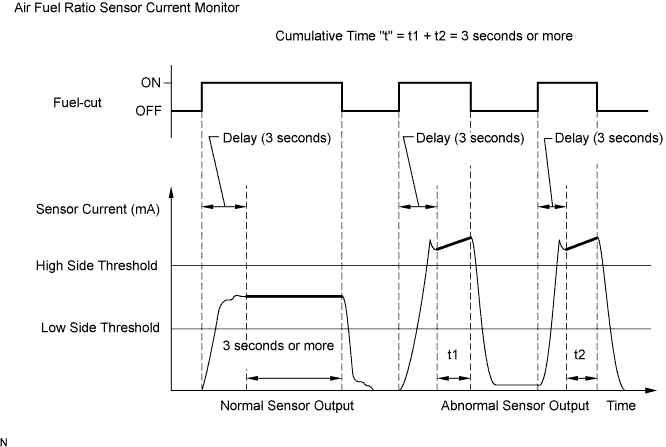
Sensor Current Detection MonitorA rich air fuel mixture causes a low air fuel ratio sensor current, and a lean air fuel mixture causes a high air fuel ratio sensor current. Therefore, the sensor output becomes low during acceleration, and it becomes high during deceleration with the throttle valve fully closed. The ECM monitors the air fuel ratio sensor current during fuel-cut and detects any abnormal current values.
If the air fuel ratio sensor output is 2.2 mA or higher for more than 3 seconds of cumulative time, the ECM interprets this as a malfunction in the air fuel ratio sensor and stores DTC P2195 (stuck on high side). If the air fuel ratio sensor output is below 0.7 mA for more than 3 seconds of cumulative time, the ECM stores DTC P2196 (stuck on low side).
MONITOR STRATEGY
| Related DTCs | P2195: Air fuel ratio sensor (sensor 1) signal stuck lean P2196: Air fuel ratio sensor (sensor 1) signal stuck rich |
| Required Sensors/Components (Main) | Air fuel ratio sensor |
| Required Sensors/Components (Related) | Heated oxygen sensor |
| Frequency of Operation | Continuous: Sensor voltage detection monitor Once per driving cycle: Sensor current detection monitor |
| Duration | 5 seconds: Sensor voltage detection monitor 3 seconds: Sensor current detection monitor |
| MIL Operation | 2 driving cycles |
| Sequence of Operation | None |
TYPICAL ENABLING CONDITIONS
| Monitor runs whenever the following DTCs are not stored | P0016 (VVT system - misalignment) P0017 (Exhaust VVT system - misalignment) P0031, P0032, P101D (Air fuel ratio sensor heater) P0102, P0103 (Mass air flow meter) P0112, P0113 (Intake air temperature sensor) P0115, P0117, P0118 (Engine coolant temperature sensor) P0120, P0121, P0122, P0123, P0220, P0222, P0223, P2135 (Throttle position sensor) P0125 (Insufficient coolant temperature for closed loop fuel control) P0128 (Thermostat) P0171, P0172 (Fuel system) P0301 - P0304 (Misfire) P0335 (Crankshaft position sensor) P0340, P0342, P0343 (Camshaft position sensor) P0451, P0452, P0453 (EVAP system) P0500 (Vehicle speed sensor) P0505 (IAC valve) P219A (Air fuel ratio Imbalance) |
| Time after engine start | 30 seconds or more |
| Air fuel ratio sensor status | Activated |
| Fuel system status | Closed loop |
| Battery voltage | 11 V or higher |
| Atmospheric pressure | 76 kPa(abs) [570 mmHg(abs)] or higher |
| Air fuel ratio sensor status | Activated |
| Engine coolant temperature | 75°C (167°F) or higher |
| Continuous time of fuel cut | 3 seconds or more, and less than 10 seconds |
TYPICAL MALFUNCTION THRESHOLDS
| Heated oxygen sensor voltage | 0.21 V or higher |
| Air fuel ratio sensor voltage | Higher than 3.8 V |
| Heated oxygen sensor voltage | Less than 0.69 V |
| Air fuel ratio sensor voltage | Less than 2.8 V |
| Air fuel ratio sensor current | 2.2 mA or higher |
| Air fuel ratio sensor current | Less than 0.7 mA |
MONITOR RESULT
Refer to detailed information in Checking Monitor Status Click here.
| Monitor ID | Test ID | Scaling | Unit | Description |
|---|---|---|---|---|
| $01 | $91 | Multiply by 0.004 | mA | A/F sensor current |
CONFIRMATION DRIVING PATTERN

-
Connect the Techstream to the DLC3.
-
Turn the ignition switch to ON.
-
Turn the Techstream on.
-
Clear the DTCs (even if no DTCs are stored, perform the clear DTC procedure).
-
Turn the ignition switch off and wait for at least 30 seconds.
-
Turn the ignition switch to ON and turn the Techstream on.
-
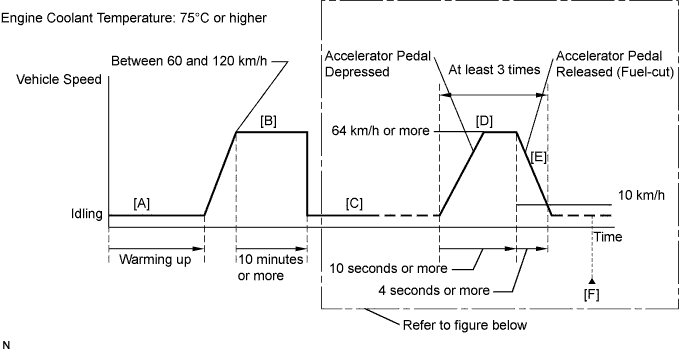
Start the engine and warm it up until the engine coolant temperature reaches 75°C (167°F) or higher [A].
-
On the Techstream, enter the following menus to check the fuel-cut status: Powertrain / Engine and ECT / Data List / Primary / Idle Fuel Cut.
-
Drive the vehicle at a speed between 60 and 120 km/h (37 and 75 mph) for at least 10 minutes [B].
CAUTION:
When performing the confirmation driving pattern, obey all speed limits and traffic laws.
-
With the shift lever in S position [C], accelerate the vehicle to 64 km/h (40 mph) or more by depressing the accelerator pedal for at least 10 seconds [D].
CAUTION:
When performing the confirmation driving pattern, obey all speed limits and traffic laws.
-
Soon after performing step [D] above, release the accelerator pedal for at least 4 seconds without depressing the brake pedal in order to execute fuel-cut control [E].
Tech Tips
Fuel-cut is performed when the following conditions are met:
-
Accelerator pedal is fully released.
-
Engine speed is 1400 rpm or higher (fuel injection restart engine speed).
-
-
Allow the vehicle to decelerate until the vehicle speed decreases to less than 10 km/h (6 mph).
-
Repeat steps [C] through [E] above at least 3 times in one driving cycle.
-
Enter the following menus: Powertrain / Engine and ECT / Trouble Codes [F].
-
Read the pending DTCs.
Tech Tips
-
If a pending DTC is output, the system is malfunctioning.
-
If a pending DTC is not output, perform the following procedure.
-
-
Enter the following menus: Powertrain / Engine and ECT / Utility / All Readiness.
-
Input the DTC: P2195 or P2196.
-
Check the DTC judgment result.
Techstream Display Description NORMAL -
DTC judgment completed
-
System normal
ABNORMAL -
DTC judgment completed
-
System abnormal
INCOMPLETE -
DTC judgment not completed
-
Perform driving pattern after confirming DTC enabling conditions
N/A -
Unable to perform DTC judgment
-
Number of DTCs which do not fulfill DTC preconditions has reached ECU memory limit
Tech Tips
-
If the judgment result shows NORMAL, the system is normal.
-
If the judgment result shows ABNORMAL, the system has a malfunction.
-
If the judgment result shows INCOMPLETE or N/A, perform steps [B] through [F] again.
-
-
If no pending DTC is output, perform a universal trip and check for permanent DTCs Click here.
Tech Tips
-
If a permanent DTC is output, the system is malfunctioning.
-
If no permanent DTC is output, the system is normal.
-
WIRING DIAGRAM
Refer to DTC P0031 Click here.
INSPECTION PROCEDURE
Note
Inspect the fuses for circuits related to this system before performing the following inspection procedure.
Tech Tips
-
Sensor 1 refers to the sensor closest to the engine assembly.
-
Sensor 2 refers to the sensor farthest away from the engine assembly.
-
Read freeze frame data using the Techstream. The ECM records vehicle and driving condition information as freeze frame data the moment a DTC is stored. When troubleshooting, freeze frame data can help determine if the vehicle was moving or stationary, if the engine was warmed up or not, if the air fuel ratio was lean or rich, and other data from the time the malfunction occurred.
-
A low air fuel ratio sensor voltage could be caused by a rich air fuel mixture. Check for conditions that would cause the engine to run rich.
-
A high air fuel ratio sensor voltage could be caused by a lean air fuel mixture. Check for conditions that would cause the engine to run lean.
PROCEDURE
-
CHECK ANY OTHER DTCS OUTPUT (IN ADDITION TO DTC P2195 OR P2196)
-
Connect the Techstream to the DLC3.
-
Turn the ignition switch to ON.
-
Turn the Techstream on.
-
Enter the following menus: Powertrain / Engine and ECT / Trouble Codes.
-
Read the DTCs.
Result Result Proceed to DTC P2195 or P2196 is output A DTC P2195 or P2196 and P0136, P0137 or P0138 are output DTC P2195 or P2196 and other DTCs are output B Tech Tips
If any DTCs relating to the air fuel ratio sensor (DTCs for the air fuel ratio sensor heater or air fuel ratio sensor admittance) are output, troubleshoot those DTCs first.
B 
GO TO DTC CHART Click here
A 
-
-
CONFIRM IF VEHICLE HAS RUN OUT OF FUEL IN PAST
-
Has the vehicle run out of fuel in the past?
NO 
READ VALUE USING TECHSTREAM (TEST VALUE OF AIR FUEL RATIO SENSOR) Click here
YES
-
-
CHECK WHETHER DTC OUTPUT RECURS (DTC P2195 OR P2196)
-
Connect the Techstream to the DLC3.
-
Turn the ignition switch to ON.
-
Turn the Techstream on.
-
Clear the DTCs Click here.
-
Turn the ignition switch off and wait for at least 30 seconds.
-
Turn the ignition switch to ON.
-
Turn the Techstream on.
-
Start the engine and warm it up.
-
Drive the vehicle in accordance with the driving pattern described in Confirmation Driving Pattern.
-
Enter the following menus: Powertrain / Engine and ECT / Utility / All Readiness.
-
Input the DTC: P2195 or P2196.
-
Check the DTC judgment.
Result Result Proceed to NORMAL (DTC is not output) A ABNORMAL (DTC P2195 or P2196 is output) B
B
READ VALUE USING TECHSTREAM (TEST VALUE OF AIR FUEL RATIO SENSOR) Click here
A 
DTC CAUSED BY RUNNING OUT OF FUEL
-
-
READ VALUE USING TECHSTREAM (TEST VALUE OF AIR FUEL RATIO SENSOR)
-
Connect the Techstream to the DLC3.
-
Turn the ignition switch to ON.
-
Turn the Techstream on.
-
Clear the DTCs Click here.
-
Drive the vehicle in accordance with the driving pattern described in Confirmation Driving Pattern.
-
Enter the following menus: Powertrain / Engine and ECT / Monitor / Current Monitor / O2 Sensor / Current.
-
Check that the status of O2 Sensor is Complete.
If the status is still Incomplete, drive the vehicle according to the driving pattern again.
-
Enter the following menus: Powertrain / Engine and ECT / Monitor / Current Monitor / O2 Sensor / Details / RANGE B1S1.
-
Check the test value of the air fuel ratio sensor output current during fuel-cut.
Result Result Proceed to Within normal range (0.7 mA or higher, and lower than 2.2 mA) A Outside normal range (lower than 0.7 mA, or 2.2 mA or higher) B
B
REPLACE AIR FUEL RATIO SENSOR Click here
A
-
-
READ VALUE USING TECHSTREAM (OUTPUT VOLTAGE OF AIR FUEL RATIO SENSOR)
-
Connect the Techstream to the DLC3.
-
Start the engine.
-
Turn the Techstream on.
-
Warm up the air fuel ratio sensor at an engine speed of 2500 rpm for 90 seconds.
-
Enter the following menus: Powertrain / Engine and ECT / Active Test / Control the Injection Volume / Gas AF Control / AFS Voltage B1S1 and O2S B1S2.
-
Perform the Control the Injection Volume operation with the engine idling.
-
Monitor the output voltages of the air fuel ratio and heated oxygen sensors (AFS Voltage B1S1 and O2S B1S2) displayed on the Techstream.
Tech Tips
-
Change the fuel injection volume within the range of -12% to +12%. The injection volume can be changed in fine gradations.
-
The air fuel ratio sensor has an output delay of a few seconds and the heated oxygen sensor has a maximum output delay of approximately 20 seconds.
-
If the sensor output voltage does not change (almost no reaction) while performing the Active Test, the sensor may be malfunctioning.
Techstream Display (Sensor) Injection Volume Status Voltage AFS Voltage B1S1
(Air fuel ratio)
+12% Rich Below 3.1 V AFS Voltage B1S1
(Air fuel ratio)
-12% Lean Higher than 3.4 V O2S B1S2
(Heated oxygen)
+12% Rich Higher than 0.55 V O2S B1S2
(Heated oxygen)
-12% Lean Below 0.4 V Result Status of AFS Voltage B1S1 Status of O2S B1S2 Air Fuel Ratio Condition and Air Fuel Ratio Sensor Condition Proceed to Lean Lean Actual air fuel ratio lean A Rich Rich Actual air fuel ratio rich A Lean Lean/Rich Air fuel ratio sensor malfunction B Rich Lean/Rich Air fuel ratio sensor malfunction B Lean/Rich Lean/Rich Normal B -
Lean: During the Control the Injection Volume Active Test, the air fuel ratio sensor output voltage (AFS Voltage B1S1) is consistently higher than 3.4 V, and the heated oxygen sensor output voltage (O2S B1S2) is consistently below 0.4 V.
-
Rich: During the Control the Injection Volume Active Test, the AFS Voltage B1S1 is consistently below 3.1 V, and the O2S B1S2 is consistently higher than 0.55 V.
-
Lean/Rich: During the Control the Injection Volume Active Test, the output voltage of the heated oxygen sensor alternates correctly.
Tech Tips
Refer to "Data List / Active Test" [AFS Voltage B1S1 and O2S B1S2] Click here.
-
B
REPLACE AIR FUEL RATIO SENSOR Click here
A
-
-
CHECK INTAKE SYSTEM
-
Check the intake system for vacuum leaks Click here.
OK No leaks in the intake system. Tech Tips
Perform "Inspection After Repair" after repairing or replacing the intake system Click here.
NG
REPAIR OR REPLACE INTAKE SYSTEM
OK
-
-
CHECK FOR EXHAUST GAS LEAK
-
Check for exhaust gas leaks.
OK No gas leaks. Tech Tips
Perform "Inspection After Repair" after repairing or replacing the exhaust system Click here.
NG
REPAIR OR REPLACE EXHAUST SYSTEM
OK
-
-
CHECK FUEL PRESSURE
-
Check the fuel pressure Click here.
NG
CHECK FUEL LINE Click here
OK
-
-
INSPECT FUEL INJECTOR ASSEMBLY
-
Inspect the fuel injector assembly injection (whether fuel volume is high or low, and whether injection pattern is poor) Click here.
Tech Tips
Perform "Inspection After Repair" after replacing the fuel injector assembly Click here.
NG
REPLACE FUEL INJECTOR ASSEMBLY Click here
OK
-
-
REPLACE AIR FUEL RATIO SENSOR
-
Replace the air fuel ratio sensor Click here.
Tech Tips
Perform "Inspection After Repair" after replacing the air fuel ratio sensor Click here.
NEXT
-
-
CHECK WHETHER DTC OUTPUT RECURS (DTC P2195 OR P2196)
-
Connect the Techstream to the DLC3.
-
Turn the ignition switch to ON.
-
Turn the Techstream on.
-
Clear the DTCs Click here.
-
Turn the ignition switch off and wait for at least 30 seconds.
-
Turn the ignition switch to ON.
-
Turn the Techstream on.
-
Start the engine and warm it up.
-
Drive the vehicle in accordance with the driving pattern described in Confirmation Driving Pattern.
-
Enter the following menus: Powertrain / Engine and ECT / Utility / All Readiness.
-
Input the DTC: P2195 or P2196.
-
Check the DTC judgment result.
Result Result Proceed to ABNORMAL (DTC P2195 or P2196 is output) A NORMAL (DTC is not output) B
B
END
A
-
-
REPLACE ECM
-
Replace the ECM Click here.
NEXT
-
-
CONFIRM WHETHER MALFUNCTION HAS BEEN SUCCESSFULLY REPAIRED
-
Connect the Techstream to the DLC3.
-
Turn the ignition switch to ON.
-
Turn the Techstream on.
-
Clear the DTCs Click here.
-
Turn the ignition switch off and wait for at least 30 seconds.
-
Turn the ignition switch to ON.
-
Turn the Techstream on.
-
Start the engine and warm it up.
-
Drive the vehicle in accordance with the driving pattern described in Confirmation Driving Pattern.
-
Enter the following menus: Powertrain / Engine and ECT / Utility / All Readiness.
-
Input the DTC: P2195 or P2196.
-
Check the DTC judgment result.
Result Techstream Display Description NORMAL -
DTC judgment completed
-
System normal
ABNORMAL -
DTC judgment completed
-
System abnormal
INCOMPLETE -
DTC judgment not completed
-
Perform driving pattern after confirming DTC enabling conditions
N/A -
Unable to perform DTC judgment
-
Number of DTCs which do not fulfill DTC preconditions has reached ECU memory limit
-
NEXT
END
-
-
REPLACE AIR FUEL RATIO SENSOR
-
Replace the air fuel ratio sensor Click here.
Tech Tips
Perform "Inspection After Repair" after replacing the air fuel ratio sensor Click here.
NEXT
-
-
CHECK WHETHER DTC OUTPUT RECURS (DTC P2195 OR P2196)
-
Connect the Techstream to the DLC3.
-
Turn the ignition switch to ON.
-
Turn the Techstream on.
-
Clear the DTCs Click here.
-
Turn the ignition switch off and wait for at least 30 seconds.
-
Turn the ignition switch to ON.
-
Turn the Techstream on.
-
Start the engine and warm it up.
-
Drive the vehicle in accordance with the driving pattern described in Confirmation Driving Pattern.
-
Enter the following menus: Powertrain / Engine and ECT / Utility / All Readiness.
-
Input the DTC: P2195 or P2196.
-
Check the DTC judgment result.
Result Result Proceed to NORMAL (DTC is not output) A ABNORMAL (DTC P2195 or P2196 is output) B
B
REPLACE ECM Click here
A
END
-
-
CHECK FUEL LINE
-
Check the fuel lines for leaks or blockage.
Tech Tips
Perform "Inspection After Repair" after replacing the fuel pump Click here.
NG
REPAIR OR REPLACE FUEL LINE
OK
REPLACE FUEL PUMP Click here
-