ECM INSTALLATION

-
INSTALL NO. 1 ECM BRACKET
-
Install the No. 1 ECM bracket with the nut.
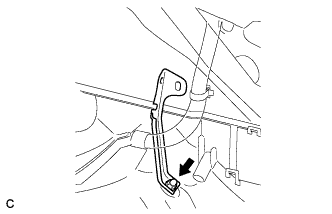
- Torque:
- 12 N*m { 122 kgf*cm, 9 ft.*lbf }
-
Connect the wire harness clamp.
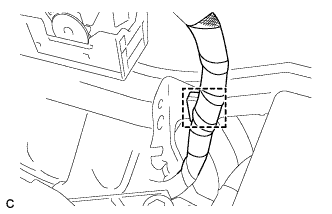
-
Connect the wire harness clamp.
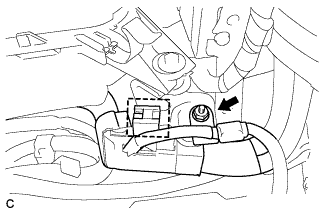
-
Install the nut.
- Torque:
- 8.0 N*m { 82 kgf*cm, 71 in.*lbf }
-
-
INSTALL ECM
-
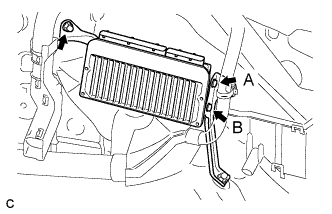
Install the No. 2 ECM bracket to the ECM with the 2 screws.
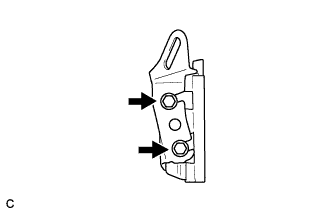
- Torque:
- 3.0 N*m { 31 kgf*cm, 27 in.*lbf }
-
Temporarily install the screw (B).
-
Install the ECM with the nut.
- Torque:
- 12 N*m { 122 kgf*cm, 9 ft.*lbf }
-
Install the screw (A).
- Torque:
- 3.0 N*m { 31 kgf*cm, 27 in.*lbf }
-
Tighten the screw (B).
- Torque:
- 3.0 N*m { 31 kgf*cm, 27 in.*lbf }
-
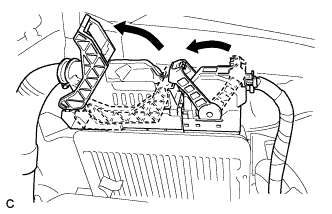
Connect the 2 ECM connectors and lower the 2 levers.
Note
-
When connecting the connectors, make sure that dirt, water or other foreign matter does not become stuck between the connectors and other part.
-
Make sure that the 2 levers are securely locked.
-
-
Connect the 2 wire harness clamps.
-
-
INSTALL BATTERY
-
Install the battery and battery tray.
-
Install the battery clamp with the bolt and nut.
- Torque:
- Bolt
- 9.0 N*m { 92 kgf*cm, 80 in.*lbf }
- Nut
- 3.5 N*m { 36 kgf*cm, 31 in.*lbf }
-
Connect the positive (+) battery terminal
- Torque:
- 6.9 N*m { 70 kgf*cm, 61 in.*lbf }
-
-
INSTALL COOL AIR INTAKE DUCT SEAL
-
Install the cool air intake duct seal with the 7 clips.
-
-
CONNECT CABLE TO NEGATIVE BATTERY TERMINAL
Note
When disconnecting the cable, some systems need to be initialized after the cable is reconnected Click here.
-
PERFORM INITIALIZATION