BACK DOOR GARNISH (w/ Tire Carrier) INSTALLATION

Tech Tips
-
A bolt without a torque specification is shown in the standard bolt chart Click here.
-
When installing the back door garnish, heat the vehicle body and back door garnish using a heat light.
Standard Heating Temperature Item Temperature Back Door Garnish 20 to 30°C (68 to 86°F) Vehicle Body 40 to 60°C (104 to 140°F) Note
Do not heat the back door garnish and vehicle body excessively.
-
INSTALL REAR LICENSE LIGHT COVER
-
Clean the vehicle body surface.
-
Using a heat light, heat the vehicle body surface.
-
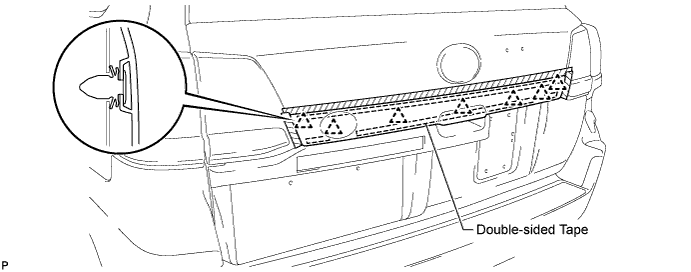
Remove the double-sided tape from the vehicle body.
-
Wipe off any tape adhesive residue with cleaner.
-
-
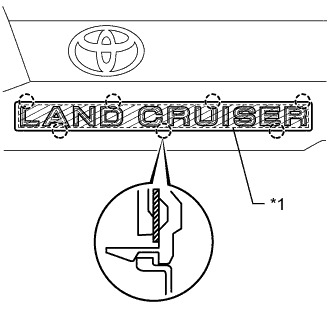
Text in Illustration *1 Double-sided Tape Install a new rear license light cover.
-
Using a heat light, heat the vehicle body and a new rear license light cover.
-
Remove the peeling paper from the face of the emblem.
Tech Tips
After removing the peeling paper, keep the exposed adhesive free from foreign matter.
-
Attach the 7 claws to install the rear license light cover.
Tech Tips
Press the rear license light cover firmly to install it.
-
-
-
INSTALL LICENSE PLATE LIGHT ASSEMBLY
-
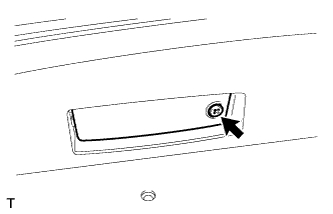
Install the 2 license plate lights with the 2 screws.
-
-
INSTALL NO. 2 BACK DOOR GARNISH SUB-ASSEMBLY OUTSIDE
-
Pass the wire harness of the license plate light through the tail gate, and install the wire harness.
-
Attach the 7 clips to install the No. 2 back door garnish.
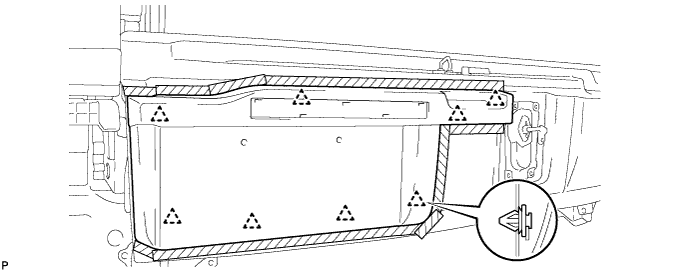
-
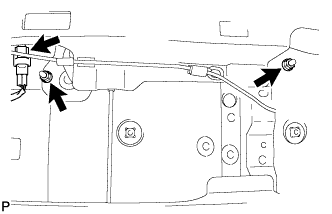
Install the 2 nuts and connect the connector.
-
-
INSTALL BACK DOOR TRIM PANEL ASSEMBLY
-
Attach the 16 clips to install the back door trim panel assembly.
-
Install the 4 bolts.
-
-
INSTALL BACK DOOR TRIM COVER RH
-
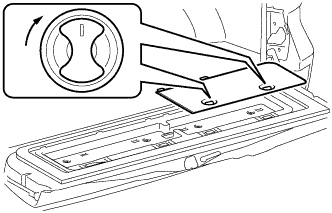
Install the back door trim cover RH as shown in the illustration.
-
-
INSTALL BACK DOOR TRIM COVER LH
-
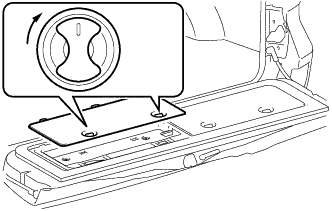
Install the back door trim cover LH as shown in the illustration.
-
-
INSTALL REAR FLOOR MAT REAR SUPPORT PLATE
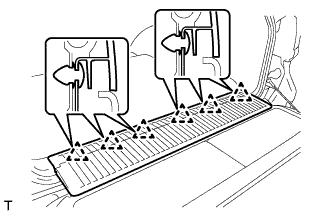
-
Attach the 6 clips to install the support plate.
-
-
INSTALL SYMBOL EMBLEM
-
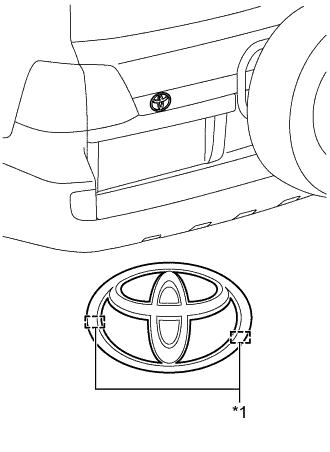
Text in Illustration *1 Boss Clean the vehicle body surface.
-
Using a heat light, heat the vehicle body surface.
-
Remove the double-sided tape from the vehicle body.
-
Wipe off any tape adhesive residue with cleaner.
-
-
Install a new emblem.
-
Using a heat light, heat the vehicle body and a new emblem.
-
Remove the peeling paper from the face of the emblem.
Tech Tips
After removing the peeling paper, keep the exposed adhesive free from foreign matter.
-
Align the boss positions and install the emblem.
Tech Tips
Press the emblem firmly to install it.
-
-
-
INSTALL BACK DOOR GARNISH SUB-ASSEMBLY OUTSIDE RH
-
Clean the vehicle body surface.
-
Using a heat light, heat the vehicle body surface.
-
Remove the double-sided tape from the vehicle body surface.
-
Wipe off any tape adhesive residue with cleaner.
-
-
Install a new back door garnish.
-
Using a heat light, heat a back door garnish and the vehicle body surface.
-
Remove the peeling paper from the face of the back door garnish.
Tech Tips
After removing the peeling paper, keep the exposed adhesive free from foreign matter.
-
Attach the 7 clips and double-sided tape to install the back door garnish.
Tech Tips
Press the back door garnish firmly to install them.
-
-