NAME PLATE (w/o Tire Carrier) INSTALLATION

Tech Tips
When installing the emblem and name plate, heat the vehicle body, emblem and name plate using a heat light.
| Standard Heating Temperature | ||||||||
|---|---|---|---|---|---|---|---|---|
|
Note
Do not heat the vehicle body, emblem and name plate excessively.
-
INSTALL SYMBOL EMBLEM
-
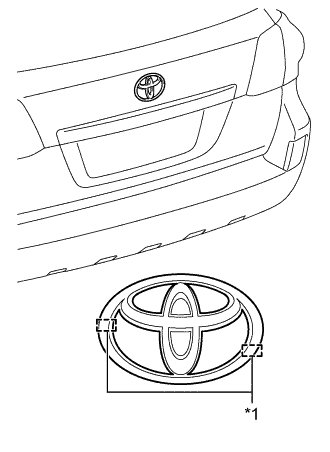
Text in Illustration *1 Boss Clean the vehicle body surface.
-
Using a heat light, heat the vehicle body surface.
-
Remove the double-sided tape from the vehicle body.
-
Wipe off any tape adhesive residue with cleaner.
-
-
Install a new emblem.
-
Using a heat light, heat the vehicle body and a new emblem.
-
Remove the peeling paper from the face of the emblem.
Tech Tips
After removing the peeling paper, keep the exposed adhesive free from foreign matter.
-
Align the boss positions and install the emblem.
Tech Tips
Press the emblem firmly to install it.
-
-
-
INSTALL REAR NO. 3 BODY NAME PLATE
-
Clean the vehicle body surface.
-
Using a heat light, heat the vehicle body surface.
-
Remove the double-sided tape from the vehicle body.
-
Wipe off any tape adhesive residue with cleaner.
-
-
Install a new rear body name plate.
-
Using a heat light, heat the vehicle body and a new rear body name plate.
-
Remove the peeling paper from the face of the rear body name plate.
Tech Tips
After removing the peeling paper, keep the exposed adhesive free from foreign matter.
-
for Type A:
Install the rear body name plate in the position shown in the illustration.
Tech Tips
Press the rear body name plate firmly to install it.
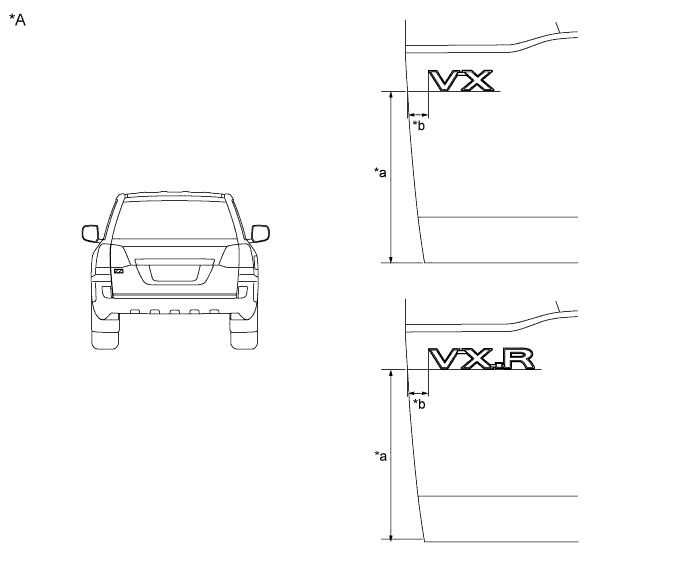
Text in Illustration *A for Type A - - *a 267.5 mm (10.2 in.) *b 31.5 mm (1.24 in.) -
for Type B:
Install the rear body name plate in the position shown in the illustration.
Tech Tips
Press the rear body name plate firmly to install it.
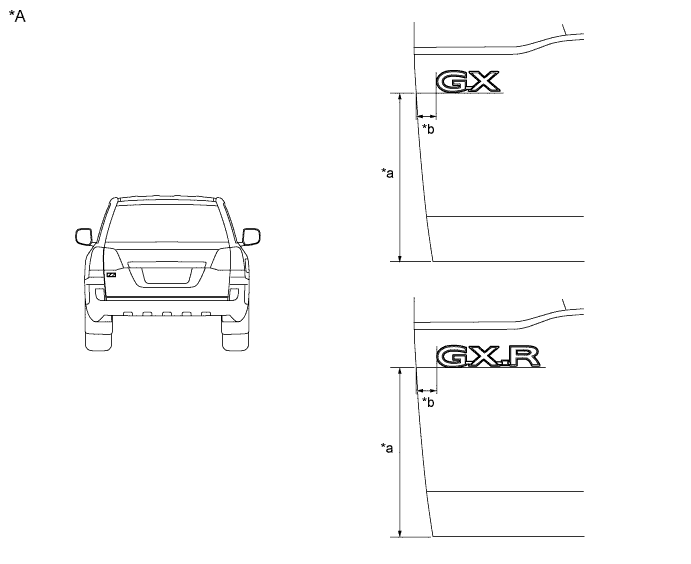
Text in Illustration *A for Type B - - *a 266 mm (10.5 in.) *b 32 mm (1.26 in.) -
for Type C:
Install the rear body name plate in the position shown in the illustration.
Tech Tips
Press the rear body name plate firmly to install it.
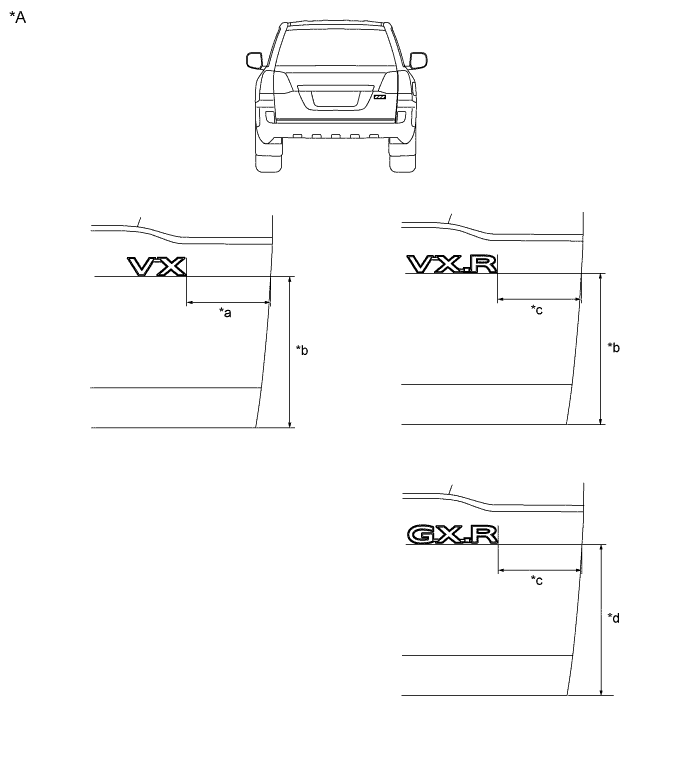
Text in Illustration *A for Type C - - *a 160.5 mm (6.32 in.) *b 271 mm (10.7 in.) *c 148 mm (5.83 in.) *d 269 mm (10.6 in.)
-
-
-
INSTALL NO. 5 BACK DOOR NAME PLATE
-
Clean the vehicle body surface.
-
Using a heat light, heat the vehicle body surface.
-
Remove the double-sided tape from the vehicle body.
-
Wipe off any tape adhesive residue with cleaner.
-
-
Install a new back door name plate.
-
Using a heat light, heat the vehicle body and a new back door name plate.
-
Remove the peeling paper from the face of the back door name plate.
Tech Tips
After removing the peeling paper, keep the exposed adhesive free from foreign matter.
-
for Type A:
Install the back door name plate in the position shown in the illustration.
Tech Tips
Press the rear body name plate firmly to install it.
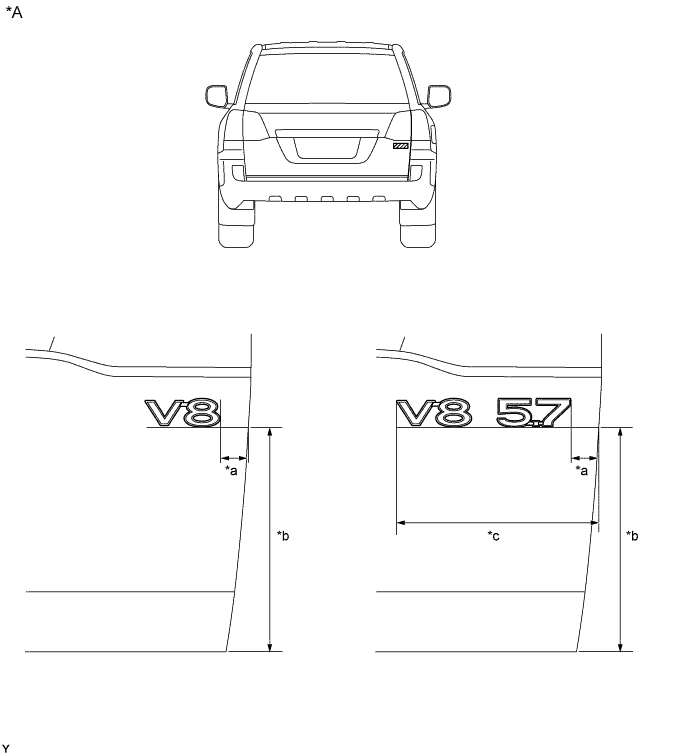
Text in Illustration *A for Type A - - *a 32.5 mm (1.28 in.) *b 266 mm (10.4 in.) *c 240.8 mm (9.48 in.) - - -
for Type B:
Install the back door name plate in the position shown in the illustration.
Tech Tips
Press the rear body name plate firmly to install it.
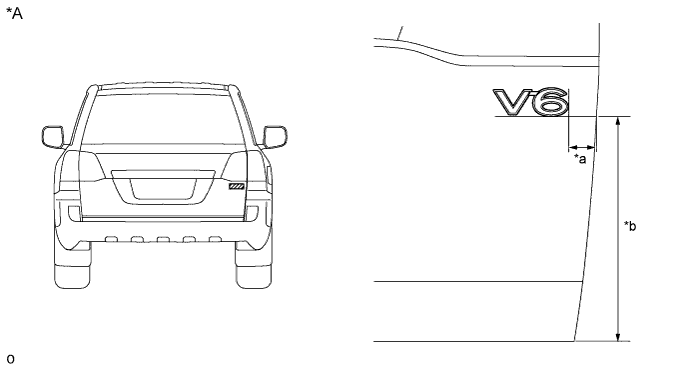
Text in Illustration *A for Type B - - *a 32.5 mm (1.28 in.) *b 266 mm (10.4 in.) -
for Type C:
Install the back door name plate in the position shown in the illustration.
Tech Tips
Press the rear body name plate firmly to install it.
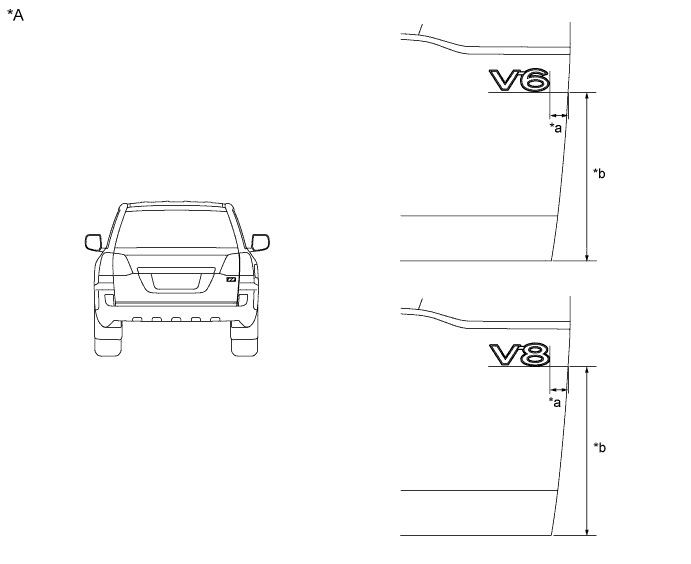
Text in Illustration *A for Type C - - *a 32.5 mm (1.28 in.) *b 266 mm (10.4 in.)
-
-
-
INSTALL BACK DOOR NAME PLATE
-
Clean the vehicle body surface.
-
Using a heat light, heat the vehicle body surface.
-
Remove the double-sided tape from the vehicle body.
-
Wipe off any tape adhesive residue with cleaner.
-
-
Install a new rear body name plate.
-
Using a heat light, heat the vehicle body and a new rear body name plate.
-
Remove the peeling paper from the face of the rear body name plate.
Tech Tips
After removing the peeling paper, keep the exposed adhesive free from foreign matter.
-
Install the rear body name plate in the position shown in the illustration.
Tech Tips
Press the rear body name plate firmly to install it.
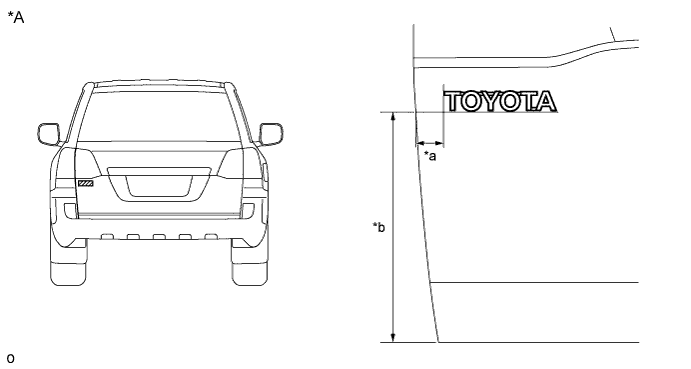
Text in Illustration *A for Type C - - *a 33 mm (1.30 in.) *b 274 mm (10.8 in.)
-
-
-
INSTALL NO. 6 LUGGAGE COMPARTMENT DOOR NAME PLATE
-
Clean the vehicle body surface.
-
Using a heat light, heat the vehicle body surface.
-
Remove the double-sided tape from the vehicle body.
-
Wipe off any tape adhesive residue with cleaner.
-
-
Install a new rear body name plate.
-
Using a heat light, heat the vehicle body and a new rear body name plate.
-
Remove the peeling paper from the face of the rear body name plate.
Tech Tips
After removing the peeling paper, keep the exposed adhesive free from foreign matter.
-
Install the rear body name plate in the position shown in the illustration.
Tech Tips
Press the rear body name plate firmly to install it.
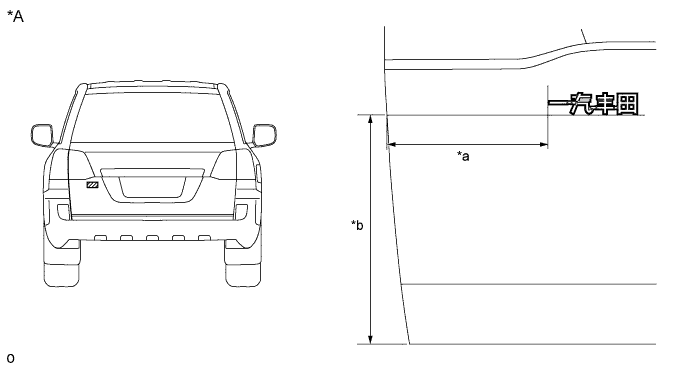
Text in Illustration *A for Type C - - *a 188.5 mm (7.42 in.) *b 274 mm (10.8 in.)
-
-