DESCRIPTION
If the driver side door entry unlock function does not operate but the entry lock function operates, the communication line between the vehicle and electrical key transmitter is normal. The part at fault may be a touch sensor circuit (certification ECU (smart key ECU assembly) → driver side door outside handle → driver side door electrical key oscillator).
INSPECTION PROCEDURE
PROCEDURE
- Click here
CHECK POWER DOOR LOCK OPERATION
-
When the master switch assembly door control switch is operated, check that the locked doors unlock.
OK Door locks operate normally.
- OKClick here
- NGClick here
-
- Click here
READ VALUE USING INTELLIGENT TESTER (DOOR LOCK POSITION SWITCH)
-
Connect the intelligent tester to the DLC3.
-
Turn the engine switch on (IG).
-
Turn the intelligent tester on.
-
Enter the following menus: Body / Main Body / Data List.
-
Read the Data List according to the display on the intelligent tester.
Table 1. Main Body Tester Display Measurement Item/Range Normal Condition Diagnostic Note D Door Lock Position SW Driver side door lock position switch signal / ON or OFF ON: Driver side door unlocked
OFF: Driver side door locked
- OK On the intelligent tester screen, the display changes between ON and OFF as shown in the chart above.
- OKClick here
- NGClick here
-
- Click here
READ VALUE USING INTELLIGENT TESTER (TOUCH SENSOR)
-
Using the intelligent tester, read the Data List.
Table 2. Entry & Start Tester Display Measurement Item/Range Normal Condition Diagnostic Note D-Door Touch Sensor Driver side door touch sensor / ON or OFF ON: Touch sensor touched
OFF: Touch sensor not touched
- OK "ON" (sensor is touched) and "OFF" (sensor is not touched) appears on the screen.
- OKClick here
- NGClick here
-
- Click here
CHECK HARNESS AND CONNECTOR (CERTIFICATION ECU [SMART KEY ECU ASSEMBLY] - DOOR ELECTRICAL KEY OSCILLATOR)
-
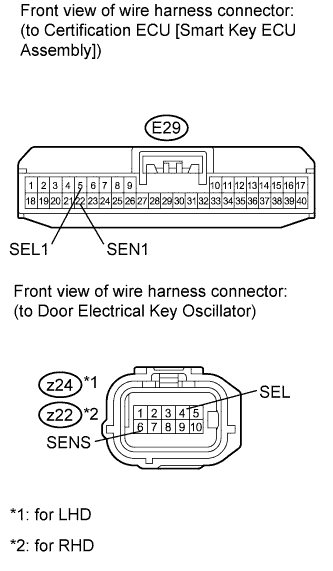
Disconnect the E29 ECU connector.
-
Disconnect the z24 or z22 oscillator connector.
-
Measure the resistance according to the value(s) in the table below.
Standard Resistance for LHD Tester Connection Condition Specified Condition E29-5 (SEL1) - z24-4 (SEL) Always Below 1 Ω E29-22 (SEN1) - z24-6 (SENS) Always Below 1 Ω E29-5 (SEL1) - Body ground Always 10 kΩ or higher E29-22 (SEN1) - Body ground Always 10 kΩ or higher for RHD Tester Connection Condition Specified Condition E29-5 (SEL1) - z22-4 (SEL) Always Below 1 Ω E29-22 (SEN1) - z22-6 (SENS) Always Below 1 Ω E29-5 (SEL1) - Body ground Always 10 kΩ or higher E29-22 (SEN1) - Body ground Always 10 kΩ or higher
- OKClick here
- NGClick here
-
- Click here
CHECK HARNESS AND CONNECTOR (DOOR ELECTRICAL KEY OSCILLATOR - FRONT DOOR OUTSIDE HANDLE)
-
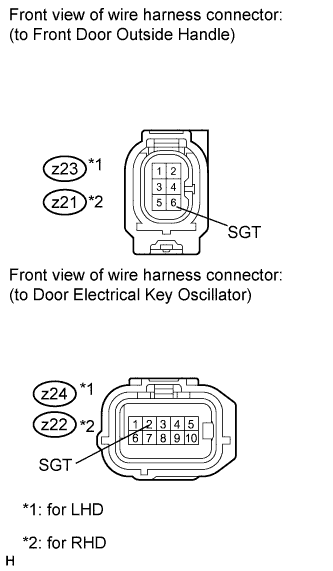
Disconnect the z23 or z21 handle connector.
-
Disconnect the z24 or z22 oscillator connector.
-
Measure the resistance according to the value(s) in the table below.
Standard Resistance for LHD Tester Connection Condition Specified Condition z23-6 (SGT) - z24-2 (SGT) Always Below 1 Ω z23-6 (SGT) - Body ground Always 10 kΩ or higher for RHD Tester Connection Condition Specified Condition z21-6 (SGT) - z22-2 (SGT) Always Below 1 Ω z21-6 (SGT) - Body ground Always 10 kΩ or higher
- OKClick here
- NGClick here
-
- Click here
REPLACE DOOR ELECTRICAL KEY OSCILLATOR
-
Replace the door electrical key oscillator (Click here).
- NEXTClick here
-
- Click here
CHECK DOOR ELECTRICAL KEY OSCILLATOR (OPERATION)
-
Check that the entry function operates normally.
OK Operates normally.
- OKClick here
- NGClick here
-
- Click here
REPLACE FRONT DOOR OUTSIDE HANDLE
-
Replace the front door outside handle (Click here).
- NEXTClick here
-
- Click here
CHECK FRONT DOOR OUTSIDE HANDLE (OPERATION)
-
Check that the entry function operates normally.
OK Operates normally.
- OKClick here
- NGClick here
-
- Click here
GO TO POWER DOOR LOCK CONTROL SYSTEMClick here
- Click here
REPAIR OR REPLACE HARNESS OR CONNECTOR
- Click here
REPAIR OR REPLACE HARNESS OR CONNECTOR
- Click here
END (DOOR ELECTRICAL KEY OSCILLATOR IS DEFECTIVE)
- Click here
END (FRONT DOOR OUTSIDE HANDLE IS DEFECTIVE)
- Click here
REPLACE CERTIFICATION ECU (SMART KEY ECU ASSEMBLY)
- Click here
GO TO POWER DOOR LOCK CONTROL SYSTEM (Proceed to Only Driver Door LOCK/UNLOCK Functions do not Operate)Click here