NETWORK GATEWAY ECU (for RHD) REMOVAL

-
PRECAUTION
Note
After turning the ignition switch off, waiting time may be required before disconnecting the cable from the battery terminal. Therefore, make sure to read the disconnecting the cable from the battery terminal notice before proceeding with work Click here.
-
DISCONNECT CABLE FROM NEGATIVE BATTERY TERMINAL (w/ Driver Side Knee Airbag)
CAUTION:
Wait at least 90 seconds after disconnecting the cable from the negative (-) battery terminal to disable the SRS system.
Note
When disconnecting the cable, some systems need to be initialized after the cable is reconnected Click here.
-
REMOVE FRONT DOOR SCUFF PLATE RH
-
w/ Sliding Roof:
Remove the front door scuff plate Click here.
-
w/o Sliding Roof:
Remove the front door scuff plate Click here.
-
-
REMOVE NO. 2 INSTRUMENT PANEL FINISH PANEL CUSHION
-
w/o Console Box Lid:
-
Remove the No. 2 instrument panel finish panel cushion Click here.
-
-
w/ Cool Box:
-
Remove the No. 2 instrument panel finish panel cushion Click here.
-
-
w/o Cool Box:
-
Remove the No. 2 instrument panel finish panel cushion Click here.
-
-
-
REMOVE LOWER INSTRUMENT PANEL PAD SUB-ASSEMBLY RH
-
w/o Console Box Lid:
-
Remove the lower instrument panel pad sub-assembly RH Click here.
-
-
w/ Cool Box:
-
Remove the lower instrument panel pad sub-assembly RH Click here.
-
-
w/o Cool Box:
-
Remove the lower instrument panel pad sub-assembly RH Click here.
-
-
-
REMOVE NO. 1 INSTRUMENT CLUSTER FINISH PANEL GARNISH
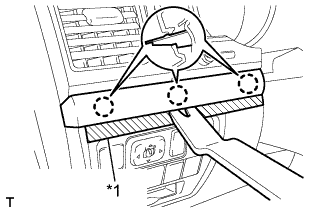
Text in Illustration *1 Protective Tape
-
Place protective tape as shown in the illustration.
-
Using a moulding remover, detach the 3 claws and remove the No. 1 instrument cluster finish panel garnish.
-
-
REMOVE NO. 2 INSTRUMENT CLUSTER FINISH PANEL GARNISH
-
Place protective tape as shown in the illustration.
-
Using a moulding remover, detach the 2 claws and remove the No. 2 instrument cluster finish panel garnish.
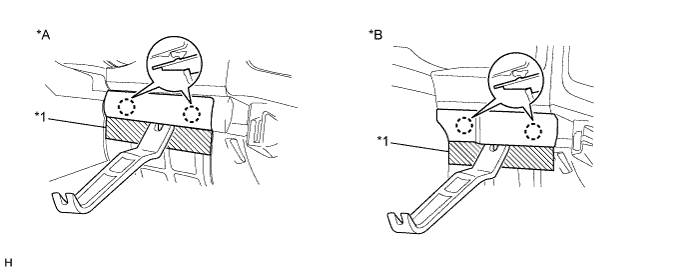
Text in Illustration *A w/ Entry and Start System *B w/o Entry and Start System *1 Protective Tape - -
-
-
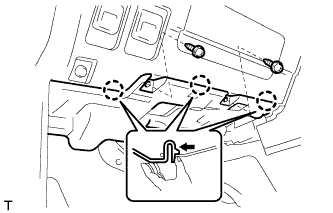
REMOVE NO. 1 INSTRUMENT PANEL UNDER COVER SUB-ASSEMBLY (w/ Floor Under Cover)
-
Remove the 2 screws.
-
Detach the 3 claws.
-
Disconnect the connectors and remove the No. 1 instrument panel under cover.
-
-
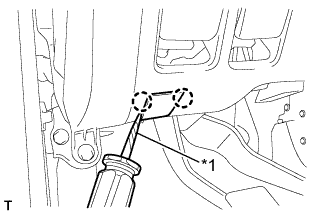
REMOVE LOWER NO. 1 INSTRUMENT PANEL FINISH PANEL
-
Using a screwdriver, detach the 2 claws and open the hole cover.
Tech Tips
Tape the screwdriver tip before use.
Text in Illustration *1 Protective Tape -
w/ Driver Side Knee Airbag:
-
Remove the 2 bolts.
-
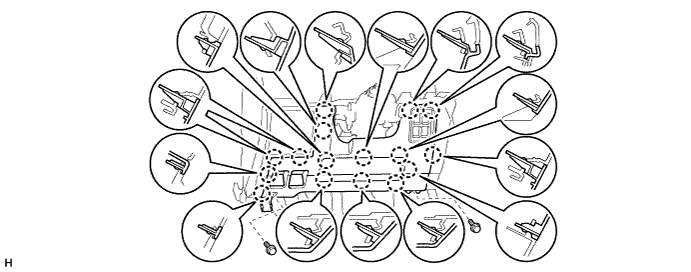
Detach the 16 claws.
-
-
w/o Driver Side Knee Airbag:
-
Remove the 2 bolts.
-
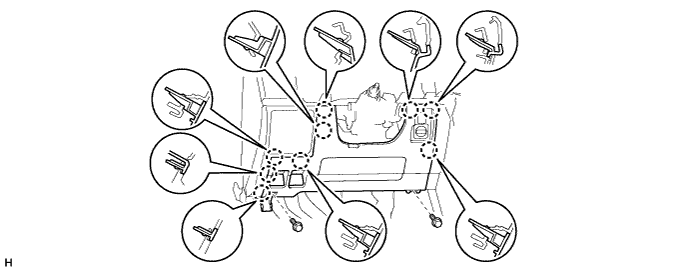
Detach the 9 claws.
-
-
for Automatic Air Conditioning System:
-
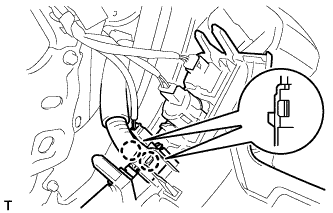
Detach the 2 claws and remove the room temperature sensor.
-
-
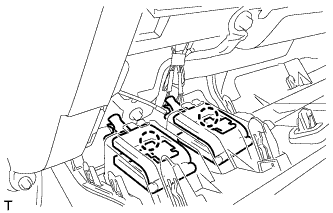
Detach the 2 claws and disconnect the 2 control cables.
-
Disconnect the connectors and remove the lower No. 1 instrument panel finish panel.
-
-
REMOVE NO. 1 SWITCH HOLE BASE
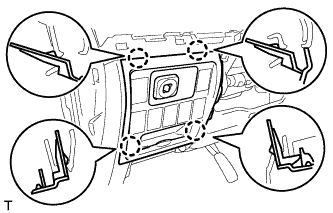
-
Detach the 4 claws.
-
Disconnect the connectors and remove the No. 1 switch hole cover.
-
-
REMOVE DRIVER SIDE KNEE AIRBAG ASSEMBLY (w/ Driver Side Knee Airbag)
-
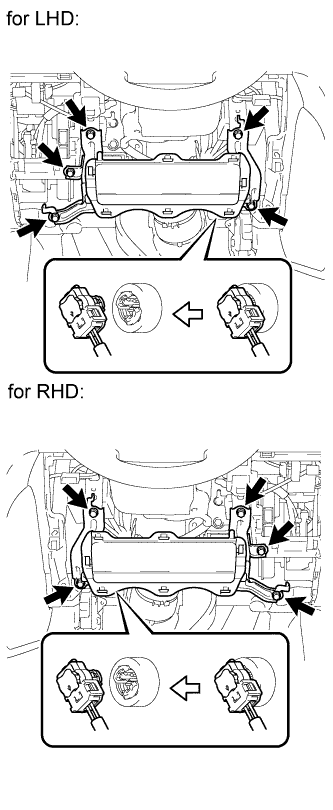
Remove the 5 bolts and driver side knee airbag.
-
Disconnect the connector.
Note
When handling the airbag connector, take care not to damage the airbag wire harness.
-
-
REMOVE LOWER INSTRUMENT PANEL SUB-ASSEMBLY (w/o Driver Side Knee Airbag)
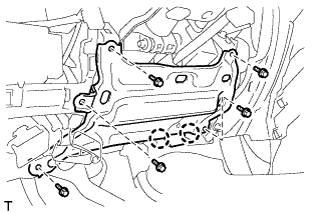
-
Detach the 2 claws and disconnect the DLC3.
-
Remove the 5 bolts and lower instrument panel.
-
-
REMOVE NETWORK GATEWAY ECU
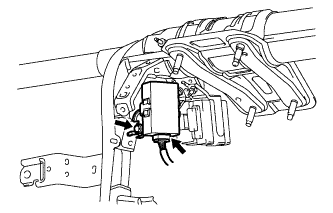
-
Disconnect the connector.
-
Remove the nut and ECU.
-