INSPECTION PROCEDURE
Images may be unclear even in normal conditions if:
-
Noise may occur in the image depending on electrical devices used in the cabin.
-
Noise may occur in the image if accessories that generate radio waves have been installed.
-
The camera screen is frosted over (the image immediately after turning the engine switch on (IG) may be blurred or darker than normal).
-
The camera lens is dirty with snow, mud, etc.
-
A strong beam of light, such as a sunbeam or headlight, hits the camera.
-
It is too dark around the camera (at night etc.).
-
The ambient temperature around the camera is either too high or too low.
-
The vehicle is tilted at a steep angle.
-
The ambient light surrounding the camera is too bright. (When a strong light, such as a sunbeam reflected off the vehicle body, hits the camera, the image may be blurred. This is called the "SMEAR" phenomenon, particular to the CCD camera.)
-
When the camera is used under fluorescent lights, sodium lights, or mercury lights etc., the lights and the illuminated area may appear to flicker.
PROCEDURE
- Click here
CHECK HARNESS AND CONNECTOR (MULTI-MEDIA MODULE RECEIVER - REAR TELEVISION CAMERA AND BODY GROUND)
-
Disconnect the F77 multi-media module receiver assembly connector.
-
Disconnect the S5 rear television camera assembly connector.
-
Measure the resistance according to the value(s) in the table below.
Standard Resistance Tester Connection Condition Specified Condition F77-18 (V+) - S5-2 (CV+) Always Below 1 Ω F77-19 (V-) - S5-1 (CV-) Always Below 1 Ω F77-39 (CA+) - S5-4 (CB+) Always Below 1 Ω F77-40 (CGND) - S5-3 (CGND) Always Below 1 Ω F77-12 (GND1) - Body ground Always Below 1 Ω F77-18 (V+) - Body ground Always 10 kΩ or higher F77-19 (V-) - Body ground Always 10 kΩ or higher F77-39 (CA+) - Body ground Always 10 kΩ or higher F77-40 (CGND) - Body ground Always 10 kΩ or higher
- OKClick here
- NGClick here
-
- Click here
CHECK MULTI-MEDIA MODULE RECEIVER DISPLAY (CA+, CGND)
-
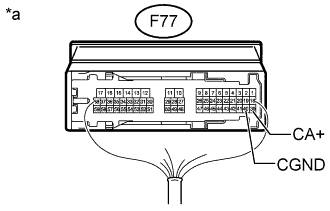
Reconnect the multi-media module receiver assembly connector.
-
Measure the resistance according to the value(s) in the table below.
Standard Resistance Tester Connection Condition Specified Condition F77-40 (CGND) - Body ground Always Below 1 Ω -
Measure the voltage according to the value(s) in the table below.
Standard Voltage Tester Connection Switch Condition Specified Condition F77-39 (CA+) - F77-40 (CGND) Engine switch on (IG), shift lever in R 5.5 to 7.05 V Table 1. Text in Illustration *a Component with harness connected
(Multi-media Module Receiver Assembly)
- OKClick here
- NGClick here
-
- Click here
CHECK REAR TELEVISION CAMERA ASSEMBLY (CV+, CGND)
-
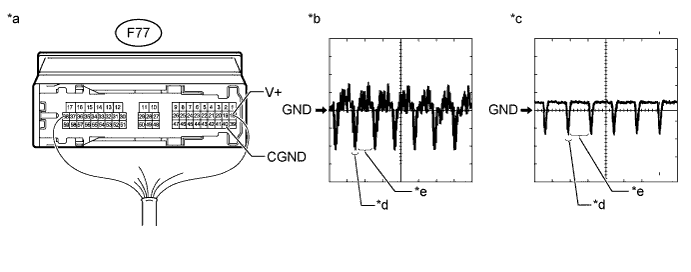
Reconnect the S5 rear television camera assembly connector.
Table 2. Text in Illustration *a Component with harness connected
(Multi-media Module Receiver Assembly)
*b Waveform A *c Waveform B *d Synchronization Signal *e Video Waveform - - -
Check the waveform of the rear television camera assembly using an oscilloscope.
Tip:
-
A waterproof connector is used for the rear television camera assembly. Therefore, inspect the waveform at the multi-media module receiver assembly with the connector connected.
-
The video waveform changes according to the image sent by the rear television camera assembly.
Table 3. Measurement Condition Item Content Tester No. (Symbol) F77-18 (V+) - F77-40 (CGND) Tool Setting 0.2 V/DIV., 50 μS/DIV Condition Waveform A: Engine starts, shift lever in R (camera lens is not covered, displaying an image)
Waveform B: Engine starts, shift lever in R (camera lens is covered, blacking out the screen)
OK Waveform is as shown in the illustration. -
- OKClick here
- NGClick here
-
- Click here
REPLACE HARNESS AND CONNECTOR (GVIF CABLE)
-
Replace the harness and connector (GVIF cable) with a normally functioning one.
- NEXTClick here
-
- Click here
CHECK REAR VIEW MONITOR SYSTEM
-
Check the operation of rear view monitor system.
OK Rear view monitor system is operated normally.
- OKClick here
- NGClick here
-
- Click here
REPLACE MULTI-DISPLAY ASSEMBLY
-
Replace the multi-display assembly with a normally functioning one (Click here).
- NEXTClick here
-
- Click here
CHECK REAR VIEW MONITOR SYSTEM
-
Check the operation of rear view monitor system.
OK Rear view monitor system is operated normally.
- OKClick here
- NGClick here
-
- Click here
END (MULTI-DISPLAY IS DEFECTIVE)
- Click here
REPAIR OR REPLACE HARNESS OR CONNECTOR
- Click here
REPLACE MULTI-MEDIA MODULE RECEIVER ASSEMBLYClick here
- Click here
REPLACE REAR TELEVISION CAMERA ASSEMBLYClick here
- Click here
END (GVIF CABLE IS DEFECTIVE)
- Click here
REPLACE MULTI-MEDIA MODULE RECEIVER ASSEMBLYClick here