Click here
INSPECTION PROCEDURE
Click here
PROCEDURE
- Click here
CLEAN INFRARED RAY RECEIVING PORTION
-
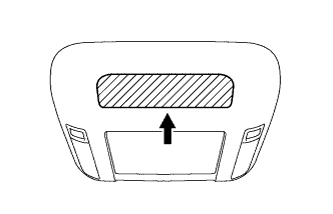
Clean the infrared ray receiving portion on the television display assembly.
-
Check whether the same malfunction occurs.
OK The function returns to normal.
- OKClick here
- NGClick here
-
- Click here
CHECK SYSTEM
-
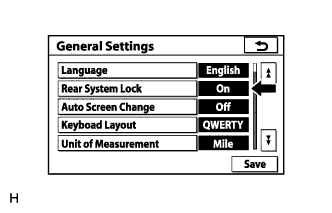
Check that the remote control operation of the rear system is not locked by the multi-display assembly.
-
Check that "Rear System Lock" is Off on the "General Settings" screen.
OK "Rear System Lock" is Off.
-
- OKClick here
- NGClick here
-
- Click here
CHECK REMOTE CONTROL (BATTERY)
-
Check that the dry-cell battery of the remote control is not depleted.
OK Battery is not depleted.
- OKClick here
- NGClick here
-
- Click here
REPLACE REMOTE CONTROL
-
Replace the remote control with a new or known good one.
-
Check that the television display assembly turns on.
OK The television display assembly turns on.
- OKClick here
- NGClick here
-
- Click here
END
- Click here
RELEASE LOCK
- Click here
REPLACE REMOTE CONTROL BATTERY
- Click here
END (REMOTE CONTROL WAS DEFECTIVE)
- Click here
REPLACE TELEVISION DISPLAY ASSEMBLYClick here