INSPECTION PROCEDURE
PROCEDURE
- Click here
CLEAN CD
-
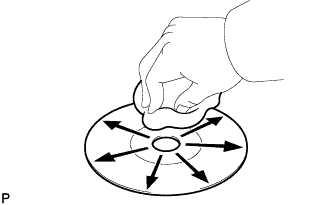
If the disc is dirty, clean the disc by wiping the CD underside radially with a soft cloth.
OK Malfunction disappears. Note:Do not use a conventional record cleaner or anti-static preservative.
- OKClick here
- NGClick here
-
- Click here
REPLACE CD WITH ANOTHER AND RECHECK
-
Replace the CD with a normal one and check if the same problem occurs again.
OK Malfunction disappears.
- OKClick here
- NGClick here
-
- Click here
CHECK WHEN PROBLEM OCCURS
-
Check the location in which CD skipping occurs.
Table 1. Result Result Proceed to Driving surface is bumpy or rough A Driving surface is normal B
-
- Click here
CHECK RADIO RECEIVER INSTALLATION
-
Check the installation condition of the radio receiver.
OK Installed properly.
- OKClick here
- NGClick here
-
- Click here
INSTALL RADIO RECEIVER IN ANOTHER VEHICLE OF SAME MODEL AND COMPARE
-
Remove the radio receiver and install it in another vehicle of the same model. Check if the CD sound skips.
OK CD sound does not skip.
- OKClick here
- NGClick here
-
- Click here
DID TEMPERATURE IN CABIN CHANGE RAPIDLY?
-
Check whether or not a rapid temperature change occurred in the cabin.
OK Rapid temperature change occurred. Tip:A rapid temperature change creates condensation inside the CD player, which may disable CD playback.
- OKClick here
- NGClick here
-
- Click here
CD WAS DIRTY
- Click here
CD IS FAULTY
- Click here
INSTALL RADIO RECEIVER PROPERLYClick here
- Click here
MALFUNCTIONS MAY NOT BE PRESENT
- Click here
CONDENSATION DUE TO TEMPERATURE CHANGE (LEAVE AS IS FOR A WHILE BEFORE USING)
- Click here
REPLACE RADIO RECEIVER ASSEMBLYClick here