AUDIO AND VISUAL SYSTEM (w/o Stereo Component Amplifier) CD Sound Skips
INSPECTION PROCEDURE
PROCEDURE
-
CLEAN CD
-
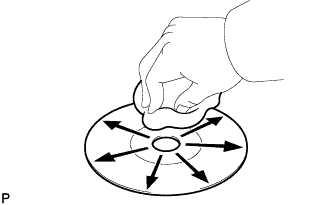
If the disc is dirty, clean the disc by wiping the CD underside radially with a soft cloth.
OK Malfunction disappears. Note
Do not use a conventional record cleaner or anti-static preservative.
NG 
REPLACE CD WITH ANOTHER AND RECHECK Click here
OK 
CD WAS DIRTY
-
-
REPLACE CD WITH ANOTHER AND RECHECK
-
Replace the CD with a normal one and check if the same problem occurs again.
OK Malfunction disappears.
NG
CHECK WHEN PROBLEM OCCURS Click here
OK
CD IS FAULTY
-
-
CHECK WHEN PROBLEM OCCURS
-
Check the location in which CD skipping occurs.
Result Result Proceed to Driving surface is bumpy or rough A Driving surface is normal B
B
INSTALL RADIO RECEIVER IN ANOTHER VEHICLE OF SAME MODEL AND COMPARE Click here
A 
-
-
CHECK RADIO RECEIVER INSTALLATION
-
Check the installation condition of the radio receiver.
OK Installed properly.
NG 
INSTALL RADIO RECEIVER PROPERLY Click here
OK
-
-
INSTALL RADIO RECEIVER IN ANOTHER VEHICLE OF SAME MODEL AND COMPARE
-
Remove the radio receiver and install it in another vehicle of the same model. Check if the CD sound skips.
OK CD sound does not skip.
NG
DID TEMPERATURE IN CABIN CHANGE RAPIDLY? Click here
OK
MALFUNCTIONS MAY NOT BE PRESENT
-
-
DID TEMPERATURE IN CABIN CHANGE RAPIDLY?
-
Check whether or not a rapid temperature change occurred in the cabin.
OK Rapid temperature change occurred. Tech Tips
A rapid temperature change creates condensation inside the CD player, which may disable CD playback.
NG
REPLACE RADIO RECEIVER ASSEMBLY Click here
OK
CONDENSATION DUE TO TEMPERATURE CHANGE (LEAVE AS IS FOR A WHILE BEFORE USING)
-