AUDIO AND VISUAL SYSTEM (w/o Stereo Component Amplifier) Tape is Tangled due to Incorrect Tape Speed or Auto-Reverse Malfunction
INSPECTION PROCEDURE
PROCEDURE
-
CHECK FOR FOREIGN OBJECT
-
Check for any foreign objects.
-
Check that no foreign objects or defects are detected in the cassette tape player of the radio receiver assembly.
OK No foreign objects or defects are detected.
-
NG 
REMOVE FOREIGN OBJECT
OK 
-
-
REPLACE CASSETTE TAPE
-
Replace the cassette tape with another one and recheck.
-
Replace the cassette tape with another normal one (90 minutes or less) to see if the same trouble occurs again.
OK Malfunction disappears.
-
NG 
CLEAN HEAD Click here
OK 
REPLACE RADIO RECEIVER ASSEMBLY Click here
-
-
CLEAN HEAD
-
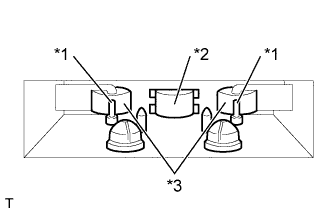
Text in Illustration *1 Capstan *2 Head *3 Pinch Roller Head cleaning
-
Raise the cassette door with your finger. Using a pencil or similar object, push in the guide.
-
Using a cleaning pen or cotton applicator soaked in cleaner, clean the head surface, pinch rollers and capstans.
-
-
Check if the same trouble occurs again.
OK Malfunction disappears.
NG
REPLACE RADIO RECEIVER ASSEMBLY Click here
OK
END
-