DESCRIPTION
Using this circuit, the multi-media module receiver assembly sends power to the map light assembly (telephone microphone assembly), and the map light assembly sends microphone signals to the multi-media module receiver assembly.
INSPECTION PROCEDURE
PROCEDURE
- Click here
CHECK HARNESS AND CONNECTOR (MULTI-MEDIA MODULE RECEIVER ASSEMBLY - MAP LIGHT ASSEMBLY)
-
Disconnect the F77 multi-media module receiver assembly connector.
-
Disconnect the R7 map light assembly connector.
-
Measure the resistance according to the value(s) in the table below.
Standard Resistance Tester Connection Condition Specified Condition F77-49 (SNS2) - R7-20 (SNS2) Always Below 1 Ω F77-29 (MACC) - R7-25 (ACC) Always Below 1 Ω F77-27 (MIN+) - R7-27 (MI1+) Always Below 1 Ω F77-48 (MIN-) - R7-26 (MIC-) Always Below 1 Ω F77-49 (SNS2) - Body ground Always 10 kΩ or higher F77-29 (MACC) - Body ground Always 10 kΩ or higher F77-27 (MIN+) - Body ground Always 10 kΩ or higher F77-48 (MIN-) - Body ground Always 10 kΩ or higher F77-28 (SGND) - Body ground Always 10 kΩ or higher
- OKClick here
- NGClick here
-
- Click here
CHECK MULTI-MEDIA MODULE RECEIVER ASSEMBLY
-
Reconnect the multi-media module receiver assembly connector.
-
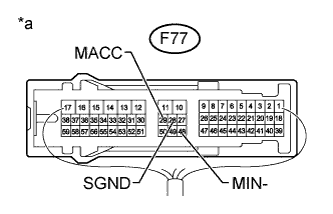
Measure the resistance according to the value(s) in the table below.
Standard Resistance Tester Connection Condition Specified Condition F77-28 (SGND) - Body ground Always Below 1 Ω F77-48 (MIN-) - Body ground Always Below 1 Ω -
Measure the voltage according to the value(s) in the table below.
Standard Voltage Tester Connection Switch Condition Specified Condition F77-29 (MACC) - Body ground Engine switch on (ACC) 4 to 6 V Table 1. Text in Illustration *a Component with harness connected
(Multi-media Module Receiver Assembly)
- OKClick here
- NGClick here
-
- Click here
INSPECT MAP LIGHT ASSEMBLY
-
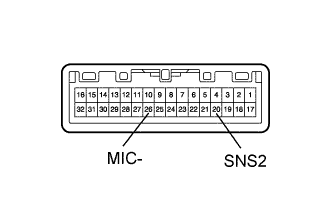
Remove the map light assembly (Click here).
-
Measure the resistance according to the value(s) in the table below.
Standard Resistance Tester Connection Condition Specified Condition 26 (MIC-) - 20 (SNS2) Always Below 1 Ω Table 2. Text in Illustration *a Component without harness connected
(Map Light Assembly)
- OKClick here
- NGClick here
-
- Click here
CHECK MAP LIGHT ASSEMBLY
-
Reconnect the multi-media module receiver assembly connector.
-
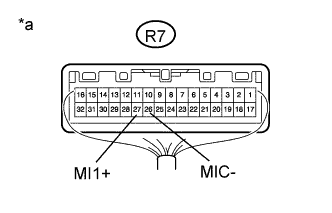
Reconnect the map light assembly connector.
-
Turn the engine switch on (ACC).
-
Connect an oscilloscope to terminals R7-27 (MI1+) and R7-26 (MIC-) of the map light assembly connector.
-
Check the waveform of the telephone microphone assembly using the oscilloscope.
Table 3. Text in Illustration *a Component with harness connected
(Map Light Assembly)
Table 4. Result Result Proceed to A waveform synchronized with the voice input to the map light assembly is not output. A A waveform synchronized with the voice input to the map light assembly is output. B
-
- Click here
CHECK TELEPHONE MICROPHONE ASSEMBLY
-
Replace the telephone microphone assembly with a new or normally functioning one (Click here).
-
Check if the same malfunction recurs.
Table 5. Result Result Proceed to Malfunction does not recur
(returns to normal).
A Malfunction recurs. B
-
- Click here
REPAIR OR REPLACE HARNESS OR CONNECTOR
- Click here
PROCEED TO NEXT SUSPECTED AREA SHOWN IN PROBLEM SYMPTOMS TABLEClick here
- Click here
PROCEED TO NEXT SUSPECTED AREA SHOWN IN PROBLEM SYMPTOMS TABLEClick here
- Click here
REPLACE MAP LIGHT ASSEMBLYClick here
- Click here
END (TELEPHONE MICROPHONE ASSEMBLY IS DEFECTIVE)