DESCRIPTION
When 2nd mode is selected with the pattern select (2ND) switch, the ECM controls the solenoid valves and the transmission starts from 2nd gear.
The 2nd mode is the system that operates the throttle motor to control engine output to reduce skidding of the driving wheels, and guarantee takeoff acceleration, driving straightness and turning stability.
When the shift lever is in D, the transmission automatically shifts up through 3rd to 6th as usual.
INSPECTION PROCEDURE
When the pattern select (2ND) switch is pushed, switch contact is made and 2nd mode is selected. To cancel 2nd mode, push the pattern select (2ND) switch once again.
2nd mode is automatically canceled when the engine switch is turned off.
PROCEDURE
- Click here
DRIVING TEST
Tip:The driving test should be performed on a paved road (nonskid road).
-
Start the engine.
-
Turn the 2ND switch off (normal drive mode).
-
Confirm vehicle response by driving from a parked position to fully depressing the accelerator pedal.
-
Turn the 2ND switch on and perform the same check as above.
When driving the vehicle with the 2ND switch on and off, check that there is a difference in acceleration.
OK There is a difference in acceleration.
- OKClick here
- NGClick here
-
- Click here
PROCEED TO NEXT CIRCUIT INSPECTION SHOWN IN PROBLEM SYMPTOMS TABLEClick here
- Click here
INSPECT PATTERN SELECT (2ND) SWITCH
-
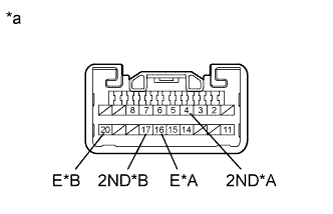
Remove the suspension control switch (Click here).
-
Measure the resistance according to the value(s) in the table below.
Standard Resistance Table 1. w/ CRAWL Tester Connection Switch Condition Specified Condition 4 (2ND) - 16 (E) Pattern select (2nd) switch continuously pressed Below 1 Ω 4 (2ND) - 16 (E) Pattern select (2nd) switch released 10 kΩ or higher Table 2. w/o CRAWL Tester Connection Switch Condition Specified Condition 17 (2ND) - 20 (E) Pattern select (2nd) switch continuously pressed Below 1 Ω 17 (2ND) - 20 (E) Pattern select (2nd) switch released 10 kΩ or higher Table 3. Text in Illustration A w/ CRAWL B w/o CRAWL *a Component without harness connected
(Suspension Control Switch)
- OKClick here
- NGClick here
-
- Click here
CHECK HARNESS AND CONNECTOR (PATTERN SELECT (2ND) SWITCH - BODY GROUND)
-
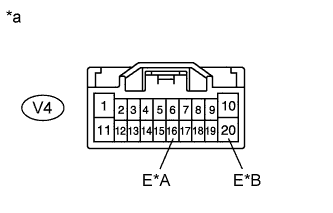
Disconnect the suspension control switch connector.
-
Measure the resistance according to the value(s) in the table below.
Standard Resistance Table 4. w/ CRAWL Tester Connection Condition Specified Condition V4-16 (E) - Body ground Always Below 1 Ω Table 5. w/o CRAWL Tester Connection Condition Specified Condition V4-20 (E) - Body ground Always Below 1 Ω Table 6. Text in Illustration A w/ CRAWL B w/o CRAWL *a Front view of wire harness connector
(to Suspension Control Switch)
- OKClick here
- NGClick here
-
-
Click here
CHECK HARNESS AND CONNECTOR (PATTERN SELECT (2ND) SWITCH - ECM)
-
Disconnect the ECM connector.
-
Measure the resistance according to the value(s) in the table below.
Standard Resistance Table 7. for LHD Tester Connection Switch Condition Specified Condition A38-4 (SNWI) - Body ground Pattern select (2ND) switch continuously pressed Below 1 Ω A38-4 (SNWI) - Body ground Pattern select (2ND) switch released 10 kΩ or higher Table 8. for RHD Tester Connection Switch Condition Specified Condition A52-4 (SNWI) - Body ground Pattern select (2ND) switch continuously pressed Below 1 Ω A52-4 (SNWI) - Body ground Pattern select (2ND) switch released 10 kΩ or higher Table 9. Text in Illustration *1 for LHD *2 for RHD *a Front view of wire harness connector
(to ECM)
- OKClick here
- NGClick here
-
- Click here
PROCEED TO NEXT CIRCUIT INSPECTION SHOWN IN PROBLEM SYMPTOMS TABLEClick here
- Click here
REPLACE PATTERN SELECT (2ND) SWITCH (SUSPENSION CONTROL SWITCH)Click here
- Click here
REPAIR OR REPLACE HARNESS OR CONNECTOR
- Click here
REPAIR OR REPLACE HARNESS OR CONNECTOR