Click here
Click here
- Click here
REMOVE V-BANK COVER SUB-ASSEMBLY
-
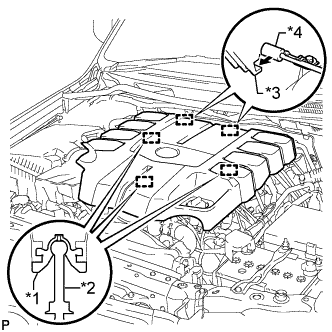
Raise the front of the V-bank cover to detach the 3 pins. Then remove the 2 V-bank cover hooks from the bracket, and remove the V-bank cover.
Table 1. Text in Illustration *1 Grommet *2 Pin *3 Hook *4 Bracket
-
- Click here
REMOVE AIR CLEANER CAP AND HOSE
-
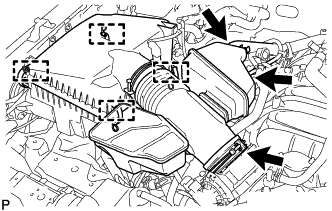
Disconnect the No. 2 PCV hose and No. 1 air hose.
-
Disconnect the mass air flow meter connector and detach the clamp.
-
Detach the 4 clamps.
-
Loosen the hose clamp and remove the air cleaner cap and hose.
-
- Click here
REMOVE CAMSHAFT POSITION SENSOR
-
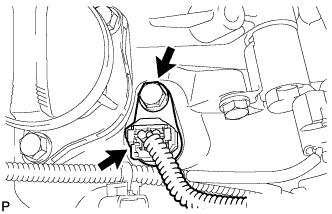
Disconnect the camshaft position sensor connector.
-
Remove the bolt and camshaft position sensor.
-
- Click here
REMOVE VVT SENSOR
-
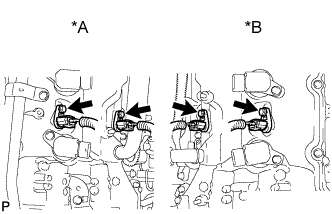
Disconnect the 4 VVT sensor connectors.
Table 2. Text in Illustration *A for Bank 2 *B for Bank 1 -
Remove the 4 bolts and 4 VVT sensors.
-